In conjunction with a federative login method (SAML or OpenID-Connect) a/the validity of your session in an application (in this case CheckMK) depends on the session at your IDP, and the following is the case:
As you authenticate against an IDP the configured session-lifetime with the IDP will determine if you need to re-authenticate or not.
Seeing a/the error “fetching data” means that in the background the application is requesting session-information from your IDP to determine if you still have a valid session with it or not.
→ If your session at the IDP has expired, you should (must) be redirected to its login-page and re-authenticate.
→ If your session is still valid at the IDP the application will refresh its content and display it correctly afterwards.
Depending on the time a/the application takes to get this information you will be confronted with the “fetching data” - error.
In my case the lifetime of an IDP-session is set at 1 hour, meaning if no ‘check’ is done to validate a/the session at the IDP a user will be forced to login again at the IDP.
Looking at the comments, it might be well possible that CheckMK does not always check with the IDP when retrieving page-content.
I will assume for now that the lifetime of a/the session by default is longer then the configured lifetime of the session on the IDP, so it will only ‘check-in’ with the IDP when the local session also expires.
Best practices for federated setups:
configure a/the local session lifetime shorter then the session lifetime configured at the IDP, as this will force the application to query the IDP, and reset/extend both a/the local session, aswell as the session at the IDP.
In my case the session lifetime in CheckMK has been set to 55 minutes forcing it to re-visit the IDP before its session expires.
We are not using any IDP service. The affected account was created locally in checkmk. This specific user is used for an 24/7 display to show warnings/errors.
In the global settings, everything is left on standard setting.
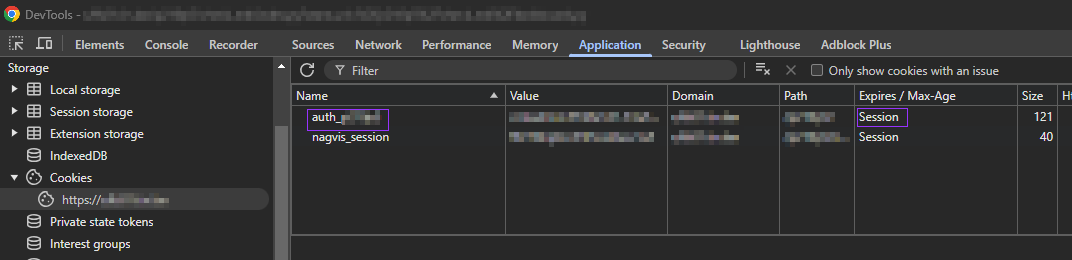
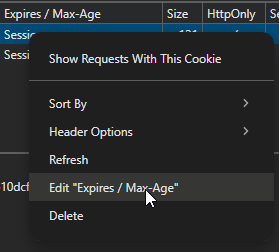
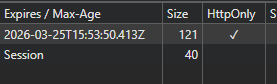
I use following ‘hack / bug’ in Chrome, changing session cookie into date time, to avoid logging into our annoying CRM system daily. Maybe it works for this use case too.
when logged in Checkmk web interface, right mouse click inspect
go to tab Application, Storage, Cookies, url of your Checkmk
No CheckMK kills internally the session after a defined time.
With this settings you can create a behavior that you only need to authenticate one time per week.
Set the Maximum session duration to 7 days and a Monday morning login is enough for the whole week.
In our environment we had to disable both “Maximum session duration” and “Set an individual idle timeout”, otherwise we would experience the same issue as the original post described.
I wanted to share my experience for those that it may help.