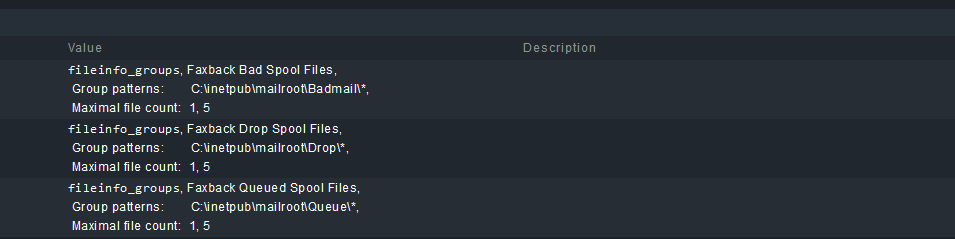
CMK version: Checkmk Managed Services Edition 2.1.0p28 OS version: CentOS 7 (check_mk server), Windows 2019 Server (client)
Error message:
After updating from 2.0.0p26 to 2.1.0p28 server and controlled deployment of check_mk agent, I am seeing different behavior for some local file monitoring via agent.
Servers with these previously establish service checks and having 0 files are notifying that the service has vanished.
I suspected the check was returning vanished because there are no files and the evaluation step changed.
Manually dropping a file into a folder causes the check to no longer report as vanished.
Output of “cmk --debug -vvn hostname”: (If it is a problem with checks or plugins)
The plugin is currently working and outputting the test file as expected.
A rule is also setup under Setup > Services > Service monitoring rules > Group patterns (fileinfo_groups) for each listed folder above with criteria for explicit hosts defined (cropped from the image).
Out of curiosity, Under Setup > Services > Enforced services > Size, age and count of file groups:
I created an enforced rule with the same name and pattern set in the Group patterns mentioned above and added some criteria.
This has eliminated the vanished evaluation behavior but I don’t know if this will cause any other issues or conflicts. I didn’t originally set this check up so am not aware of any other special setup.
Passing this for more context or if it helps out anyone else. Also interested in knowing if this is expected behavior or a known change I am overlooking.
I don’t know if it’s the ‘best’ solution but has continued to function as a workaround for our use case.
Ideally, if someone from CheckMK can confirm if the evaluation for the check changed, it might identify something that could be modified to no longer report ‘vanished’ because there are 0 files in the target location especially since 0 is the ideal number in our situation.
@MarsellusWallace, That is an excellent way to phrase the logic for setup and makes sense. My original confusion was around the change in original behavior and I appreciate your confirmation.
This is not a good option to use enforced services!!!
We are monitoring virus files in a specific folder for only specific hosts. Not all hosts!!!
When we use enforced service rule, then we must assign this rule to only this servers.
We have no tag or anything to assign to this servers.
It was so easy to use in earlier agents when folder in filegroup has the missing output for empty folders. The service assignment always worked!!!
I understand the logic but disagree that it never worked that way. My original post was due to a change in the default behavior observed. Not trying to argue but point out that it was a difference between major version changes hence some confusion.
Did your original service discovery rule run globally or specify the desired servers? If so, could you simply drop the discovery and move to an enforcement only rule if you’re trying not to define the criteria in more than one location?
You also mention not having a tag but could you create one to handle this?
In our organization, I have added a custom tag set called ‘Device Profile’ for some items I could not figure out a way to automatically detect and some host/service grouping.
Also, some of the process detection that affixes a label might work as well but be warned if the service stops, it might remove the label if you have vanished services automatically removed.
Hello scotsie,
yes we have a globally rule without any assign to hosts, so that the service is automatically found when empty folder and the agent output is:
<fileinfo:sep(124)>
1707385117
C:\ProgramData\Trend Micro\AMSP\temp\virus*|missing|1707385117
C:\ProgramData\Trend Micro\AMSP\quarantine*|missing|1707385117
Group patterns
Trendmicro Include Pattern C:\ProgramData\Trend Micro\AMSP\temp\virus*
Trendmicro Include Pattern C:\ProgramData\Trend Micro\AMSP\quarantine*
Size, age and count of file groups
Maximal file count Warning/Critical at or above 1
File Group Name Trendmicro.*
then the behavior is like this!!!
Very bad for us
Without group patterns is service only found when file inluded
Hello scotsie,
Would there be an alternative solution - other than enforced services - to monitor whether a file is in a folder? From my point of view, it’s actually nothing unusual that something like this is needed
@Udo, I apologize that I missed your follow up on this post sooner.
I believe, based on that official response/answer, that the behavior we’ve asked about is considered ‘as designed’ now.
If you haven’t already found some other alternative, the only thing I could think of would be to use an ‘enforce’ rule with some test hosts, drop a single ‘always there/placeholder’ file in the folder in question and modify the thresholds +1 and see if that might be more to what you desire. If your AV application doesn’t complain about or remove the placeholder file during testing, that may be another method to the same end.
That may be just as problematic for you but in our environment, we have deployment/orchestration software to allow file creation fairly easily with the AV install or programmatically. Once the file is in place, you could then make the rule global. Only a thought and I did not test it myself since my use case sounds more specific than yours.
This topic was automatically closed 365 days after the last reply. New replies are no longer allowed. Contact an admin if you think this should be re-opened.