CMK version:
Open Monitoring Distribution Version 2.2.0p3 cre
OS version:
Red Hat Enterprise Linux release 8.9
Error message:
Fail start with omb start mysite
Temporary filesystem already mounted
Starting agent-receiver...OK
Starting mkeventd (builtin: snmptrap)...Cannot bind UDP socket for snmptrap to port (Is SUID bit set on mkeventd_open514? Is "nosuid" not set on the filesystem?): Permission denied
OK
Starting rrdcached...OK
Starting npcd...OK
Starting nagios...OK
Starting apache...[Tue Mar 04 07:19:06.002249 2025] [auth_mellon:notice] [pid 3129400] MellonDiagnosticsFile has no effect because Mellon was not compiled with diagnostics enabled, use ./configure --enable-diagnostics at build time to turn this feature on.
[Tue Mar 04 07:19:06.002318 2025] [auth_mellon:notice] [pid 3129400] MellonDiagnosticsEnable has no effect because Mellon was not compiled with diagnostics enabled, use ./configure --enable-diagnostics at build time to turn this feature on.
OK
Starting redis...OK
Initializing Crontab...OK
First steps for Troubleshooting
The CheckMK installation is located in /opt/omd within the root partition of the VM:
$ df -h
Filesystem                 Size  Used Avail Use% Mounted on
devtmpfs                   3.8G     0  3.8G   0% /dev
tmpfs                      3.8G     0  3.8G   0% /dev/shm
tmpfs                      3.8G  377M  3.4G  10% /run
tmpfs                      3.8G     0  3.8G   0% /sys/fs/cgroup
/dev/mapper/rootvg-rootlv   33G   12G   21G  37% /
/dev/mapper/rootvg-usrlv    10G  2.4G  7.6G  25% /usr
/dev/mapper/rootvg-varlv   8.0G  3.2G  4.9G  39% /var
/dev/mapper/rootvg-tmplv   2.0G   71M  2.0G   4% /tmp
/dev/mapper/rootvg-homelv 1014M  150M  865M  15% /home
/dev/sdb1                   16G   32K   15G   1% /mnt
tmpfs                      3.8G  5.6M  3.8G   1% /opt/omd/sites/mysite/tmp
/dev/sdc1                   42M  1.5K   42M   1% /mnt/azure_bek_disk
tmpfs                      769M     0  769M   0% /run/user/1001
tmpfs                      3.8G  5.1M  3.8G   1% /opt/omd/sites/sauron/tmp
/dev/sda1                  496M  213M  283M  43% /boot
/dev/sda15                 495M  5.8M  489M   2% /boot/efi
It is desired to move to another disk that has the xfs partition. The procedure followed is as follows:
- Stop CheckMK:
omd stop mysite
- Mount new disk to directory and copy data:
mount /dev/sdd1 /datos

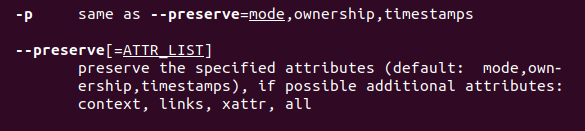
cp -pr /opt/omd/* /datos
- Unmount new disk:
umount /datos
- Mount disk in /opt/omd directory
$ cat /etc/fstab
#
# /etc/fstab
# Created by anaconda on Mon Nov 20 06:07:57 2023
#
# Accessible filesystems, by reference, are maintained under '/dev/disk/'.
# See man pages fstab(5), findfs(8), mount(8) and/or blkid(8) for more info.
#
# After editing this file, run 'systemctl daemon-reload' to update systemd
# units generated from this file.
#
/dev/mapper/rootvg-rootlv /                      xfs     defaults                    0 0
UUID=XXXXXXXX-XXXX-XXXXX-XXXX-XXXXXXXXXXXX /boot         xfs     defaults            0 0
UUID=XXXX-XXXX          /boot/efi                vfat    defaults,uid=0,gid=0,umask=077,shortname=winnt 0 2
/swapfile none swap sw 0 0
/dev/mapper/rootvg-homelv /home                  xfs     defaults                    0 0
/dev/mapper/rootvg-tmplv /tmp                    xfs     defaults                    0 0
/dev/mapper/rootvg-usrlv /usr                    xfs     defaults                    0 0
/dev/mapper/rootvg-varlv /var                    xfs     defaults                    0 0

/dev/sdd1 /opt/omd/                              xfs     defaults                    0 0

LABEL=BEK\040VOLUME /mnt/azure_bek_disk          auto    defaults,discard,nofail     0 0
tmpfs  /opt/omd/sites/mysite/tmp tmpfs noauto,user,mode=751,uid=mysite,gid=mysite    0 0
/dev/disk/cloud/azure_resource-part1    /mnt    auto    defaults,nofail,x-systemd.requires=cloud-init.service,_netdev,comment=cloudconfig       0       2
tmpfs  /opt/omd/sites/sauron/tmp tmpfs noauto,user,mode=751,uid=sauron,gid=sauron    0 0

$ mount -a
- Start the service with the occurring error:
$ omd start mysite
Temporary filesystem already mounted
Starting agent-receiver...OK
Starting mkeventd (builtin: snmptrap)...Cannot bind UDP socket for snmptrap to port (Is SUID bit set on mkeventd_open514? Is "nosuid" not set on the filesystem?): Permission denied
OK
Starting rrdcached...OK
Starting npcd...OK
Starting nagios...OK
Starting apache...[Tue Mar 04 07:19:06.002249 2025] [auth_mellon:notice] [pid 3129400] MellonDiagnosticsFile has no effect because Mellon was not compiled with diagnostics enabled, use ./configure --enable-diagnostics at build time to turn this feature on.
[Tue Mar 04 07:19:06.002318 2025] [auth_mellon:notice] [pid 3129400] MellonDiagnosticsEnable has no effect because Mellon was not compiled with diagnostics enabled, use ./configure --enable-diagnostics at build time to turn this feature on.
OK
Starting redis...OK
Initializing Crontab...OK