I have not. To do this I create a subfolder in local and set the folder name to the amount of seconds desired I believe? edit - ignore that, reading what you linked. thanks.
Configuring Windows
Under Windows, the configuration is also analogous to that of a plug-in. Instead of using a special subdirectory as with Linux & Co, the options are set in a configuration file:
C:\ProgramData\checkmk\agent\check_mk.user.yml
local:
    enabled: yes
    execution:
        - pattern     : $CUSTOM_LOCAL_PATH$\mylocalcheck.bat
          async       : yes
          run         : yes
          cache_age   : 600
As you can see above, under Windows you can configure the asynchronous execution (with async) and the time interval (with cache_age) separately.
Alternatively, on Windows you can also do the configuration in the Agent Bakery.
1 Like
Good morning,
the Logpresso guys are driving me crazy. Version 2.0.0 released today.
Thank you all for the hard work here. This is awsome!
Yeah, that will for sure not break anything 
hi,
can´t get it running…
Anybody else?
did the settings like above, but no new service exists, no error messages etc. 
other scripts in “local -folder” works as expected.
(Agentversion on Server: 2.0p13, Windows-OS)
cheers
I dont get whats the problem. Some of my servers get a check-mk agent timeoout, its not responding since the point i copied the powershell script into the agent/local folder.
i also tested the agent connection manually by connection test, but even with a timeout from oveer 360 its not coming back. if i start the log4j scan in powershell on this machine the scans done within a minute, so its not about the overall scan time that causes the issue. its like the agent isnt able to start up clean when the script is within this folder. if i delete the ps script the agents is reachable again.
Hi. Unfortunately, the service is not displayed on my Windows servers either. However, the script can be started locally. It runs smoothly on my Linux servers.
(Agentversion on Server: 2.0p17, Windows-OS)
1 Like
on windows you can try the script like this (it’s what the cmk agent does). Remember to do this in a admin shell (cmd).
powershell.exe -NoLogo -NoProfile -ExecutionPolicy Bypass -File "C:\ProgramData\checkmk\agent\local\check_CVE-2021-44228_log4j.ps1"
here is a sample output (slightly redacted), this was running with version 2.0 of log4j2-scan
PS C:\ProgramData\checkmk\agent\log> cmd
Microsoft Windows [Version 10.0.19042.1083]
(c) Microsoft Corporation. All rights reserved.

C:\ProgramData\checkmk\agent\log>powershell.exe -NoLogo -NoProfile -ExecutionPolicy Bypass -File "C:\ProgramData\checkmk\agent\local\check_CVE-2021-44228_log4j.ps1"
P CVE-2021-44228_log4j vulnerable=0;1;1|potential_vulnerable=0;1;1|mitigated=0;;|real_time=42.09;;;1; Files: 0 vulnerable, 0 potentially vulnerable, 0 mitigated, Scanned 129407 directories and 500898 files, Runtime: 42.09 s, drives: C:\,D:\\nLogpresso CVE-2021-44228 Vulnerability Scanner 2.0.0 (2021-12-17)\nScanning drives: C:\,D:\\n\nRunning scan (9s): scanned 12711 directories, 151235 files, last visit: <removed> scan (19s): scanned 40228 directories, 264186 files, last visit: <remoced>nRunning scan (29s): scanned 75661 directories, 375580 files, last visit: <removed>\n\nScanned 129407 directories and 500898 files\nFound 0 vulnerable files\nFound 0 potentially vulnerable files\nFound 0 mitigated files\nCompleted in 42.09 seconds
the check looks like this

2 Likes
so to not get you wrong, you would do this as a batch file placed in the local folder?
Type was on local in CheckMK. Thanks for the note! 
Found my problem… Maybe someone can confirm the problem (CheckMK & Agent v2.0.0p12) or explain it to me. 
After i changed the check_mk.user.yml like in the Documetation (with the example) and checked it on http://www.yamllint.com/ i get an “(): did not find expected key while parsing a block mapping at line 49 column 1” ERROR.
But after i find the check_mk.yml under “c:\Program Files (x86)\checkmk\service” and make the same changes like in the check_mk.user.yml i got “Valid YAML!” and the service get cached!
no, this is just how the agent runs the check_CVE-2021-44228_log4j.ps1 script. This only that you can test the script manualy.
2 Likes
@a3093
After installing your script i found a litte “problem”.
all results are print out, but the overall return code ist 1 instead of 2 (in my case), because the “last” line has the status code of 1.
So i changed your code a litte bit
I hope that’s the correct syntax
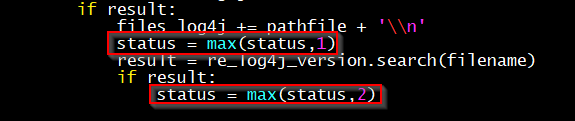
for example:

1 Like
There is now also a a first CMK plugin version available (no local check anymore). You can configure the warn/crit levels via WATO. The output is also a lot nicer
All the hard work is now done on the CMK server. The Plugin will only run the scanner and forward the complete output to the CMK server.
5 Likes
very, very nice Work. I will test this later. THX!!!
give it a little time, I am working on the full integration in the bakery, so you can than configure the scanner options as well. Like drives, path, fix, timeout, caching time and so on…
1 Like
@Doc now you can test if you like
The CVE-2021-44228-log4j plugin is now fully(?) integrated with the bakery (no custom files any more). You can now configure the search path/drives for the scanner via the bakery. There is also the option to tell the scanner to fix vulnerable files. Caching and timeout can also be configured.
cheers
2 Likes
“give it a little time” = 8min 
I will start testing in about 1h
NICE WORK!!!
There is a typo in the servicename “2921” instead of “2021”
register.check_plugin(
    name='cve_2021_44228_log4j',
    service_name='CVE-2921-44228-log4j',
I can’t find the place to register for your gitlab… so no pull request
fixed. THX! had a lot of fun with this number 