Sure thing 
/omd/versions/2.2.x/lib/python3/cmk/notification_plugins/slack.py
line 67 (cmk 2.2.0p17)
+ ", ".join(map("@{}".format, context["CONTACTNAME"].split(","))),
prepares user names to be mentioned on Slack but they are treated literally and user is not mentioned at all, i.e. @username is displayed as regular text, not a “mention”
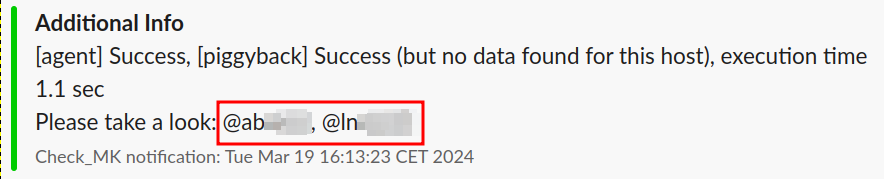
When I changed the above line and add <> around @{} like this
+ ", ".join(map("<@{}>".format, context["CONTACTNAME"].split(","))),
notifications stared to properly mention user but only one of them (I don’t know why not both, I’m not skillful enough in python to catch this message):
(screen in my next message, as new users can only embed one media  )
)
This mention is a proper mention which triggers Slack’s notification rules, display info on hover etc. and this is the mention I would like to have out of the box, without the need of writing my own notification plugin that will basically fix just that.
This is, however the issue discribed by @liliang in the above comment and not the feature question asked by @jonh3000 in first place.
Please, let me know if you have more questions.