We just upgraded our multisite from 2.0.0.p39 to 2.3.0.p12 and our kiosk setup broke.
Is there a solution to autologin or are we better of downgrading?
I am not 100% sure but it could be related to:
Hi, in 2.3 the “Login via GET request” option is still usable. Go to “Setup” → “General” → “Global Settings”, enable “Login via GET requests”, save and apply.
Then, you can use an url like
https://$MON_HOST/$SITE/check_mk/login.py?_origtarget=/$SITE/check_mk/dashboard.py%3Fname%3Dmain&_username=$USER&_password=$PASSWORD&_login=1
In your kiosk browser (one line, of course and replace $PLACEHOLDERS).
BUT:
The “Login via Get request” option is deprecated and might not be available in coming versions.
And you will need a current browser to display the dashboard. I use an Amazon Fire tablet running only a kiosk mode app and that works great. I once had a Raspberry with Porteus Kiosk, which also worked fine, but a tablet is much more energy efficient than a Raspi with monitor or tv.
Edit: Of course the user should be a readonly user and not “admin” and the device which displays the dashboard should be isolated at least.
Hi Guys,
I upgraded to cmk 2.3 recently and since than i have a strange behaviour with my Kiosk-Setup.
The automated login / Url works as usual, it opens the desired Dashboard and everything runs fine.
But after a while (i think a little over 24h) i jut get an empty dashboard with no entries and nothing refreshes. If i F5 it i see an login screen - so i think it ran in a timeout.
But afaik there is no default timeout and in my config there is also no timeout set.
To test it i set up an Timeout manually, but it didnt change the behaviour. It had no impact if the Timeout was set to 2 or to 14 days…
Anybody that experienced this and has an solution?
Thx in adavance
Gregor
I think this setting will help you.
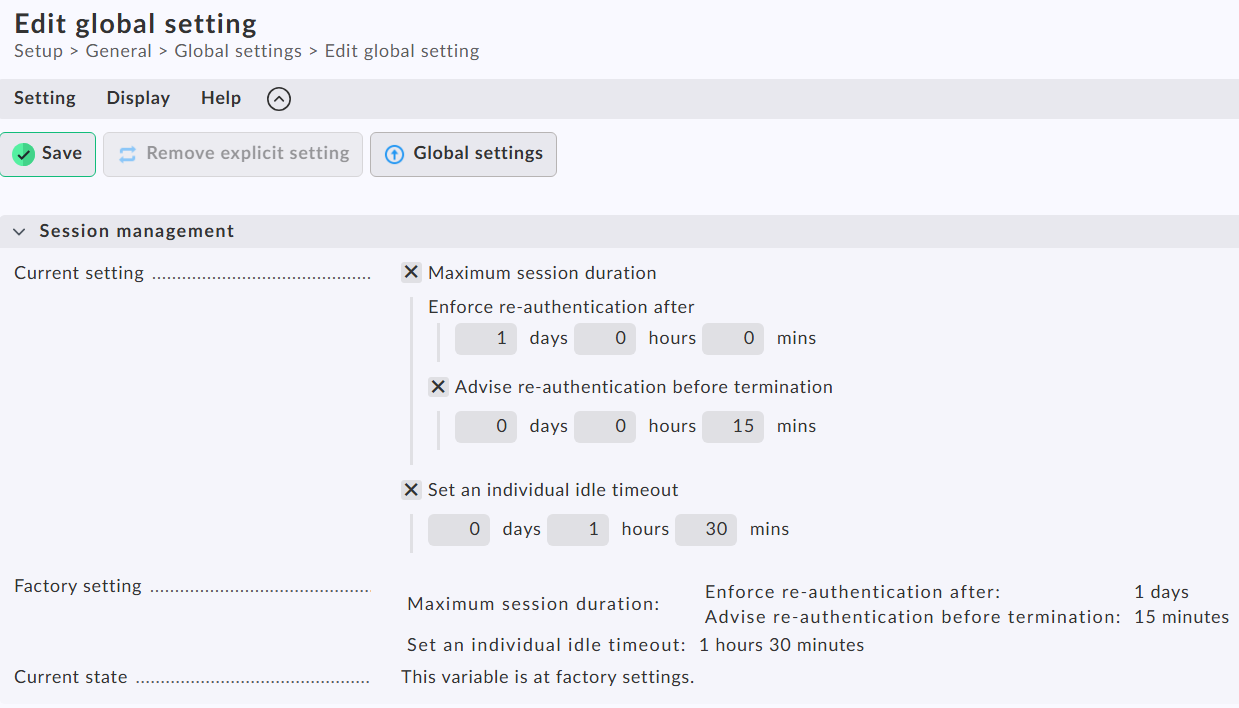
What you see is the default values.
If you change the “re-authentication” value you should see a difference in your setup behavior.
1 Like
Hi Andreas,
Thx for your super fast reply.
Implemented the settings you mentioned and it worked like a charme.
Really Appreciate your Support!
Regards
Gregor