Hello together,
I want to monitor a specific process.
Something like PROCESS.exe for example.
But here comes the caveat:
I want to get a critical status if one of the processes runs longer than x minutes and uses >=20%
How could I set that up?
Greetings
Max
I assume you mean when PROCESS.exe utilises at least X% of the CPU for more than X minutes set State CRIT.
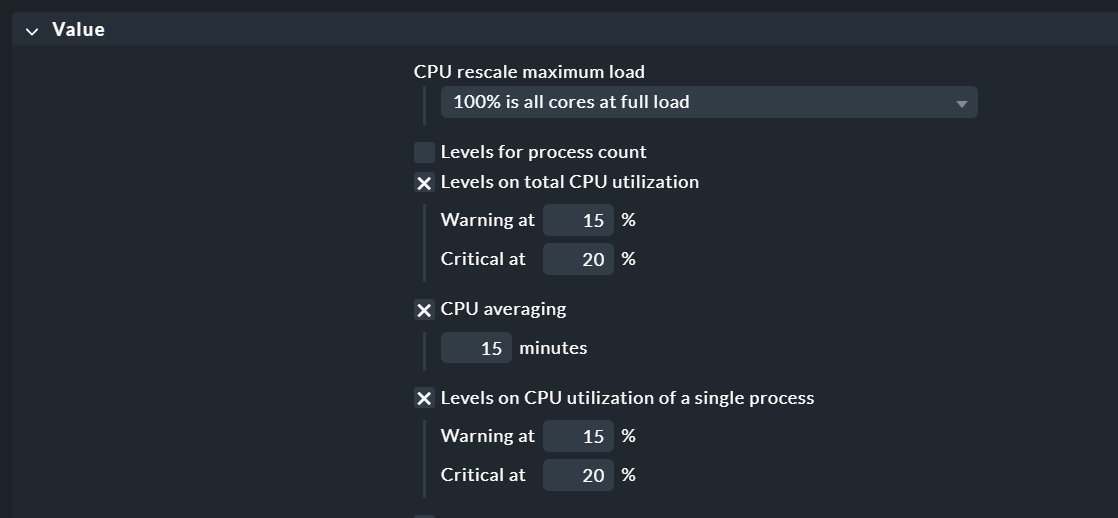
You could calculate the average CPU utilisation over X minutes and set an alert if it is greater than 20% for the group or single process.
Thank you for your help!
I didn’t describe detailed enough 
There are many of those processes running (~200).
But I would like the service to change if one of those processes runs on at least X% of the CPU for more than X minutes.
→ If I set it up like you said, the average goes up und down, depending on the processes, but it doesn’t detect if one of them is running for X
That would probably work, if every process would be discovered as a single service since the average would work for that case.
There are like I said many processes running, everyone with the same executable file.
Is there a way to discover the inidividual processes and not automatically group them?
I created a process discovery rule which uses the regex
.*PROCESS.exe.* → If I run a service discovery on the host, they get automatically grouped.
Then I could let service discovery run with every agent run, accept the new services and vanish the old ones.
Greetings
If you have around 200 instances of “PROCESS.exe” running and want to be alerted when any single one of those processes uses more than X% CPU for more than X minutes, then instead of using the “Level on total CPU” trigger, you should use the “Level on CPU of a single process” trigger ;-).
To discover a single service for each individual process, the processes need to be distinguishable from each other in some way — for example, by different command-line arguments or instance identifiers such as:
PROCESS.exe id1
PROCESS.exe id2
PROCESS.exe id3
You can use a regex like this in your service discovery rule to capture these variations:
PROCESS.exe (id\d+)
Then define your service name using the captured group:
PROCESS %1
Here, %1 will be replaced by the matched value from (id\d+), resulting in separate services like:
Process PROCESS id1
Process PROCESS id2
Process PROCESS id3
This way, each process is monitored individually, and alerts can be triggered if any one of them exceeds the CPU threshold, without averaging across all processes.
1 Like