hi
just wish to know
what are the steps ,if we want to migrate 2.2.0p09 cloud to 2.2.0p09 Enterprise edition
hi
just wish to know
what are the steps ,if we want to migrate 2.2.0p09 cloud to 2.2.0p09 Enterprise edition
The documentation includes detailed steps.
Simply, do an omd update
not able to locate the document , can you please provide the link ?
hi Norm
thanks for the links.
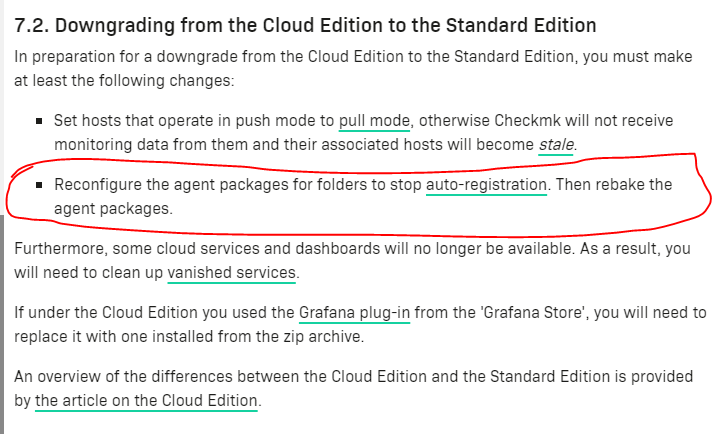
in the attached document for downgrading from cloud to standard . below highlighted point is mentioned , i just want to understand what we need to check for this condition check?
Reconfigure the agent packages for folders to stop auto-registration. Then rebake the agent packages
also i m following the below process.
to downgrade from free cloud edition to standard edition .
currently omd versions showing version 2.2.0p9.cce (default)
will down load check-mk-enterprise-2.2.0p9-el9-38.x86_64.rpm
1)wget --user=***** https://download.checkmk.com/checkmk/2.2.0p9/check-mk-enterprise-2.2.0p9-el9-38.x86_64.rpm --ask-password
2)yum install check-mk-enterprise-2.2.0p9-el9-38.x86_64.rpm
3)omd versions (after above yum install we will show the cee version in default and cce version as a non default) as shown below
omd versions
2.2.0p9.cee (default)
2.2.0p9.cce
4)su mysite
5)omd stop
6)omd update mysite (will select 2.2.0p9.cee and proceed)
7)omd start mysite
now after successful update , i should able to see
omd versions should now show 2.2.0p9.cee for mysite
Note: once 2.2.0p9.cee will be updated, i can go for next available stable versions like
2.2.0p9.cee
2.2.0p12.cee
2.2.0p14.cee
2.2.0p16.cee
which is available on Download archive of outdated Checkmk versions
thanks for the reply ,
Actually i m in process to downgrade free cloud edition to check-mk standard edition .
and on check-mk document section , i came through this line as pasted in screen shot, so i was just verifying .because i have tested the cloud free edition .so after migration , i am not suppose to do any changes for host addition ?
This is only relevant if you actually created agent packages for auto registration for deployment in operating system images.
ok , thanks mschlenker for the reply .
I would greatly appreciate it if you could verify the following steps, which I intend to use to downgrade from the free cloud edition to the standard edition, and offer suggestions if I’m mistaken.
currently omd versions showing version 2.2.0p9.cce (default)
i have to download check-mk-enterprise-2.2.0p9-el9-38.x86_64.rpm
1)wget --user=***** https://download.checkmk.com/checkmk/2.2.0p9/check-mk-enterprise-2.2.0p9-el9-38.x86_64.rpm --ask-password
2)yum install check-mk-enterprise-2.2.0p9-el9-38.x86_64.rpm
3)omd versions (after above yum install we will show the cee version in default and cce version as a non default) as shown below
omd versions
2.2.0p9.cee (default)
2.2.0p9.cce
4)su mysite
5)omd stop
6)omd update mysite (will select 2.2.0p9.cee and proceed)
7)omd start mysite
now after successful update , i should able to see
omd versions should now show 2.2.0p9.cee for mysite
Note: once 2.2.0p9.cee will be updated, i can go for next available stable versions like
2.2.0p9.cee
2.2.0p12.cee
2.2.0p14.cee
2.2.0p16.cee
which is available on Download archive of outdated Checkmk versions
Yes, 2.2.0p9.cce to 2.2.0p9.cee first is the recommended way.
Then the update from p9 to p16 can be done in a single step.
And please create backups.
thanks you for the reply and valuable suggestion.
one small query.
i have downloaded check-mk-enterprise-2.2.0p9-el9-38.x86_64.rpm from the check-mk URl (https://download.checkmk.com/checkmk/2.2.0p9/check-mk-enterprise-2.2.0p9-el9-38.x86_64.rpm )
Since it’s only option shows on check-mk portal and I don’t know anything about el9-38 (what is 38 here), I downloaded check-mk-enterprise-2.2.0p9-el9-38.x86_64.rpm from the check-mk. I’m only aware of the version 2.2.0p9-el9 of the current cce version which i have tested.i hope this will not be issue here.
All RPM packages currently have “38” in the filename. So surely nothing to worry about. However, I will still check with development whether this is some leftover that can be omitted or the number actually makes some sense, then we will document it.
thank you mschlenker for the reply.
Hi
please consider the example of status of omd versions on host machine.
omd versions
2.2.0p9.cce
2.2.0p9.cee (default)
omd version site1 (test site with less than 750 services with free cloud edition)
OMD - Open Monitoring Distribution Version 2.2.0p9.cce
omd version site2 (production site with more than 750 services running with enterprise edition )
OMD - Open Monitoring Distribution Version 2.2.0p9.cee
now i wish to update the site2 with the latest available patches on check_mk site .
2.2.0p12.cee
2.2.0p14.cee
2.2.0p16.cee
1)can i update the site1 running with 2.2.0p9.cce with enterprise edition 2.2.0p9.cee on same host? i wish to run site1 as a test machine before applying new updates to site2.
2) can i keep multiple patches on same machines ? is there any limitations for keeping patches on same host?
You can keep any number of editions, versions, sites on your machines. Just ask our consultants and us doc people: We sometimes have 20 Checkmk packages installed and like 30 sites on our machines.
When testing this way, it is important to keep an eye on versions that are not needed anymore and only activate sites that are currently required for testing.
And always run omd update as site user to make sure you are updating the correct site…
thanks mschlenker for the reply.
This topic was automatically closed 365 days after the last reply. New replies are no longer allowed. Contact an admin if you think this should be re-opened.