OS version:
Red Hat Enterprise Linux Server release 7.9 (Maipo)
Error message:
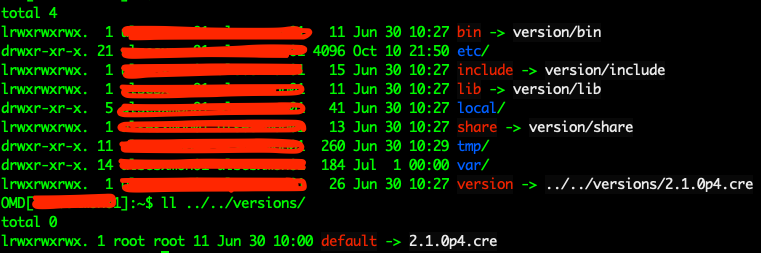
/omd/sites/sitename shows links to non present /omd/versions/2.1.0p4.cre
Output of “cmk --debug -vvn hostname”: (If it is a problem with checks or plugins)
Cannot find “cmk” command
So, someone from the team accidentally deleted the check-mk-raw RPM from the server. Question is can I rebuild it without doing the whole installation? Is there some DB that I can link new files to and it will work?
We rolled back the whole VM to a previous date where everything was working. I didn’t have to go through installing the package again and configuring the site again.
Well the RPM is not needed to run any programs in linux, you can delete it if you want. What you mean here is someone deleted SOME FILES (otherwise your entire directory would be wiped)
If you solved the problem I would strongly suggest you update the first post or mark it as solved
This topic was automatically closed 365 days after the last reply. New replies are no longer allowed. Contact an admin if you think this should be re-opened.