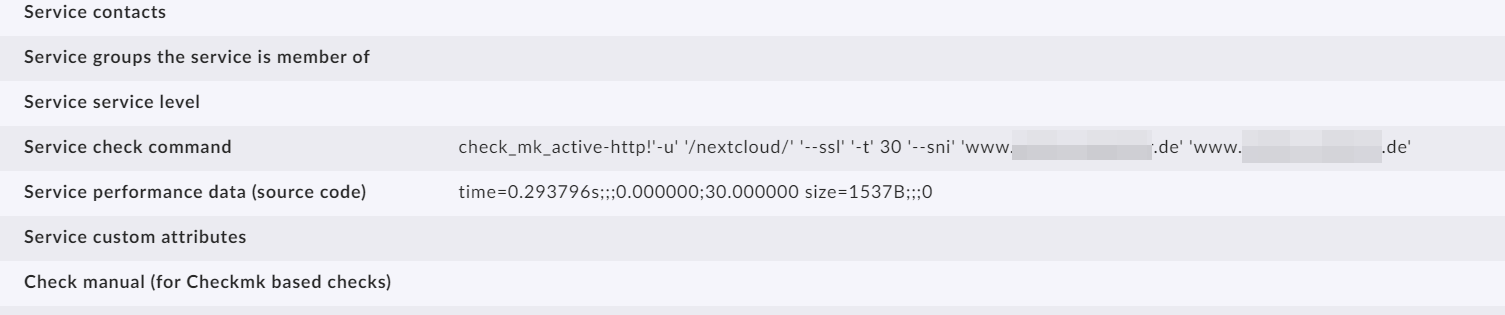
I must be confused since none of the documentation matches what I see in the WATO on my side but this is what I’m trying todo…
I want to check multiple sites using a active check_http check for our internal sites so that I can give site.example.com and give the correct internal ip and do a simple GET /…
I created a rule in wato → services → http… and did a simple GET / https then I added a blank host with the correct hostname for the site and an IP with the same hostname.
when I go to this host I get a 404 ? if I run the check_http check from omd host or a curl I get a 200
How can I debug why the check gets a 404 when it works on the cli ?
no proxy… these “sites” and the checkmk host is on the same network. If I go on the checkmk and run the check_http check on the cli I get the correct and expected result.
Not quite sure I follow what you’ve done here. Might need to explain further.
The HTTP check can get a little tricky to understand. It will (unless you override the IP in the rule) direct the check to whatever host object the rule matches. If you create a host object with the website name, it will send the check to the external name, and you would need to override the IP on the rule.
You probably also need to set the “virtual host” header so that the HTTP Host header has the right name in it, otherwise your web server may reject it (it has to match, for example, nginx’s server_name directive).
I would recommend that you make the HTTP check rule match against the internal web server host, and set the “Virtual host” setting with the site’s name. That way the failed check appears under the actual web host, and this method also works well for HA arrangements where the servers could fail individually.
so we do not have a one to one host and website so I wanted to just create a host for each site so we could monitor web and SSL certs. with multiple haproxy, nginx and kubernetes clusters its hard to have the active checks floating around in different areas. So my thought was to create a folder (websites) and create hosts for each of the sites that we need to monitor (50+). I think I have it down now BUT its a little harder than I wanted. I create a host with the fqdn of the site which is empty. Then I create a “check HTTP service” rule but since these need the virtual host and a custom header to work I need 2 rules for each site.
other issue is that some of the hosts are down since the floating/virtual ip is not pingable so check_mk sees it as down.
Under ruleset “Host Check Command” you have the option “always assume the host is up”, or a few others you might find more appropriate (like TCP connect, there’s also use the state of a service which sounds like it could make the host status be the HTTP check status).
This topic was automatically closed 365 days after the last reply. New replies are no longer allowed. Contact an admin if you think this should be re-opened.