Hi all,
Is there a way to add the physical location of a host to the hosts properties, and have that included on any e-mail notifications our administrators receive? We have about 50 locations, and all hosts are labelled by a site number, such as S14-DFCS01. When reading notification e-mails after-hours, looking up what site that is can be difficult.
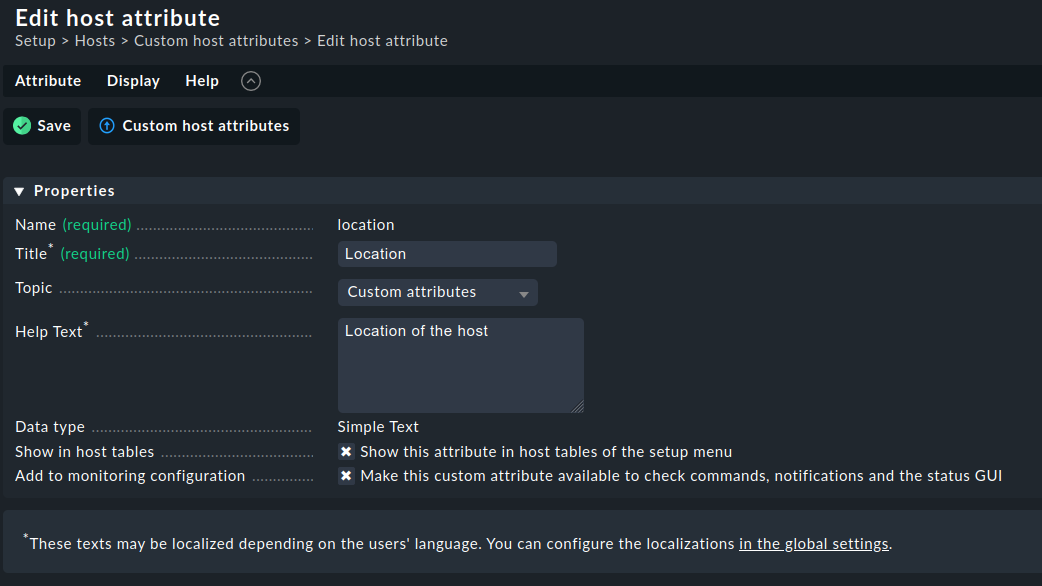
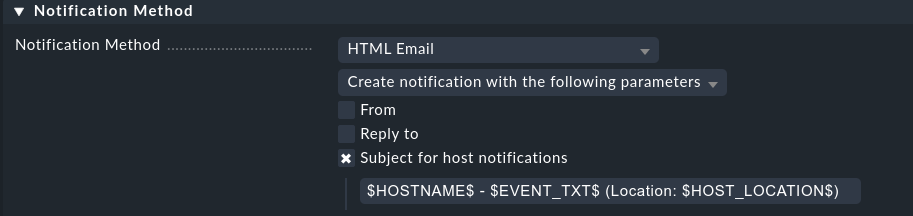
Thanks for that. I was able to create a custom attribute for the location. I’ve been trying to figure out how to get the location included in our default notifications, any thoughts there?
You need to dig a bit into Nagios configuration to track this.
When you edit a host object and enter a location in Checkmk, and activate your changes, Checkmk creates the file ~/etc/nagios/conf.d/check_mk_objects.cfg. Here, the content entered into the custom host attribute “location” is stored as _LOCATION within a host object. Example (shortened):
The Nagios core makes the custom host attributes available as macros. From the Nagios documentation, chapter “Custom Variable Macros”:
Any custom object variables that you define in host, service, or contact definitions are also available as macros. Custom variable macros are named as follows:
$_HOSTvarname$
$_SERVICEvarname$
$_CONTACTvarname$
So in this case, the location information is available as macro _HOSTLOCATION.
That worked! Couldn’t figure out how to get it in the body of the e-mail, but I think it’s fine just as part of the subject. Good enough. Honestly, I’m really surprised this isn’t a built-in function by default when creating hosts.
This topic was automatically closed 365 days after the last reply. New replies are no longer allowed. Contact an admin if you think this should be re-opened.