Adding vCenter - Cannot login to vSphere Server

Hello Community!

I’m trying to monitor our vCenter, no ESX hosts at the moment,
according to Monitoring VMWare ESXi

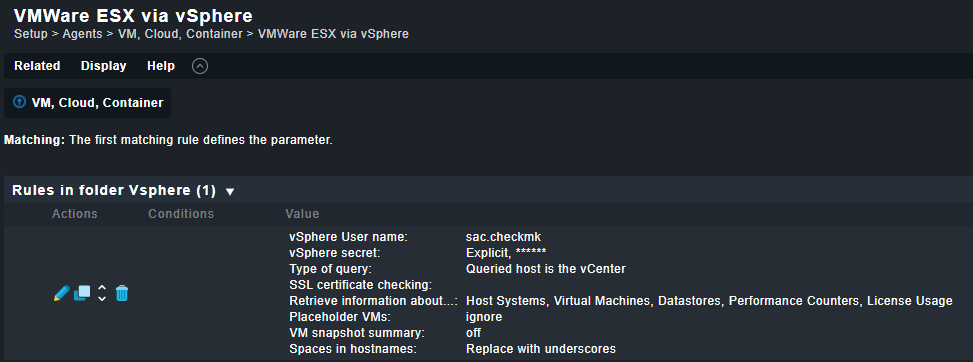
so I created a r/o User in vCenter beforehand, and added a Rule like this:

Then I added the vCenter host which looks like this:

But my service connection tests fail:

OMD[SAL]:~$ cmk -d salvvcenter01.research.silicon-austria.com
ERROR [special_vsphere]: Agent exited with code 1: Cannot login to vSphere Server (reason: [500] Internal Server Error). Please check the credentials.(!!)

But still, is my basic configuration correct?

The above document states about the prerequisites: The vCenter has been defined as a host and configured as a Checkmk Agent agent in Checkmk

what does that mean, I mean, where can this be configured?

Thanks.

Hi,
the basic configuration looks good. You can go through that manual to find more and detailed debug information: vSphere - Checkmk Knowledge Base - Checkmk Knowledge Base

Some questions:

  • Are there special characters inside the secret?
  • Are you able to log in directly?

Check the tracefile for more information.

BR
Anastasios

thanks for the information. I found more details now, it’s not special characters in the password.

OMD[SAL]:~/share/check_mk/agents/special$ ./agent_vsphere -u ‘sac.checkmk’ -s '**’ --debug --tracefile ~/tmp/vcenter.out -i hostsystem,virtualmachine,datastore,counters,licenses -P --spaces cut --no-cert-check ‘salvvcenter01.research.silicon-austria.com


response:
body:

to perform this operation was denied.
NoPermissionFault


so I must check the vCenter user again

1 Like

This topic was automatically closed 365 days after the last reply. New replies are no longer allowed. Contact an admin if you think this should be re-opened.