We recently (finally) upgraded from 1.6 to 2.1. We have Powershell scriptblock logging (event 4104) enabled for security logging and it logs to our SIEM. For the servers (most of them) that have been upgraded to agent 2.1, we have noticed a HUGE increase in the amount of powershell logging. They went from ~8GB/day to almost 300GB/day of powershell logs! This is absolutely killing us in our SIEM and we are well over-subscribed.
I understand some changes were made to the windows_if.ps1 plugin for monitoring NICs. More powershell is being used now than in the 1.6 agent.
I also came across this from a Splunk page:
But we seem to be seeing the same stuff over and over. My windows guy noticed that he can generate the corresponding warning 4104 events ONLY after closing and re-opening his powershell when he is running windows_if.ps1 manually.
So this leads me to my actual question… Did something change with the way Poweshell sessions are created to run the plugins between agent version 1.6 and 2.1? It’s almost like with the 1.6 agent, a single Powershell session would be started when the agent was started and then that session would be re-used (thus the 4104s would be logged only once for the first run of windows_if.ps1), but with the new 2.1 agent, it seems maybe a Powershell session is being started and stopped with every agent call?
We’ve opened a support case, but their answer was “don’t log Powershell scriptblocks” which isn’t really an option.
I will give you one guess as to when we upgraded our Windows CMK agents from 1.6 to 2.1!
On a related note, where can I find accurate information for agent version 2.1 and how winperf_if.ps1 and windows_if.ps1 are or are not related. Which should be deployed, if either, to gather NIC performance stats? We have no bonded interfaces on our Windows servers so that is not something we need.
Thanks for the reply. We removed the windows_if.ps1 plugin because it seemed to only be needed for network bonding/teaming, which we don’t use. We re-WATO’d/scanned our hosts and no services were added/removed. We still have the same Interface* services. Is this expected? I thought maybe basic interface stats were built-in checks in the agent?
Removing the windows_if.ps1 plugin definitely had a positive impact on our events/sec in our SIEM.
You can see where our non-prod servers auto-updated their agents last night and removed the plugin then our admins started updating our prod servers this morning:
But can you give me some information where you get these events?
I had a look at one of my machine and could not find this event without going to every log file.
It depends if you use the interface description and not the index number a change can happen. I thin also the operational state is not available from only the wmi counters.
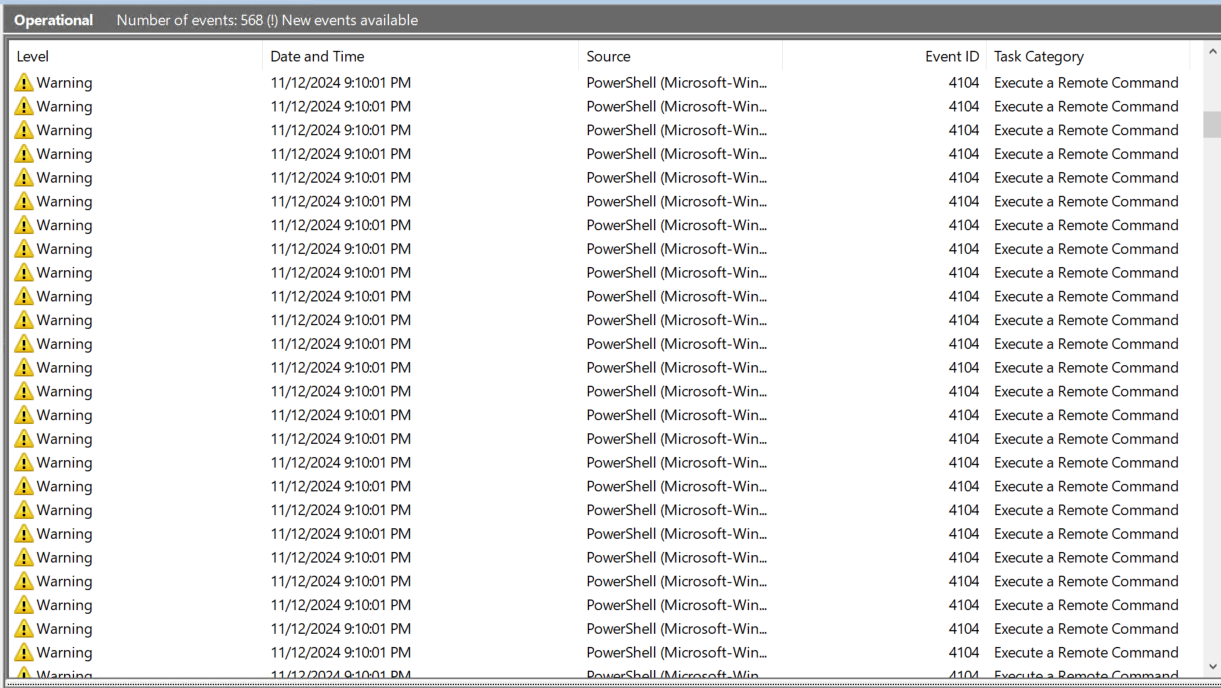
Windows event viewer in Application and Services Logs/Microsoft/Windows/PowerShell/Operational
The 4104s below all happened at the same second (there are more off the page) and seem to be a direct result of the windows_if.ps1 script running. If you open Powershell and run it manually, you should see them… but only the first time you run it in that Powershell session. If you close the Powershell session and open a new one and run it again, you’ll see them again. Unfortunately, this must mimic what the agent is doing because it is logging them every time it returns data to the CMK server.
Are you saying windows_if.ps1 is responsible for the data in above? I can’t see how it could be because we removed it and we’re still getting the data in the Interface service above.
We haven’t noticed any missing data/checks since removing windows_if.ps1, but we’re not 100% sure why. The good news is that it significantly reduced the events being sent to our SIEM.