Appliance on HyperV VM Generation 2. No Keybard

OS version: virtual appliance . Firmware 1.7.4
Hi,

i have created a VM Generation 2 on a HyperV Server and like to use this as virtual appliance.
I have “installed” both vhdx files and the vm is booting.

But cant do anything. The Keyboard is not working.
Any idea what is wrong with Firmware 1.7.4 on an MS-HyperV Gen 2 VM (secure boot is disabled)

Kind Regards
Stephan

AFAIK HyperV is not a supported platform.

The documentation lists VirtualBox, VMware and Proxmox: Installation of the virtual appliance

1 Like

The checkmk GmbH has installed three virtual checkmk appliances on our HyperV hosts.
No one told us that this could be a problem.

That is correct. :+1:

Hi @StephanBuerger, please reach out to me with a private message. If what you say is true, I want to make sure, something like that does not happen again.

Towards your problem: What does “Generation 2” mean in non-microsoft lingo? Is it related to EFI? Does it still work with “Generation 1” (whatever that would mean)? Can you share your exact settings, so even though it is not supported, we might be able to give you pointers?

Only one small comment from my testings. I had the appliance running on Hyper-V before - also Gen2 (UEFI boot).
I think here it is a problem with the booting kernel - missing hyperv_keyboard.
With normal distributions i had no such problem until now.
Is it possible that the kernel inside the appliance is a own build?

2 Likes

It is not, mostly an off-the-shelf Kernel, just one or two added modules.

I have no means to test on Hyper-V, can any of you check, which Hyper-V modules might be loaded in a current CMA running on Hyper-V?
lsmod | grep hv_*

The base image of the appliance is a Debian 12 or?


All modules inside a Debian 12 booted from ISO.
Machine is Gen2 with Secure Boot.
I can have a look at a old appliance what is loaded there.

1 Like

As of writing, that is correct.

Looks to me like everything should be fine from a platform point of view.

Pre-1.7.0 there is no EFI support, so whatever issue we are looking at here, might not be applicable.

@StephanBuerger as a workaround, you can deploy a Gen 1 VM with CMA 1.6.9 and then upgrade it straight to 1.7.4. This should at least get you back into a working state.

That’s not the appliance, this is a normal Debian 12 bootet from ISO.
With appliance you cannot see this as it stops responding after the boot screen on the setup where no keyboard is working.

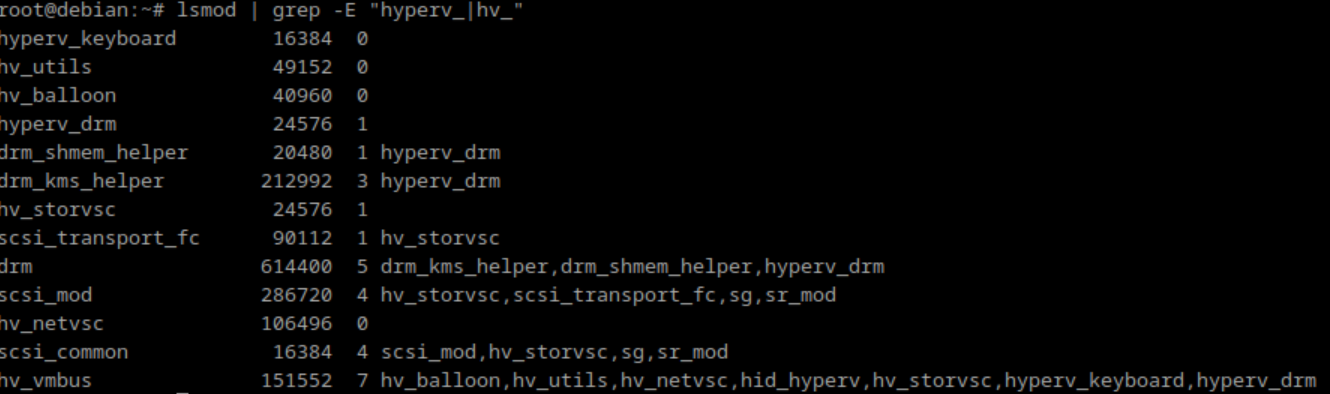
Ah! So you can reproduce the initially reported issue, correct?

Yes

The following are the modules loaded with 1.6.9 appliance inside a Gen1 VM.

Welcome to Check_MK virt1 Mark I (Version: 1.6.9)
Last login: Mon Aug 19 11:55:27 2024
root@cma:~# lsmod | grep -E "hyperv_|hv_"
hyperv_fb              20480  1
hv_utils               32768  0
hv_balloon             24576  0
hyperv_keyboard        16384  0
hv_storvsc             20480  3
hv_netvsc              86016  0
scsi_transport_fc      69632  1 hv_storvsc
scsi_mod              249856  7 sd_mod,hv_storvsc,scsi_transport_fc,megaraid_sas,libata,sg,sr_mod
hv_vmbus              106496  7 hv_balloon,hv_utils,hv_netvsc,hid_hyperv,hv_storvsc,hyperv_keyboard,hyperv_fb

i will try now the update with 1.7 firmware.

Update done and working

Welcome to Checkmk virt1 Mark I (Version: 1.7.4)
Last login: Mon Aug 19 12:01:08 2024
root@cma:~# lsmod | grep -E "hyperv_|hv_"
hyperv_keyboard        16384  0
hv_utils               49152  0
hv_balloon             40960  0
hv_storvsc             24576  3
scsi_transport_fc      90112  1 hv_storvsc
hv_netvsc             106496  0
scsi_mod              286720  7 sd_mod,hv_storvsc,scsi_transport_fc,megaraid_sas,libata,sg,sr_mod
hv_vmbus              151552  6 hv_balloon,hv_utils,hv_netvsc,hid_hyperv,hv_storvsc,hyperv_keyboard
scsi_common            16384  5 scsi_mod,hv_storvsc,libata,sg,sr_mod

All on Gen1 VM

1 Like

We just released Firmware 1.7.6 which should fix the missing drivers at boot time. :wrench:

4 Likes

Working again without problem.

1 Like

This topic was automatically closed 365 days after the last reply. New replies are no longer allowed. Contact an admin if you think this should be re-opened.