Archive event only archiving oldest event and not all

CMK version:
Checkmk version 2.4.0p21

OS version:
Docker

Error:
The Event Viewer archiving of events does not work properly. It only archives the oldest event and not all of them.

When I look at “Monitor > Event Console > Events” I see seven events from event #15293 through to #15299.

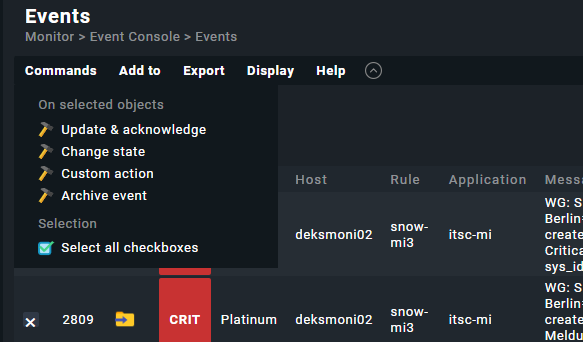
If I got to “Commands > Archive Event” and get this dialog:

I select “Archive” then I go back to the view, and only the oldest event #15293 has been archived. The other 6 are not archived.

So I have to step through this multiple times in order to get all the events archived. Very tedious. It is only a recent regression in this version and I think the previous one. Please fix. Thanks.

Output of “cmk --debug -vvn hostname”: (If it is a problem with checks or plugins)

OMD[cmk]:~$ cmk --debug -vvn cmkraw.xxxxxx.local
value store: loading from disk
Checkmk version 2.4.0p21
+ FETCHING DATA
  Source: SourceInfo(hostname='cmkraw.xxxxxx.local', ipaddress='172.18.0.101', ident='piggyback', fetcher_type=<FetcherType.PIGGYBACK: 4>, source_type=<SourceType.HOST: 1>)
[cpu_tracking] Start [7f23e6d6b110]
Read from cache: NoCache(path_template=/dev/null, max_age=MaxAge(checking=0.0, discovery=0.0, inventory=0.0), simulation=False, use_only_cache=False, file_cache_mode=1)
0 piggyback files for 'cmkraw.xxxxxx.local'.
0 piggyback files for '172.18.0.101'.
Get piggybacked data
[cpu_tracking] Stop [7f23e6d6b110 - Snapshot(process=posix.times_result(user=0.0, system=0.0, children_user=0.0, children_system=0.0, elapsed=0.0))]
[cpu_tracking] Start [7f23e6fc2480]
0 piggyback files for 'cmkraw.xxxxxx.local'.
+ PARSE FETCHER RESULTS
  HostKey(hostname='cmkraw.xxxxxx.local', source_type=<SourceType.HOST: 1>)  -> Add sections: []
Received no piggyback data
[cpu_tracking] Stop [7f23e6fc2480 - Snapshot(process=posix.times_result(user=0.020000000000000018, system=0.0, children_user=0.0, children_system=0.0, elapsed=0.019999999552965164))]
[piggyback] Success (but no data found for this host), execution time 0.0 sec | execution_time=0.020 user_time=0.020 system_time=0.000 children_user_time=0.000 children_system_time=0.000 cmk_time_agent=0.000
1 Like

Can you try replicating this using the Checkbox option? Are you using a custom view? I`m using this option to archive events heavily in 2.3 without any issues.

Makes no difference if checkboxes are enabled, and multiple items are selected.

No.

Indeed - it used to work fine.

There is a high probability that something might not be right. Please access your site console and view the latest entries in file var/log/mkeventd.log after your removal attempt. I was facing some issues with SNMP Traps and was able to fix after reviewing the log file. Good luck!

Hi @Gcon,

well detailed description — this issue sounds very familiar.

There’s an older but still relevant Werk #10307 that describes exactly this kind of conflict:
Werk #10307 – Resolve conflict event console archive event

In short: When checkboxes are enabled, they sometimes “shadow” the single-event archiving (clicking the archive icon directly). This behavior still occurs in some cases in 2.4 (known regression).

What you can try right now:

1. Check the mkeventd log
Run this right after trying to archive events like @paulosantanabr described:

# As site user:
tail -n 50 ~/var/log/mkeventd.log

Look for errors like “event not found”, permission issues, or anything related to archiving.

2. Use the checkbox bulk method
This is currently the most reliable way:

  1. Go to Monitor → Event Console → Events
  2. Enable checkboxes: Display → Modify display options → Checkboxes
  3. Select the events you want to archive
  4. Click Commands → Archive Event

Important note: The single “Archive Event” button (without checkboxes) is designed to archive only the oldest event. That is expected behavior.

3. CLI workaround (always works)

# As site user

# Archive a single event (replace 15294 with the event ID):
unixcat ~/tmp/run/mkeventd/status <<< "COMMAND DELETE;1;15294"

# Archive multiple events:
for id in 15293 15294 15295; do
    unixcat ~/tmp/run/mkeventd/status <<< "COMMAND DELETE;1;$id"
done

4. REST API workaround (cleanest method)

curl -k -X POST \
  "https://your-checkmk-server/<site>/check_mk/api/1.0/domain-types/event_console/actions/archive/invoke" \
  -H "Authorization: Bearer automation your-api-token" \
  -H "Accept: application/json" \
  -H "Content-Type: application/json" \
  -d '{
    "filter_type": "by_id",
    "site_id": "<site>",
    "event_id": 15294
  }'

Next steps

If the problem persists (especially in custom views), it would be very helpful if you could open a bug report and reference Werk #10307.

If you want, feel free to post the exact log output or your Checkmk version (2.4.0pXX) here — I can take a closer look.

Greetz Bernd

1 Like

Hi Bernd,

I had 8 events in the Event Log to archive. Choosing “Commands > Archive Event” and agreeing to archive 8 events, I actioned this and got the fault condition of only the most recent event being archived.

I then went to the log you suggested and this is the result:

OMD[cmk]:~$ tail -n 50 ~/var/log/mkeventd.log
  File "/omd/sites/cmk/lib/python3/cmk/ec/main.py", line 805, in do_housekeeping
    self._history.housekeeping()
  File "/omd/sites/cmk/lib/python3/cmk/ec/history_sqlite.py", line 347, in housekeeping
    cur.execute("DELETE FROM history WHERE time <= ?;", (delta,))
sqlite3.DatabaseError: database disk image is malformed
2026-03-07 21:42:14,750 [40] [cmk.mkeventd] Exception in main thread
Traceback (most recent call last):
  File "/omd/sites/cmk/lib/python3/cmk/ec/main.py", line 2492, in run_eventd
    event_server.do_housekeeping()
  File "/omd/sites/cmk/lib/python3/cmk/ec/main.py", line 805, in do_housekeeping
    self._history.housekeeping()
  File "/omd/sites/cmk/lib/python3/cmk/ec/history_sqlite.py", line 347, in housekeeping
    cur.execute("DELETE FROM history WHERE time <= ?;", (delta,))
sqlite3.DatabaseError: database disk image is malformed
2026-03-07 21:42:15,751 [40] [cmk.mkeventd] Exception in main thread
Traceback (most recent call last):
  File "/omd/sites/cmk/lib/python3/cmk/ec/main.py", line 2492, in run_eventd
    event_server.do_housekeeping()
  File "/omd/sites/cmk/lib/python3/cmk/ec/main.py", line 805, in do_housekeeping
    self._history.housekeeping()
  File "/omd/sites/cmk/lib/python3/cmk/ec/history_sqlite.py", line 347, in housekeeping
    cur.execute("DELETE FROM history WHERE time <= ?;", (delta,))
sqlite3.DatabaseError: database disk image is malformed
2026-03-07 21:42:16,753 [40] [cmk.mkeventd] Exception in main thread
Traceback (most recent call last):
  File "/omd/sites/cmk/lib/python3/cmk/ec/main.py", line 2492, in run_eventd
    event_server.do_housekeeping()
  File "/omd/sites/cmk/lib/python3/cmk/ec/main.py", line 805, in do_housekeeping
    self._history.housekeeping()
  File "/omd/sites/cmk/lib/python3/cmk/ec/history_sqlite.py", line 347, in housekeeping
    cur.execute("DELETE FROM history WHERE time <= ?;", (delta,))
sqlite3.DatabaseError: database disk image is malformed
2026-03-07 21:42:17,754 [40] [cmk.mkeventd] Exception in main thread
Traceback (most recent call last):
  File "/omd/sites/cmk/lib/python3/cmk/ec/main.py", line 2492, in run_eventd
    event_server.do_housekeeping()
  File "/omd/sites/cmk/lib/python3/cmk/ec/main.py", line 805, in do_housekeeping
    self._history.housekeeping()
  File "/omd/sites/cmk/lib/python3/cmk/ec/history_sqlite.py", line 347, in housekeeping
    cur.execute("DELETE FROM history WHERE time <= ?;", (delta,))
sqlite3.DatabaseError: database disk image is malformed
2026-03-07 21:42:18,755 [40] [cmk.mkeventd] Exception in main thread
Traceback (most recent call last):
  File "/omd/sites/cmk/lib/python3/cmk/ec/main.py", line 2492, in run_eventd
    event_server.do_housekeeping()
  File "/omd/sites/cmk/lib/python3/cmk/ec/main.py", line 805, in do_housekeeping
    self._history.housekeeping()
  File "/omd/sites/cmk/lib/python3/cmk/ec/history_sqlite.py", line 347, in housekeeping
    cur.execute("DELETE FROM history WHERE time <= ?;", (delta,))
sqlite3.DatabaseError: database disk image is malformed
OMD[cmk]:~$ 

Is there a way I can have the database (I assume of prior events) completely reset? I am hoping this is how I can recover from the error of “database disk image is malformed”.

Thanks!
Gavin

EDIT: OK I stopped my site, then went into “OMD[cmk]:~/var/mkeventd/history” and deleted the “history.sqlite’“ file. When I started the site, there were still 7 events. I archived them the usual way (in bulk) and this time it worked fine.

part of my logs

2026-03-07 21:54:21,724 [20] [cmk.mkeventd] Daemonized with PID 256281.
2026-03-07 21:54:21,727 [20] [cmk.mkeventd.StatusServer] Starting up
2026-03-07 21:54:21,727 [20] [cmk.mkeventd.EventServer] Starting up
2026-03-07 21:55:11,356 [20] [cmk.mkeventd.StatusServer] Executing command: DELETE;15411,15412,15413,15414,15415,15416,15417;cmkadmin
OMD[cmk]:~/var/mkeventd/history$

No problem deleting those 7 events.

Thanks for your help!

2 Likes

Hello!

If one of the answers helped you solve your question, please mark it as the solution. This way, you thank the person who helped you and also indicate that the question has been resolved. This, in turn, helps others who come across the same question.

Thank you!

1 Like