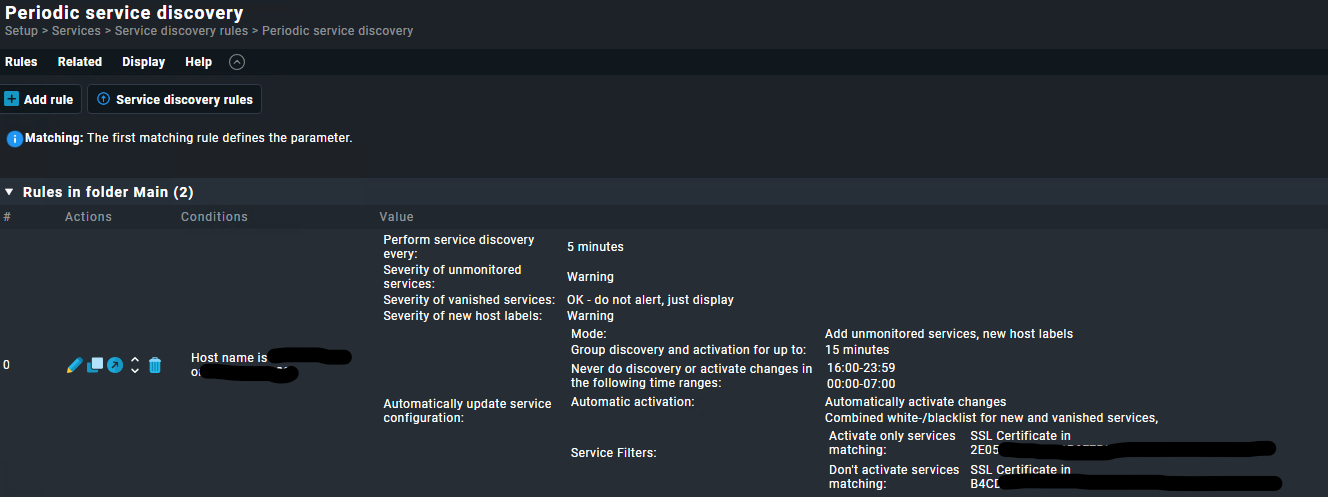
I have an some specifik certificate that i want to make sure I monitor, can I create an rule that activate service check if exist
The service is like this: SSL Certificate in XXXXXXXXXXXXXX
The question is : What is your definition of a service ?
If it is an additional server (item) that is already being output by the agent or an installed plugin, then you can use the rule I mentioned to automatically activate the changes.
You have to activate the “activate changes” in the ruleset, otherwise checkmk will only tell you, that new services are present.
Or do you want to install certain checkmk agent plugins automatically based on a certain criteria ?
If so, you can use the agent bakery to create installation packages with plugins based on host or service labels, which can, to automate that further, be automatically generated by Roberts data2tag or data2label extensions that create tags or labels based on information from the hardware/software inventory.
I do use the “Periodic service discovery”, but I do not use the “Automatically update services, new host labels” because I don’t want every think added automatically.
I do use the Checkmk agent plugins with ssl certificate and bakery to automatically deploy it.
So I get in undecided services an wildcard certificate, but when I update that, all servers containing that will get an new to monitor and an old that wannish.
So was hoping that I with the name could make an rule to specific add this certificate this automatically when its gets there and remove again with an other rule.
you can use the discovery rules multiple times and add the activation only for these specific hosts based on conditions like hostnames, Tags or Labels. And you can specify a regex which services you want to add, that only these services are activated added automaically.
This topic was automatically closed 365 days after the last reply. New replies are no longer allowed. Contact an admin if you think this should be re-opened.