Checkmk Raw Edition 2.4.0p7
Ubuntu 24.04.2 LTS
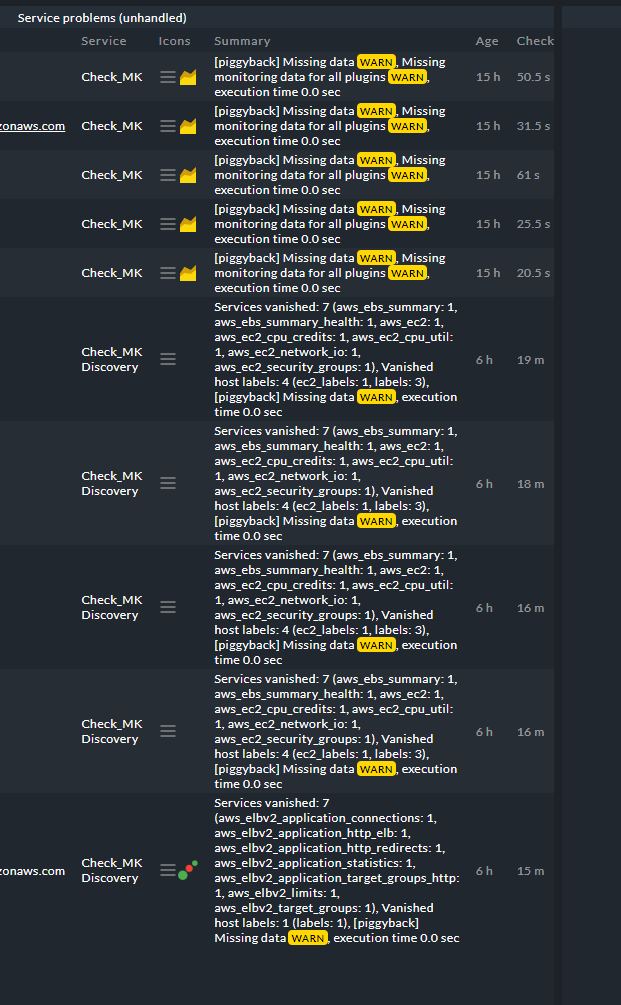
I have followed the guide to add my AWS infrastructure to my Checkmk. This all works fine with no issues. I have also manually added hosts which works and I can see the monitoring data ok. After a while however (30 minutes, or 60 minutes, it seems random) Checkmk seems to lose access to the data, and I see this in my service problems:
I this is a vanilla install of Checkmk Raw 2.4, and is the first thing I have configured in the server. I have removed it all and re-added 3 times, but eventually it seems to lose the connection.
Any assistance would be appreciated! Thanks 
Error message:
[piggyback] Missing dataWARN , Missing monitoring data for all pluginsWARN , execution time 0.0 sec
Services vanished: 7 (aws_ebs_summary: 1, aws_ebs_summary_health: 1, aws_ec2: 1, aws_ec2_cpu_credits: 1, aws_ec2_cpu_util: 1, aws_ec2_network_io: 1, aws_ec2_security_groups: 1), Vanished host labels: 4 (ec2_labels: 1, labels: 3), [piggyback] Missing dataWARN , execution time 0.0 sec
``
Output of “cmk --debug -vvn hostname”: (I have removed identifying info)
OMD[SITENAME]:~$ cmk --debug -vvn <HOSTNAME_PLACEHOLDER>
value store: loading from disk
Checkmk version 2.4.0p7
- FETCHING DATA
Source: SourceInfo(hostname=‘<HOSTNAME_PLACEHOLDER>’, ipaddress=None, ident=‘piggyback’, fetcher_type=<FetcherType.PIGGYBACK: 4>, source_type=<SourceType.HOST: 1>)
[cpu_tracking] Start [<ID_PLACEHOLDER>]
Read from cache: NoCache(path_template=/dev/null, max_age=MaxAge(checking=0.0, discovery=0.0, inventory=0.0), simulation=False, use_only_cache=False, file_cache_mode=1)
0 piggyback files for ‘<HOSTNAME_PLACEHOLDER>’.
Get piggybacked data
[cpu_tracking] Stop [<ID_PLACEHOLDER> - Snapshot(process=posix.times_result(user=0.0, system=0.0, children_user=0.0, children_system=0.0, elapsed=0.0))]
[cpu_tracking] Start [<ID_PLACEHOLDER>] - PARSE FETCHER RESULTS
HostKey(hostname=‘<HOSTNAME_PLACEHOLDER>’, source_type=<SourceType.HOST: 1>) → Add sections:
Received no piggyback data
AWS/EBS Health <VOLUME_ID_PLACEHOLDER> PEND Check plug-in received no monitoring data
AWS/EBS Summary PEND Check plug-in received no monitoring data
AWS/EC2 CPU Credits PEND Check plug-in received no monitoring data
AWS/EC2 CPU utilization PEND Check plug-in received no monitoring data
AWS/EC2 Network IO Summary PEND Check plug-in received no monitoring data
AWS/EC2 Security Groups PEND Check plug-in received no monitoring data
AWS/EC2 Status Check PEND Check plug-in received no monitoring data
[cpu_tracking] Stop [<ID_PLACEHOLDER> - Snapshot(process=posix.times_result(user=0.0, system=0.0, children_user=0.0, children_system=0.0, elapsed=0.010000000707805157))]
[piggyback] Missing data(!), Missing monitoring data for all plugins(!), execution time 0.0 sec | execution_time=0.010 user_time=0.000 system_time=0.000 children_user_time=0.000 children_system_time=0.000 cmk_time_agent=0.000``