CMK version: Checkmk Ultimate (formerly Cloud) 2.5.0p8
OS version: RHEL9
Since upgrading to Checkmk Ultimate I’ve been trying to implement some of the enhanced features surrounding the use of piggyback and dynamic host management to get more information on EC2s - I have a few troubleshooting questions.
- Is it possible to rename the hosts to use the ‘Name’ tag on the AWS EC2 Instances
- When adding the instances - I am able to set the hostname to be just be the IP Address using the Host name translation for piggybacked hosts (regex to get the IP and use that) - this then allows me to use IP CheckMK Agent based checks which allows me to collect all the data from the agents - but is it possible to set the IP Address when doing the dynamic host management - rather than relying on the hostname (specially if I can achieve #1)
- Is it possible to only include the EC2s for dynamic host management - it appears to be also creating ‘hosts’ for dynamodb tables, load balancers - but I want to keep getting the top level data for these from the AWS Account itself - just not from the piggyback data.
Thanks
Is it possible to rename the hosts to use the ‘Name’ tag on the AWS EC2 Instances
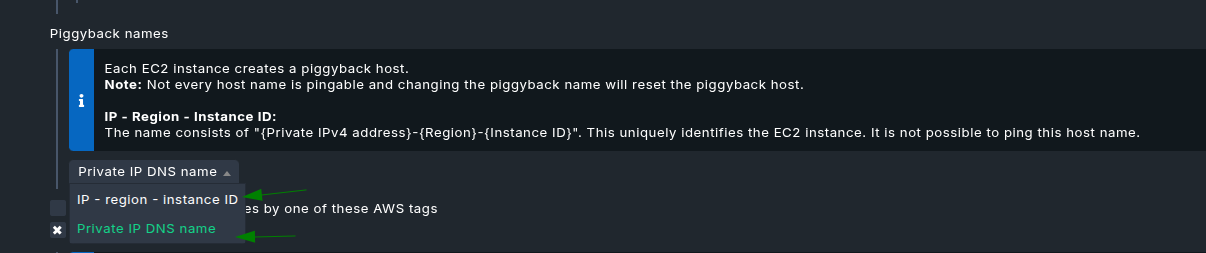
For the naming of these piggybacked EC2 instances generated by the AWS special agent, currently one can choose between only these two schemes in the screenshot:
What’s your case with the “Name” tag ? Do you also have multiple AWS accounts and your Evc2 instances have unique “Name” tag in all the accounts?
When adding the instances - I am able to set the hostname to be just be the IP Address using the Host name translation for piggybacked hosts (regex to get the IP and use that) - this then allows me to use IP CheckMK Agent based checks which allows me to collect all the data from the agents - but is it possible to set the IP Address when doing the dynamic host management - rather than relying on the hostname (specially if I can achieve #1)
You cannot set IP address of the Piggyback host via Dynamic host management unless you create the host manually with the IP or use REST API or some custom extension. If your goal is to combine the data from the agent and piggyback so that it shows on the same host, then you could also use “Automated host creation” and use one scheme out of 2 currently supported by us.
Is it possible to only include the EC2s for dynamic host management - it appears to be also creating ‘hosts’ for dynamodb tables, load balancers - but I want to keep getting the top level data for these from the AWS Account itself - just not from the piggyback data.
Each LB(CLB,ALB etc..) has its own services like EC2 and same applies to DynamoDB.
So, you can’t attach these results to the main AWS source host.
but I want to keep getting the top level data for these from the AWS Account itself - just not from the piggyback data.
However, if you are only interested to see “Summary” and “Limits” check for LB,DynamoDB then don’t simply create the piggyback data for LB and DynamoDB. Just “Add matching hosts” and add a regex filter for only EC2 instances in the DCD rule.