I monitor an AWS account with checkmk. I changed the default quota of a service (VPC elastic IPs). This increased quota is not recognized by checkmk. It is still using the default quota of 5 as a maximum and therefore, shows 180% usage since I use 9 EIPs.
Is there something to do so checkmk automatically notifies the changed quota or can I set it manually somehow?
@chervilarmor The AWS check queries the AWS API (both Cloudwatch, as well as the service’s API, if available)
So the question is - is the API reporting things correctly, but Checkmk not?
Has the API been queried since you made the change? → What is your Check interval?
Does the AWS API report the checked value and Checkmk doesn’t process it correctly? → can you manually query the API?
What happens if you reschedule that specific service or do a full service rediscovery?
how did you change the quota? Did you change something in AWS or in CMK? What exactly?
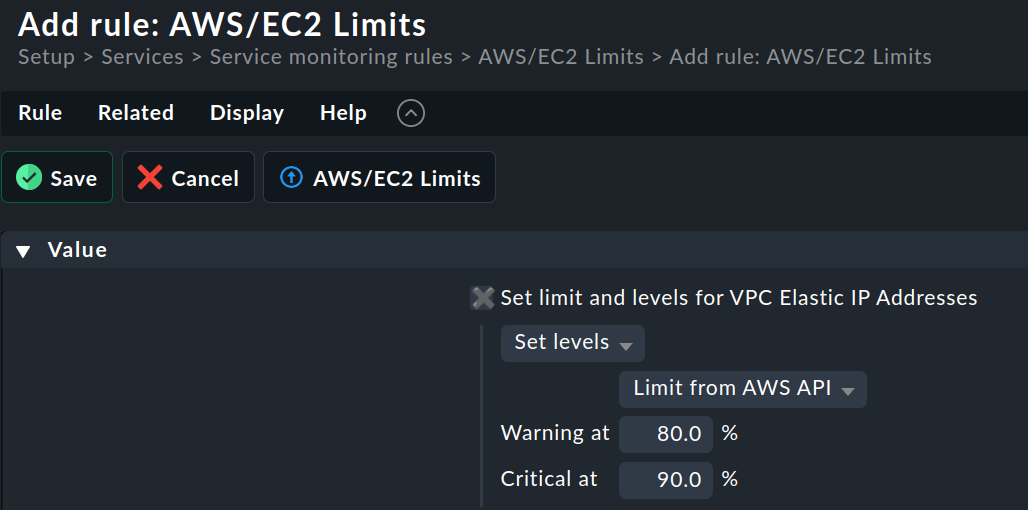
I assume you changed the quota in AWS. This does not c hange the quota in CMK by default. If you want to use the AWS quota, you can set it in ruleset “AWS/EC2 limits” like this:
This topic was automatically closed 365 days after the last reply. New replies are no longer allowed. Contact an admin if you think this should be re-opened.