CMK version: 2.3.0p35
OS version: Oracle Linux 8.x
Error message:
Azure Agent Info : Management client: An error occured* in authentication or authorization. Make sure the resource provider has been registered with this subscription
Output of “cmk --debug -vvn hostname”:
Debug info available on request. It didn’t obviously give any more useful info.
I monitor about 6 Azure subscriptions. Since updating from 2.2 to 2.3 earlier this week, I’m getting this error on just one of them.
All the “services” and piggyback data seems to be coming through OK, so the error doesn’t seem to be affecting anything, but obviously I’d like it to go away.
I’ve checked the resource providers in the subscription, and all obvious ones are registered, including microsoft.insights. (I’ve read this thread.)
Can anybody suggest a fix for this?
- Don’t know who is responsible for this error message, but “occurred” is spelt incorrectly.
This is clearly a type error. I will try to get this fixed. Regarding the error message, it should have displayed the resource providers that are supposed to be registered with the subscription which doesn’t seem to be very useful as it doesn’t tell which resource providers.
Which Azure services you have selected to be queried in the rule ?
As you’ve already attached Microsoft.Insights which is crucial for collecting metrics, but to fully monitor all the resources, you’ll also need to ensure that the following providers are attached to your subscription:
Microsoft.DBforMySQL (for MySQL-related metrics)Microsoft.DBforPostgreSQL (for PostgreSQL-related metrics)Microsoft.Network (for network-related resources like load balancers, traffic managers, etc.)Microsoft.Sql (for SQL Server resources)Microsoft.Storage (for Storage Account metrics)Microsoft.Web (for Web Apps metrics)Microsoft.Compute (for Virtual Machines metrics)
Please let me know.
I’m looking at these services:
X Usage Details
X Virtual Machines
X vNet Gateway
X SQL Databases
X Storage
X Load Balancer
Though this particular subscription doesn’t have any databases or load balancers.
I have a bunch of resource providers enabled, but surprisingly not Microsoft.Storage.
Adding it in doesn’t appear to have fixed the problem.
Do I need to add the MySQL and PostgreSQL providers even if I’m not using or monitoring them?
Sometimes even after adding a particular resource provider , the API takes a little time to reflect the activated resource provider.
Can you run the special agent on the command line and see if the problem still persists ?
Running “cmk --debug -vvn azure_subscription” still shows the same error.
Is there another way to run it?
So I ran that grep command to get the special agent command, then ran it. And got the same error. 
Can you select this option if not already selected?
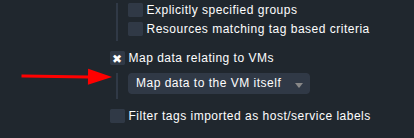
Also, to pinpoint which resource provider is missing, could you deselect each of these services 1 by 1 and see where the error happens ?
X Usage Details
X Virtual Machines
X vNet Gateway
X SQL Databases
X Storage
X Load Balancer
Can you also double check if the below resource provider is also enabled or not ?
Microsoft.ResourceHealth
BTW, this message containing the typo comes Microsoft. See this
This is the one that fixed it. Thank you!
I had thought it might be Microsoft’s typo, but wasn’t sure.