CMK version:
Checkmk Cloud Edition 2.3.0p18
OS version:
Ubuntu 24.04.1 LTS
Hi,
Beginner user coming over from PRTG and looking to monitor a Cisco Meraki environment of 30 switches, 130 WAPs & 100 cameras on a single site. Running a trial version and so far the solution is excellent.
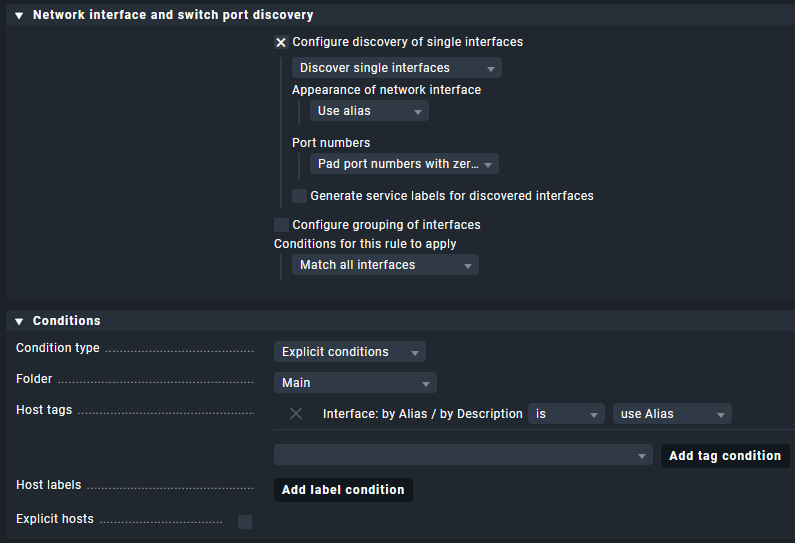
However, I’m running into trouble with Port Discovery naming where the ‘Alias’ is not displaying. I have followed the numerous articles and steps, and also worked through previous forum posts troubleshooting similar issues but to no avail.
Using both ‘Index’ and ‘Description’ both work correctly as expected if selected in port discovery. This includes padding the port numbers with zeros, etc. But as soon as I try and use ‘alias’, it does not work. What displays is the same data that was previously displayed (e.g. 'either ‘Index’ or ‘Description’, whichever was the last I had configured).
If I look at the Hardware Inventory I can see the Index, Description and Alias that has been pulled from the Cisco Meraki switch I am testing with. But that ‘Alias’ won’t display when selected in port discovery.
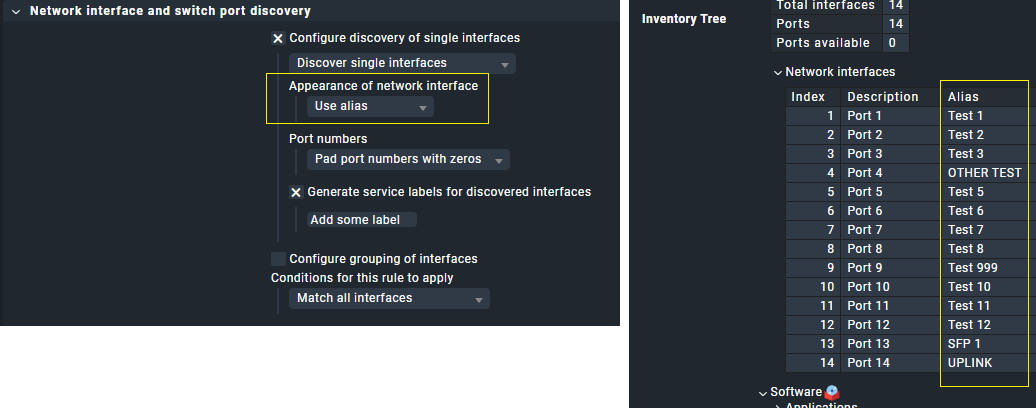
Is the Alias in Hardware Inventory different to the alias it would find in port discovery? If so, that may explain this.
But if not, why does it display in Hardware Inventory but not via port discovery?
What could I be missing? I’ve been working through this for much longer than I want to admit and have well and truly hit a brick wall. Any assistance would be appreciated.