I’m building custom reports and don’t seem able to find basic formatting options. Text justification (left, center, right). I’d like to clean up my layouts a little but the options don’t seem to exist.
1 Like
Which version are you using?
Checkmk Pro (formerly Enterprise) 2.4.0p24
Try using one of the following options:
Customize > Reports > Find your report (Should be on Customized section at the top of the page)
- Edit > Modify Report Properties
- Edit Report Content > Content Elements > Edit
- Edit Report Content > Fixed Page Elements > Edit
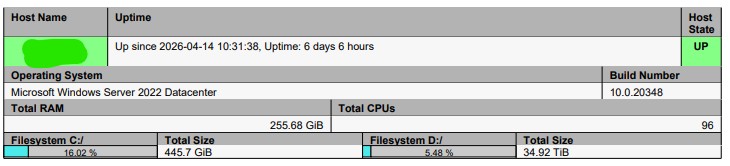
I see a lot of good options in there (especially the Default Table Layout section of Edit > Modify Report Properties), just nothing that will let me center the value of a cell. Sometimes numbers are right justified and sometimes they’re left justified. It makes it look weird. Being able to control column width would be nice too.
Let me put Headers to the top-left and Content in the center.
1 Like