Attention: please don’t use the 2.3 daily builds for testing Redfish or any other special agent based extensions. There is a “bug” at the moment preventing all extensions to generate a special agent command line with password store secrets.
As this problem affects all extensions, also active checks if they are using the password store, i think it should be fixed before b4.
Now with beta 5 i have again a working version here.
Attention: if you configure a special agent rule, you need to do an activation before you can discover the host with the rule assigned to. I think this is bug.
2 Likes
It’s a bug and fixed in b6. That then also includes the latest MKP.
2 Likes
Hey Andreas,
can you pm me, because since I’m a new user I can’t pm other users.
I would like to share the outcome of the Mockup tool for Raritan PX4 devices.
Best regards
Geeroy
2 Likes
still a LOT of these. (HPE Proliant)

how can i help troubleshooting these?
cmk raw 2.2.0p26, redfish plugin 2.2.33
Only with the mentioned procedure. Run the agent manually on command line with the addition of “–debug” and “-vvv”. If this brings no insights the procedure with “redfish-mockup-creator” is needed.
Uploaded a new version of the Redfish package.
This version should support the Raritan devices if they provide correct root data.
@Geeroy can you please test if it works.
Example Screenshot
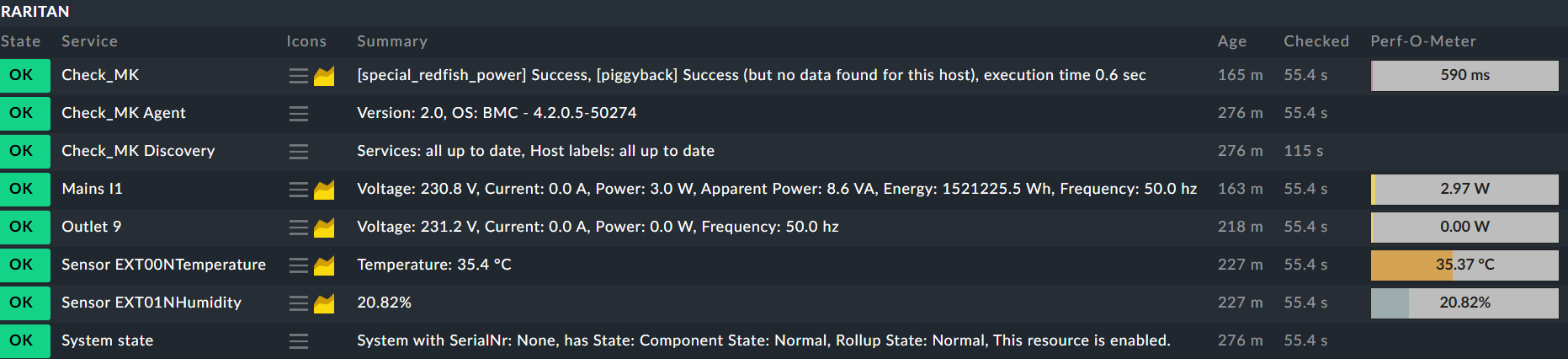
Only removed all the other outlets to get a compact picture

1 Like
Hello Andreas,
I’m sure the HW/SW Inventory was working up to a certain version (< 2.2.31/2.3.31?) for HPE Gen9+. Now (Checkmk 2.3, redfish-2.3.38 and redfish-2.3.43) I don’t see the serial numbers for the system/controllers any longer. Do you already know that? I suspected an iLO update, but the issue appears on old systems (iLO 4, 2.80), too.
Greetings
Stefan
The HW/SW inventory was only part of the old “hpe_ilo” special agent and also only on iLO 4/5.
iLO 6 already had no HW/SW inventory anymore.
The problem is that there is no common location for this data. It can be extracted from all the data that is fetched. But i had no time to implement it. Or no need.
Hello Martin,
It’s a bug and fixed in b6. That then also includes the latest MKP.
Issue still happens in 2.3.0p3 with fresh redfish rule.
- Add rule
- Add host
- Service discovery → Crash
Working path:
- Add rule
- Add host
- Activate
- Service discovery
- Activate
Cannot be - what crash do you receive?
All actual tests worked on my systems without activation in between.
Ok, then I will find a new way to fetch firmware and serials for HPE hardware. The chassis serial is present in “System state”.
Can we talk about “plugins for extensions” on the conference this year? 
Greetings
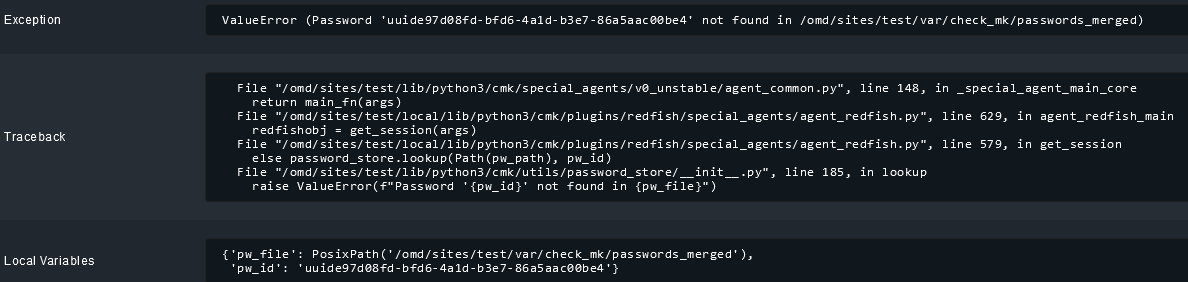
Is this distributed setup? If yes then it could be that this password file needs to be synced to the remote site first (activate).
The rules are local. This “test” instance was directly created as 2.3.0p3.
Then something in your instance is wrong/not working correctly.
If you create a rule with password then you should see that the “password_merged” files is written at the moment the rule is created.
Follow Up - i tested in one of my setups. If you watch the “passwords_merged” file you should see the update in the moment you create the rule for the host.
This should be the same behavior for all rules that use hidden passwords.
I have 7 hpe apollo 4500’s, all configured exactly the same.
When using the latest redfish mkp (2.3.42) the service discovery crashes on 2 of the 7 nodes with the following:
cmk --debug --check-discovery apollo004
Services: all up to date, Host labels: all up to date, [special_redfish] Agent failed - please submit a crash report! (Crash-ID: 65525a06-2275-11ef-90c3-a14d0e1a8f44)(!!)
Agent exited with code 1: ERROR 2024-06-04 13:21:47 redfish.rest.v1: Service responded with invalid JSON at URI /redfish/v1/Systems/1/Storage/DE081000/Volumes/1
{“@odata.id”:“/redfish/v1/Systems/1/Storage/DE081000/Volumes/1”,“@odata.type”:“#Volume.v1_8_0.Volume”,“@Redfish.WriteableProperties”:[“DisplayName”,“ReadCachePolicy”,“WriteCachePolicy”],“Id”:“1”,“Name”:“Logical Drive 1”,“Status”:{“Health”:“OK”,“State”:“Enabled”},“Identifiers”:[{“DurableName”:“600508B1-001C-F792-A558-77E620BA61E0”,“DurableNameFormat”:“UUID”}],“Encrypted”:false,“EncryptionTypes”:,“CapacityBytes”:100800976545382,“BlockSizeBytes”:512,“OptimumIOSizeBytes”:3670016,“StripSizeBytes”:131072,“DisplayName”:“Logical Drive 1”,“DisplayName@Redfish.AllowablePattern”:“[1]{1,64}$”,“ReadCachePolicy”:“ReadAhead”,“ReadCachePolicy@Redfish.AllowableValues”:[“Off”,“ReadAhead”],“WriteCacheState”:“Protected”,“RAIDType”:“RAID60”,“VolumeUsage”:“Data”,“Operations”:,“LogicalUnitNumber”:1,“MediaSpanCount”:30,“WriteCachePolicy”:“ProtectedWriteBack”,“WriteCachePolicy@Redfish.AllowableValues”:[“Off”,“ProtectedWriteBack”,“UnprotectedWriteBack”],“Links”:{“@Redfish.WriteableProperties”:,“Drives@odata.count”:60,“Drives”:[{“@odata.id”:“/redfish/v1/Systems/1/Storage/DE081000/Drives/8”},
…
… omitted 60 lines of drives data
…
{“@odata.id”:“/redfish/v1/Systems/1/Storage/DE081000/Drives/66”},{“@odata.id”:“/redfish/v1/Systems/1/Storage/DE081000/Drives/67”}],“DedicatedSpareDrives@odata.count”:0,“DedicatedSpareDrives”:},“@odata.etag”:“"4D1FCD37"”}
Agent failed - please submit a crash report! (Crash-ID: 65525a06-2275-11ef-90c3-a14d0e1a8f44)(!!)
!"#$%&'()*+,-.\/\w:;<=>?@[\]\^`{\❘}~ ↩︎
You have two options first.
Execute the special agent with the command line switches “–debug” and “-vvv”.
The debug option will generate a debug log with all the resources fetched and will als give a little bit more error message.
If this is to generic from the error message then i need an dump of the Redfish data created with the “redfish-mockup-creator” tool.
I tested the -vvv but the error was the same. Then i ran the redfish-mockup-creator and actually am getting the same error on the same point. Invalid json response for every created raid volume. So this seems to be ILO (firmware) related. Thanks for the tips! Going to bug HPE with this.