Main Check_MK CMK version: 2.0.0p20.cre OS version: Ubuntu
Distributed Check_MK CMK version: 2.0.0p17.cre OS version: Raspberry Pi (Buster)
I setup a raspberry pi with Check_MK on my local network and connected them to the main check_mk system. After I transfered the raspberry to the related data center and now I’m trying to connect the raspberry again with check_mk. I can connect to both via http and via ssh. Also the main check_mk is able to reach them via port 80 and 6557.
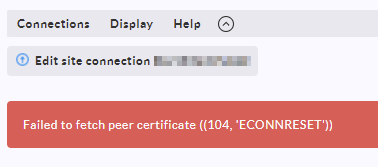
This is how it looks like at the moment on the main check_mk in distributed monitoring. If I click the shield icon I get the following picture as an error.
I think this is related to a certificate issue and I don’t know how to solve it. The certificates are in global settings → trusted certificates included.
Is there a way to reset and create new self signed certificates and add them to the main and distributed check_mk sites?
Just stating the obvious: You are running a custom build of Checkmk on ARM, which is not supported by tribe29. There might be something wrong in that build, so you might want to contact the maintainer of that build.
Anyway: This is not a certificate error and your questions won’t lead to an answer. The connection is simply reset on the remote site. Why that is hard to tell. You might want to check the logs on that site, specifically the Apache and web logs.
Hey Robin,
thank you very much for the info. Yes I know that CheckMK is not supported on an ARM.
Meanwhile I was finally able to fix the issue. I had to use a different IP-Address in the distributed monitor config for LIVESTATUS. After I changed the IP-Address it was working.
This topic was automatically closed 365 days after the last reply. New replies are no longer allowed. Contact an admin if you think this should be re-opened.