Can't login with users in LDAP group

CMK version: 2.0.0p12
OS version: SLES 15 SP3

Error message:

Output of “cmk --debug -vvn hostname”: (If it is a problem with checks or plugins)

OMD[test]:~$  /opt/omd/versions/2.0.0p12.cre/bin/cmk --debug -vvn check-mk
Checkmk version 2.0.0p12
Try license usage history update.
Trying to acquire lock on /omd/sites/test/var/check_mk/license_usage/next_run
Got lock on /omd/sites/test/var/check_mk/license_usage/next_run
Trying to acquire lock on /omd/sites/test/var/check_mk/license_usage/history.json
Got lock on /omd/sites/test/var/check_mk/license_usage/history.json
Next run time has not been reached yet. Abort.
Releasing lock on /omd/sites/test/var/check_mk/license_usage/history.json
Released lock on /omd/sites/test/var/check_mk/license_usage/history.json
Releasing lock on /omd/sites/test/var/check_mk/license_usage/next_run
Released lock on /omd/sites/test/var/check_mk/license_usage/next_run
Updating IPv4 DNS cache for check-mk: 10.201.25.252
Trying to acquire lock on /omd/sites/test/var/check_mk/ipaddresses.cache
Got lock on /omd/sites/test/var/check_mk/ipaddresses.cache
Releasing lock on /omd/sites/test/var/check_mk/ipaddresses.cache
Released lock on /omd/sites/test/var/check_mk/ipaddresses.cache
+ FETCHING DATA
  Source: SourceType.HOST/FetcherType.PIGGYBACK
[cpu_tracking] Start [7f47e3bbdd00]
No piggyback files for 'check-mk'. Skip processing.
No piggyback files for '10.201.25.252'. Skip processing.
[PiggybackFetcher] Fetch with cache settings: NoCache(base_path=PosixPath('/omd/sites/test/tmp/check_mk/data_source_cache/piggyback/check-mk'), max_age=MaxAge(checking=0, discovery=120, inventory=120), disabled=False, use_outdated=False, simulation=False)
[PiggybackFetcher] Execute data source
[cpu_tracking] Stop [7f47e3bbdd00 - Snapshot(process=posix.times_result(user=0.0, system=0.0, children_user=0.0, children_system=0.0, elapsed=0.0))]
[cpu_tracking] Start [7f47e3bbdfa0]
+ PARSE FETCHER RESULTS
  Source: SourceType.HOST/FetcherType.PIGGYBACK
No persisted sections loaded
  -> Add sections: []
Received no piggyback data
Loading item states
Trying to acquire lock on /omd/sites/test/tmp/check_mk/counters/check-mk
Got lock on /omd/sites/test/tmp/check_mk/counters/check-mk
Releasing lock on /omd/sites/test/tmp/check_mk/counters/check-mk
Released lock on /omd/sites/test/tmp/check_mk/counters/check-mk
No piggyback files for 'check-mk'. Skip processing.
No piggyback files for '10.201.25.252'. Skip processing.
[cpu_tracking] Stop [7f47e3bbdfa0 - Snapshot(process=posix.times_result(user=0.0, system=0.0, children_user=0.0, children_system=0.0, elapsed=0.009999997913837433))]
execution time 0.0 sec | execution_time=0.010 user_time=0.000 system_time=0.000 children_user_time=0.000 children_system_time=0.000 cmk_time_agent=0.000

I connected checkmk to our Windows AD. Testing the connection is fine.
I can login with a user account which is configured in checkmk in
Setup ==> Users ==> [LDAP connections] ==> Edit LDAP connection.
I also configured there a group with several users who should have access, but login with these users failed. The group is of course configured in AD.

Any ideas ?

Thanks.

Bernd
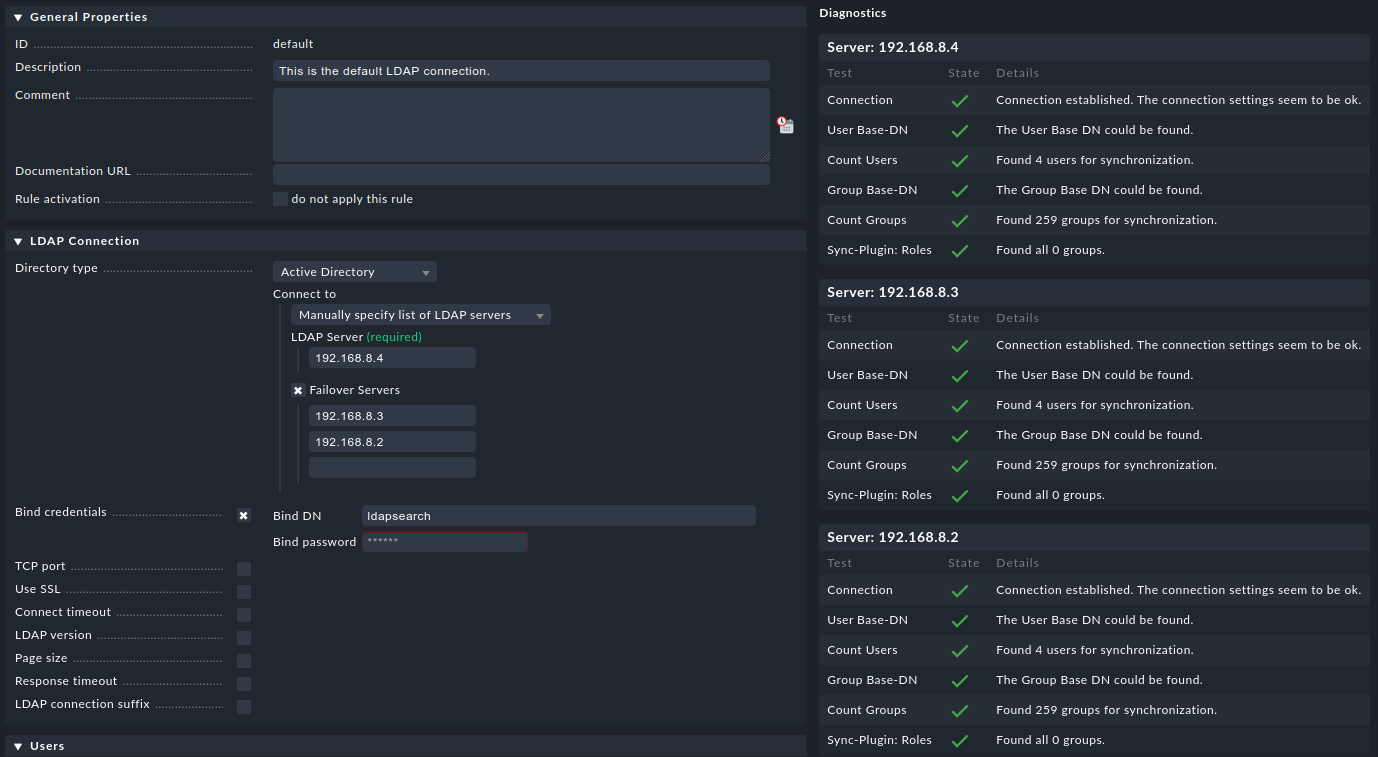
Please send a screenshot of your LDAP configuration

Hello, I have the same problem: configuration seems ok, all check passed, all users imported in Check_MK users, but logins fails without errors except “autorization failed”.

Here is my config:

Thanks,
Matteo

You mean no one of the four found users can login in your system?

Can you have a look at the file ~/var/check_mk/web/USERNAME/cached_profile.mk of an affected user?
Is there a “connector” key in the dictionary?

Is this a new or upgraded checkmk environment?

Yes, no one of them can login

Sure, thanks: ‘connector’: ‘default’

This is and upgraded checkmk environment.

num_failed_logins.mk contains ‘0’ even if I tried a lot of time to login.

You could increase the logging level in "Global settings" - "Logging" - "LDAP" and check the log ~/var/log/web.log.

I did (debug), but I only get infos about LDAP sync and anything about a failed login:

2022-01-18 10:14:04,577 [20] [cmk.web.ldap.Connection(default) 2379442] SYNC STARTED
2022-01-18 10:14:04,577 [20] [cmk.web.ldap.Connection(default) 2379442]   SYNC PLUGINS: alias, email, groups_to_roles
2022-01-18 10:14:04,578 [20] [cmk.web.ldap.Connection(default) 2379442] LDAP_SEARCH "OU=XYZ Users,DC=xyz,DC=local" "sub" "(&(objectclass=user)(objectcategory=person)(memberof=cn=Check_MK,ou=XYZ Users,dc=xyz,dc=local))" "['samaccountname', 'mail', 'cn']"
2022-01-18 10:14:04,578 [20] [cmk.web.ldap.Connection(default) 2379442] LDAP CONNECT - Connecting...
2022-01-18 10:14:04,582 [20] [cmk.web.ldap.Connection(default) 2379442] LDAP_BIND ldapsearch
2022-01-18 10:14:04,756 [20] [cmk.web.ldap.Connection(default) 2379442]   SUCCESS
2022-01-18 10:14:04,757 [20] [cmk.web.ldap.Connection(default) 2379442] LDAP_BIND ldapsearch
2022-01-18 10:14:04,763 [20] [cmk.web.ldap.Connection(default) 2379442]   SUCCESS
2022-01-18 10:14:04,764 [20] [cmk.web.ldap.Connection(default) 2379442] LDAP_BIND ldapsearch
2022-01-18 10:14:04,783 [20] [cmk.web.ldap.Connection(default) 2379442]   SUCCESS
2022-01-18 10:14:04,784 [20] [cmk.web.ldap.Connection(default) 2379442]   PAGED ASYNC SEARCH
2022-01-18 10:14:04,796 [20] [cmk.web.ldap.Connection(default) 2379442]   RESULT length: 4, duration: 0.218
2022-01-18 10:14:05,454 [20] [cmk.web.ldap.Connection(default) 2379442]   SKIP SYNC "testuser" (name conflict with user from "htpasswd" connector)
2022-01-18 10:14:05,455 [20] [cmk.web.ldap.Connection(default) 2379442] SYNC FINISHED - Duration: 0.878 sec, Queries: 1

If I increase the logging level of web.auth I get this:

2022-01-18 10:40:30,766 [10] [cmk.web.auth 2340548] Exception while checking cookie auth_xyz: Traceback (most recent call last):
  File "/omd/sites/xyz/lib/python3/cmk/gui/login.py", line 398, in _check_auth_cookie_for_web_server_auth
    _check_auth_cookie(cookie_name)
  File "/omd/sites/xyz/lib/python3/cmk/gui/login.py", line 227, in _check_auth_cookie
    check_parsed_auth_cookie(username, session_id, cookie_hash)
  File "/omd/sites/xyz/lib/python3/cmk/gui/login.py", line 259, in check_parsed_auth_cookie
    raise MKAuthException(_('Invalid credentials'))
cmk.gui.exceptions.MKAuthException: Invalid credentials

I’m sure credentials are correct.

Hi,
i succeeded. Reading about the LDAP configuration in the doc showed me the way.

Bernd

Maybe this helps others:
Under “Users” in “User base DN” i have the path to the users.
But there are more users than i’d like to have login capability.
So i created an additional group with just the users who should be able to login.
And this group is in “Search filters” in “Users”:
(&(objectclass=user)(objectclass=person)(memberof=cn=OG-MCD-Checkmk,OU=MCD,OU=_OrgGroups,OU=INTERN,DC=xxxxxxx,DC=de))

Bernd

This topic was automatically closed 365 days after the last reply. New replies are no longer allowed. Contact an admin if you think this should be re-opened.