The way to do it is with Setup > Services > Service monitoring rules > Service State Translation, but that rule is unavailable in the raw edition.
An example of this rule can be seen here: Service State Translation upon Summary instead of Service Name - #4 by StefanM
I don’t think the Dutch Slaapstand is causing the warning, but more the code / value attached to it. There is a rule called Setup > Services > Service monitoring rules > Translation of service descriptions, but the help suggests that it will only make user friendly descriptions, the state will remain the same.
I also found the rule Setup > Services > Service monitoring rules > Generic String, but it lacks real documentation or examples what it actually does.
Checkmk AI says folllowing about it, which gives a bit of hope:
The generic string rule in Checkmk is used to define how string values from checks are processed and interpreted. It allows you to specify patterns and conditions to match string output from checks and then assign states, labels, or other attributes based on those matches.
In essence, the generic string rule helps you customize the interpretation of string results from various checks, enabling more precise monitoring and alerting based on textual data.
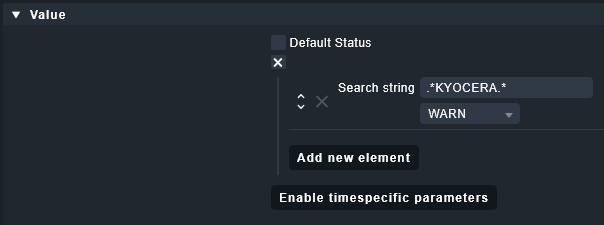
I tried this rule on my printer so stuff would go to a warning state when KYOCERA is mentioned, but I can’t get it to work on my 2.1.0.p5.cre.
Maybe you can get it to work in your newer version, or somebody else can help you further with your issue.