as far as I know the following is only possible with an active check (nagios plugin):
Set the normal check interval to 1 hour.
If the check fails, set the check interval to 5 Min.
The problem I have is, that I need this feature for a check which is currently implemented as a special agent. This special agent generates several services. But a nagios plugin can only create one service.
Its correct. this you can do for active checks only.
The Check_MK service is an active check which executes your special agent.
If you change the scheduling of Check MK check all discovered passive checks ‘inherit’ the settings. Please also consider to change RRD settings according to the changed timing.
the check interval can be changed. But I also changed the retry interval along with max. check attempts for services. But the retry interval did not change after a service failed.
I did the following settings:
Created a virtual host called Host NP_Test
Created a rule for “Individual program call” (special agent) for this host.
(This special agent is creating the services.)
For the host NP_Test I also created the following rules:
Added rule “Normal check interval for service checks“ for Check_MK$ with 5 Min. interval.
Added rule “Retry check interval for service check“ for service Check_MK$ with 1 Min. interval.
Added Rule “Maximum number of check attempts for service“ for service Check_MK$ and specific services generated by the special agent.
The normal check interval is changed to 5 Min. But the retry interval is not changed to 1 Min.
yes, the values are shown correctly but, the retry is done every 5m and not every 1m in case you would have 5m / 1m setting. In oder words, the retry setting is ignored except for nagios checks.
I have a nagios check with 5m normal check interval and 1m retry check interval. And it works exactly as expected. The check is executed every 5 min. On the first CRIT (soft CRIT) the check intervall is changed to 1m. After three failed checks the service get red (hard CRIT). The maximum number of attemps is set to 3.
When I configure this check as a special agent, the GUI shows 5m / 1m. But the retry interval does not change when the check failes. Only the normal check interval changes.
As far as I`m aware when using Special Agents, only the one named Check_MK is the Active Check while the discovered services are considered Passive Checks as they wait for Check_MK service to bring the results, also results are updated when you update Check_MK service.
can I consider this as a bug or how can this be explained.
For special agents the changed retry intervall is shown in the WATO for example as 5m / 1m. But in reality it is not considered. Becuase the retry interval remains the same as the normal check interval (5m). The same is the case when I change the retry interval for the Check MK service. The retry interval of the services do not change.
So, either I’m copletely missing something. Or the WATO is missleding in this case.
I can’t assume that I’m the only person how is facing this issue.
If this is a bug or not is hard to decide as it is in this state all the time before.
I could simulate your problem in my test system. In my own systems i normally have not this problem as i try to stay with the 1 minute check interval and here also the 1 minute retry.
If i need more check interval then also the retry has the same value.
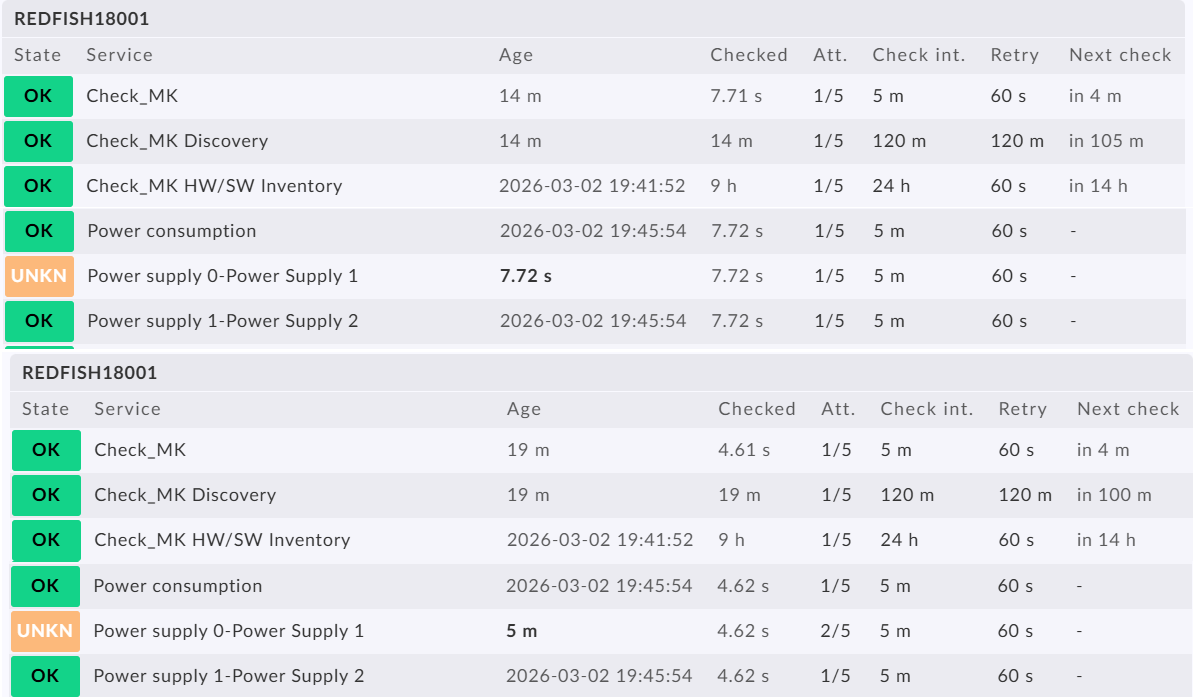
The following screenshot shows your problem with the one single check that is UNKN and it is a passive check from the CheckMK service on top.
It can be seen that the second check attempt is done 5 minutes after the first one, also with a retry interval of 1 minute.
The only viable solution for this problem would be an alert handler for such a machine that is triggering the Check_MK service in case of an problem with one of the passive services.
Inside the alert handler you can decide then how long it waits before retrying the Check_MK service.


 as it is in this state all the time before.