Hi all,
i would like to adjust the threshold for the HDD Temperature of my QNAP NAS. I thought that would not be a big deal, but unfortunately I did not find a solution by googling or in this forum.
I created a new rule for temperature, but problem is that it affects all temperatures, e.g. CPU temperature, but I only want to adjust the threshold for HDDs. Next thing is at conditions is no option for setting a Service Name where I could define that rule only to be applied to services named like HDD.
There is a field for Sensor ID, but I could not find out an ID for this service.
What can I do?
Regards,
Peter
Hello Peter (and welcome to the community!)
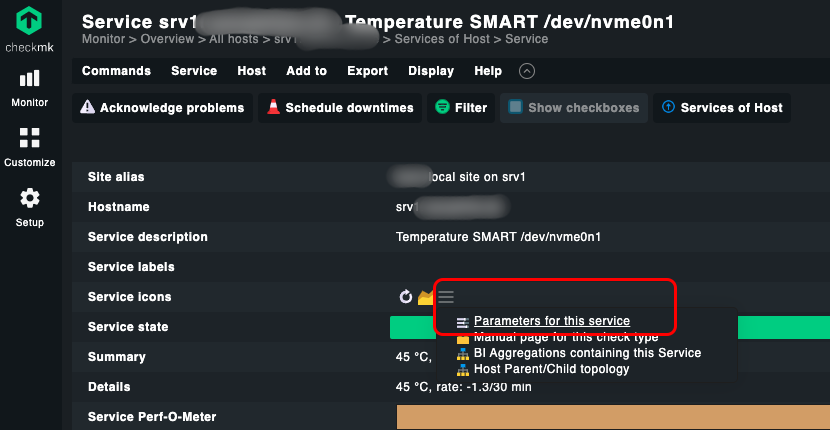
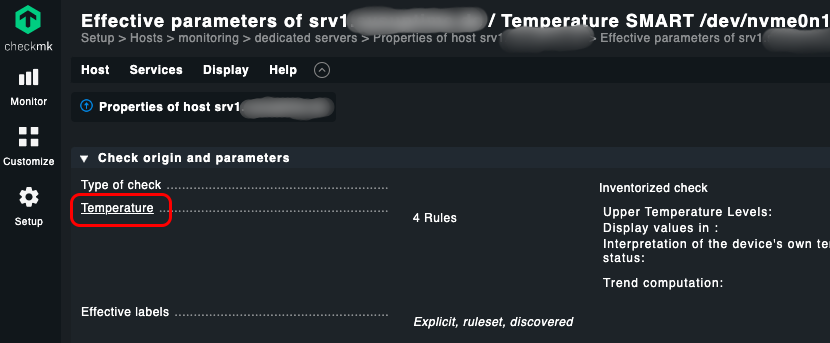
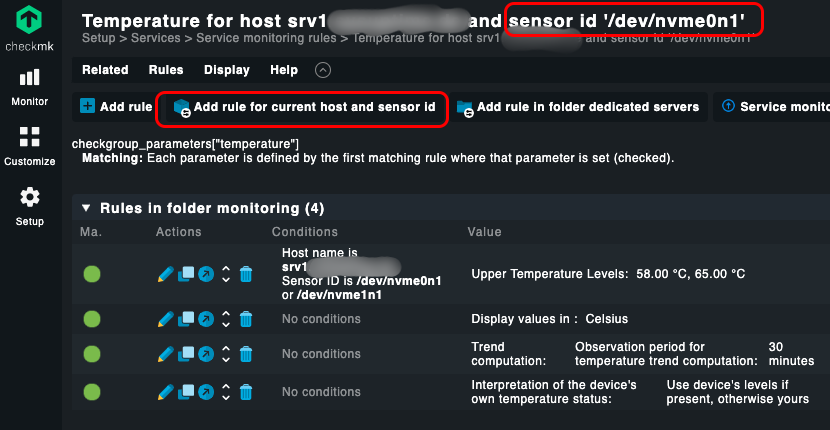
When you’re on the temperature service page, go to “Parameters for this service” from the action menu icon (three horizontal bars), then click on “Temperature”. You should then already have the host name and sensor id in the page title.
… some screen shots to illustrate the steps. Please note that in this example, a matching rule for that sensor id as well as general rules already exist but the steps are the same:
Also have a look at the docs:
Hi Martin,
thanks for the fast and detailed reply. Now it is working. I could have seen the ID at the top of the page  but for some reason I expected a number is ID.
Regards,
Peter
1 Like
This topic was automatically closed 365 days after the last reply. New replies are no longer allowed. Contact an admin if you think this should be re-opened.