Dear Forum Members!
I would like to check the SSL certificate for one of my internal websites. However, my problem is that while I can specify my host explicitly, I need to check the certificate on a subpage. For example, my hostname is xy.org.local, but the URL where I would be searching is https://xy.org.local/AppServer/. How can I solve this? Thank you in advance for your answers.
Hi Alex,
I would try the Check HTTP web service with settings similar to these:
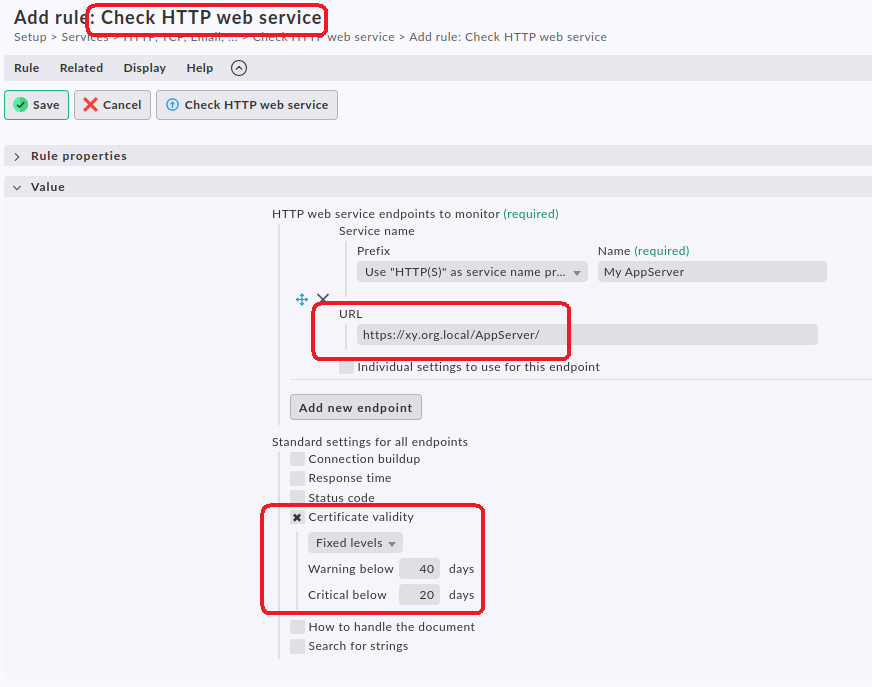
Under conditions you can then define a host which you want to attach this service to. That can be any host and it may be completely unrelated to the AppServer.
How would that work? A webserver certificate is always valid for the whole server AFAIK.
I have the same problem for a few machines from my freelance past. It’s Apaches with always a certificate for 1 to 30 domains, and like 10 to 20 such certificates on a single machine. Since sometimes a certificate and the associated domains move between machines, I just created a folder called CertCheckOnly where no Checkmk agent is associated and each host present uses the primary domain name of the certificate as host name.
Then check_cert for it and call it a day.
With SNI one certificate works for several domains served on a single IP. Server Name Indication - Wikipedia
The route does not matter. Handshake with SNI, then the correct certificate for the subdomain is presented to the client. At that point check_cert is done. Everything after this (including accessing the route) is HTTP stuff and does not have to do with the certificate check.
1 Like
Yes, but not for a subpath, route or anything after the hostname in the URL.
1 Like
Yeah i tried this modul, but i got 401 HTTP error code. From my browser the url works fine
This isn’t just a regular website, actually. It’s an IDM system where it’s possible to run a different app engine under a subdomain. The problem arose when someone replaced the certificate under the subdomain with a different one, so while the main site continued to function, the features implemented by the subdomain no longer did. That is why I need to be able to monitor this subdomain separately, so that if the certificate expires, we can respond in time and avoid disrupting business continuity in the production environment.
Then we are talking SNI. See my previous posts.
This turned out to be the final solution. I had to add that the site should authenticate via SSO right away, but that caused a 401 error. I configured this in the “Expected status codes” section, and everything worked fine. It was able to request the certificate despite the HTTP 401 error, so the issue was resolved.
2 Likes