Hi,
I’m trying to monitor the file age on a speciffic file on a windows host. In my check_mk.user.yml I’ve configured this:
fileinfo:
    # enabled: yes
    # below are possible examples
    path:
        C:\Program Files\Tivoli\TSM\baclient\dsmsched.log
Running the agent with the showconfig option on the command line it shows that it’s picked up:
C:\Program Files (x86)\checkmk\service>check_mk_agent.exe showconfig fileinfo
# Environment Variables:
# MK_LOCALDIR="C:\ProgramData\checkmk\agent\local"
# MK_STATEDIR="C:\ProgramData\checkmk\agent\state"
# MK_PLUGINSDIR="C:\ProgramData\checkmk\agent\plugins"
# MK_TEMPDIR="C:\ProgramData\checkmk\agent\tmp"
# MK_LOGDIR="C:\ProgramData\checkmk\agent\log"
# MK_CONFDIR="C:\ProgramData\checkmk\agent\config"
# MK_SPOOLDIR="C:\ProgramData\checkmk\agent\spool"
# MK_INSTALLDIR="C:\ProgramData\checkmk\agent\install"
# MK_MSI_PATH="C:\ProgramData\checkmk\agent\update"
# MK_MODULESDIR="C:\ProgramData\checkmk\agent\modules"
# Loaded Config Files:
# system: 'C:\Program Files (x86)\checkmk\service\check_mk.yml'
# bakery: 'C:\ProgramData\checkmk\agent\bakery'
# user  : 'C:\ProgramData\checkmk\agent\check_mk.user.yml'

# fileinfo
enabled: yes
path: C:\Program Files\Tivoli\TSM\baclient\dsmsched.log
Also, I’ve created a rule for this file and host in Setup → Services → Service monitoring rules → Size and age of single files, that looks like this:
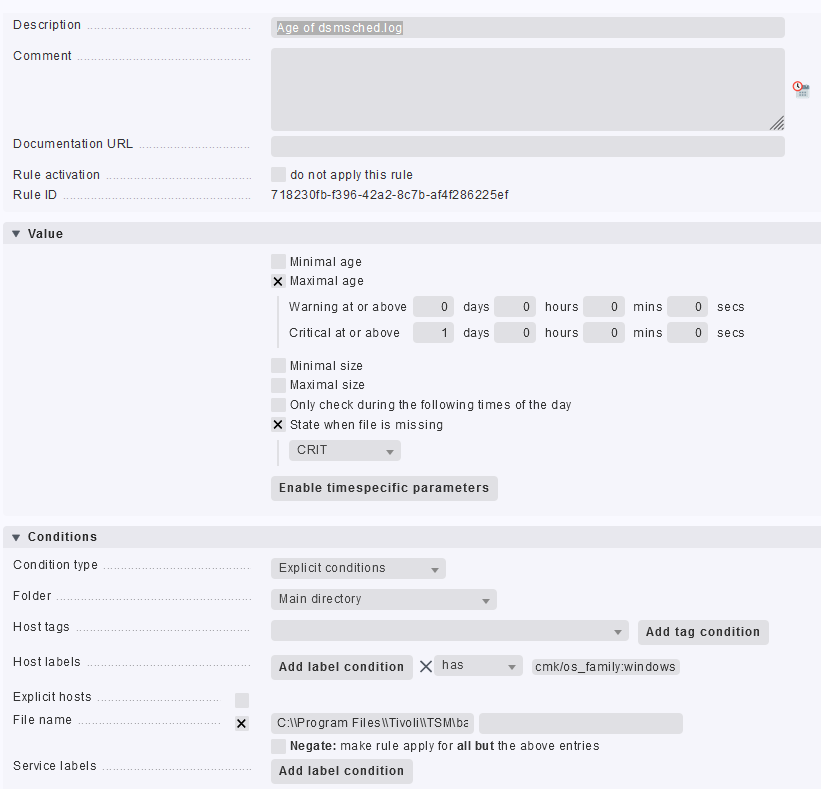
No matter what I try I can’t see any check appearing for the dsmched.log file. The only thing concering fileinfo in the agent output is this:
<<<fileinfo:sep(124)>>>
1636723556
What am I doing wrong?
Kind regards,
Louis