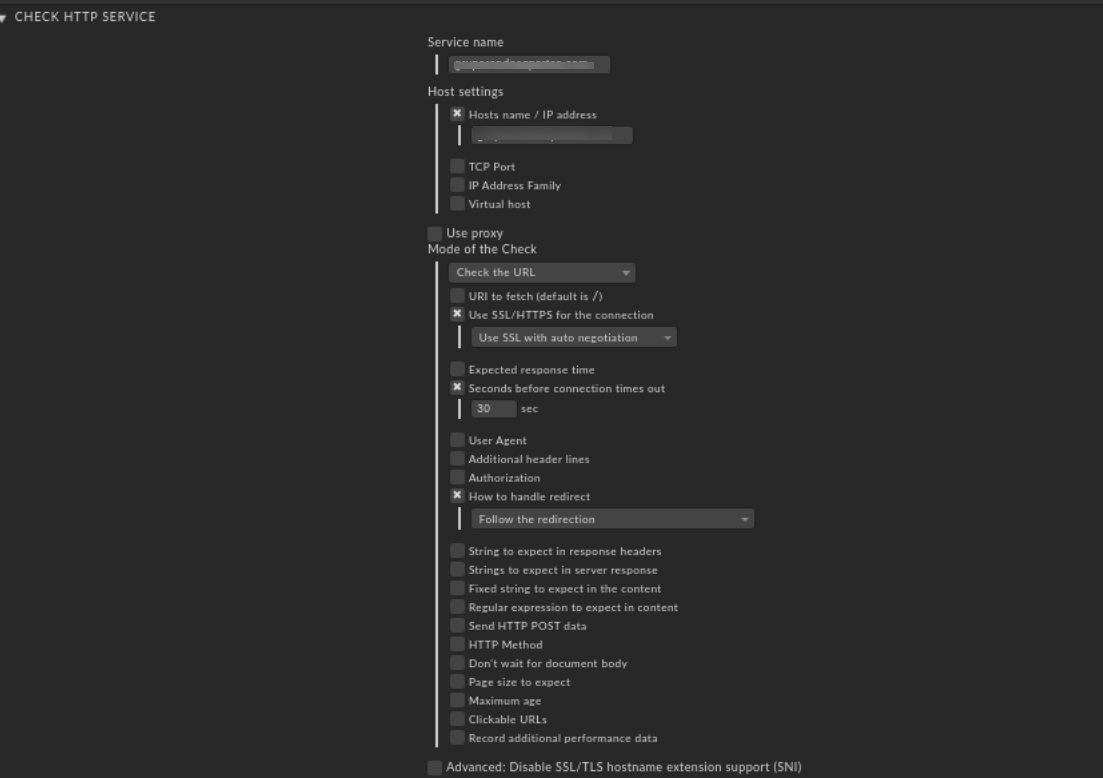
We have Checkmk v1.6.0p7 installed in our production server, where I’ve added a Check_HTTP rule is which is not working. The request is always throwing 400 Bad request output, and further checking I’ve noticed the -H argument is not adding in ‘Service Check Command’. This same rule is working fine on our development instance which runs on v1.6.0p3 CheckMK.
I’ve attached a screenshot of my current rule, the same is working on development instance so this must be a bug it seems.
The manual execution of this is fine, and getting expected results but not from WATO:
The command is running as below from WATO
OMD[monitor]:~$ ./lib/nagios/plugins/check_http -t 30 domain.com
HTTP WARNING: HTTP/1.1 400 Bad Request - 335 bytes in 0.010 second response time |time=0.010093s;;;0.000000;30.000000 size=335B;;;0
However, I’m able to run it fine with -H argument in command line:
OMD[monitor]:~$ ./lib/nagios/plugins/check_http -H domain.com -t 30 -S --onredirect=follow --sni
HTTP OK: HTTP/1.1 200 OK - 138879 bytes in 1.011 second response time |time=1.011315s;;;0.000000;30.000000 size=138879B;;;0
Attached the screenshot rule, and Service Check Command section.
Not a bug as far as I can see. You probably just need to configure the “Virtual Host” setting in WATO.
This should add the -H <vhost> to the check command so your webserver will be able to match the request to the correct webserver config. Without this, the request will end up in the default vhost which is probably not what you want/need.
In my development instance, I didn’t add ‘Virtual host’ rather only added ‘Hosts name/ IP address’ field and it has the command loaded correctly with -H argument.
Anyway, I’ve added the domain to Virtual hosts field in production server and it worked fine. Thanks for the suggestion @martin.schwarz
However, my doubt is why my Development instance works different way than this production? Which works just fine without that field, so any clarification on this matter would be helpful.
That’s a question of the webserver config and the HTTP request.
By giving the -H <vhost> argument, the Host: header of the resulting http query (GET /url HTTP/1.1) will contain the given <vhost> instead of the IP address or the base hostname.
If your development webserver has just one vhost (default vhost), then any request will end up there, no matter what Host: header was given in the request. If you have different name-based virtual hosts on your webserver, then the Host: header from the request decides which virtual host will be targeted.
I guess I misunderstood you for my above reply, sorry!
You are talking about a development checkmk server, not a development webserver, right? Where in both checkmk instances you had the same WATO configuration regarding “Virtual host” but observed different behaviour in the resulting check ocmmand?
Is the dev checkmk server using the same Checkmk version and edition as the productive checkmk server? I vaguely remember that the “virtual host” setting changed in some checkmk release and is now the default.
Perhaps that explains the different behaviour you have observed?
This topic was automatically closed 365 days after the last reply. New replies are no longer allowed. Contact @fayepal if you think this should be re-opened.