Check_httpv2 fails to use semicolon in string search

CMK version: Community 2.5.0p16

Say you want to create a HTTP check and search for a string in the html source code.
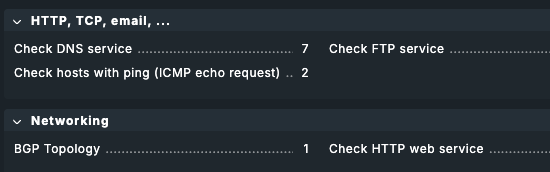
You click Setup ➜ HTTP, TCP, email... and end up here:

You then question your sanity because you can’t find it in the HTTP, TCP, email block where you would expect a HTTP check, but then later find it below, in the Networking section. You create a check.

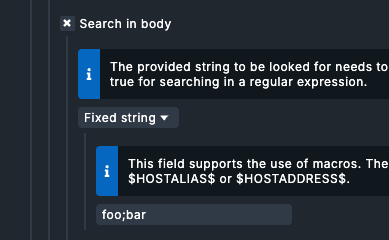
You fill Search for strings ➜ Search in body ➜ Fixed string as:

MyCoolApp™ Version

because you want to match the “MyCoolApp™ Version 1.3.37” string in the footer. Your check then goes CRIT with (null) as plugin output. A closer look at the plugin command in the service details page reveals the issue:
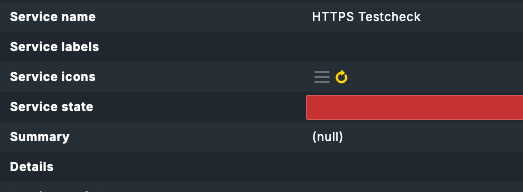
check_mk_active-httpv2!--url https://myapp.tld --body-string 'MyCoolApp&trade

Things I found that might help narrow down the origin of the issue:

  • running it from the CLI with --body-string 'MyCoolApp™ Vers' works fine, so it’s probably not the check binary itself
  • The string also saves fine in the web interface and editing the check later brings the original string back into the input field.
  • it’s also not the nagios config generation, as etc/conf.d/check_mk_objects.cfg shows the correct call:
check_command    check_mk_active-httpv2!--url https://myapp.tld --body-string 'MyCoolApp™ Version'

Could you provide me with the exact output? I suspect the output also contains the semicolon at a position where parsing by the Nagios core fails. There are a few subtle differences between allowed characters for Nagios and CMC. I’ll forward to dev in that case.

The exact output of what, the check run via CLI? Sure (with some careful redactions):

OMD[checkmk]:~$ /opt/omd/versions/default/lib/nagios/plugins/check_httpv2 --url https://myapp.tld/backend/login --server myhost.tld --certificate-levels 14,5 --body-string 'MyAppName™ Vers'
URL to test: https://myapp.tld/backend/login, Version: HTTP/1.1, Status: 200 OK | response_time=0.019533957s;;;0;10 time_http_headers=0.019294423s;;;; time_http_body=0.000239534s;;;; response_size=9109B;;;0;
URL to test: https://myapp.tld/backend/login
Connected to server: myhost.tld
Method: GET
Version: HTTP/1.1
Status: 200 OK
Response time: 0.02 seconds
Page size: 9109 Bytes
Server certificate validity: 191 days
User agent: checkmk-active-httpv2/2.5.0
Expected string in body: MyAppName™ Vers (found)

Thanks!

Thanks, unfortunately, this is not enough. I also need the service name generated or the rule for service name generation. If it contains the semicolon, it most likely is the cause.


Rules page:


Rule edit:

~/etc/nagios/conf.d/check_mk_objects.cfg

define service {
  active_checks_enabled         1
  check_command                 check_mk_active-httpv2!--url https://test.example.tld --body-string 'foo;bar'
  check_interval                1.0
  host_name                     scriptwiki
  max_check_attempts            3
  service_description           HTTPS Testcheck
  use                           check_mk_perf,check_mk_default
}

~/etc/check_mk/conf.d/wato/rules.mk

{'condition': {'host_name': ['scriptwiki']},
 'id': 'c0fbcbff-0de1-40b7-aa75-566f5fc7337d',
 'options': {'disabled': False},
 'value': {'endpoints': [{'service_name': {'name': 'Testcheck',
                                           'prefix': 'auto'},
                          'url': 'https://test.example.tld'}],
           'standard_settings': {'content': {'body': ('string', 'foo;bar')}}}},

The only semicolon I could find is in the test string. Should I look anywhere else or is this all you need?
To repro, I really just created a dummy check with foo;bar as the body search string.

One more:
~/tmp/nagios/status.dat

servicestatus {
	host_name=scriptwiki
	service_description=HTTPS Testcheck
	modified_attributes=0
	check_command=check_mk_active-httpv2!--url https://test.example.tld --body-string 'foo
	check_period=24X7
	notification_period=24X7
	check_interval=1.000000

I guess this is where the service detail page gets its info from. So, looks like a nagios bug then.

From the Nagios command definition.

NOTE: You may not include a semicolon (;) in the command_line directive, because everything after it will be ignored as a config file comment. You can work around this limitation by setting one of the $USER$ macros in your resource file to a semicolon and then referencing the appropriate $USER$ macro in the command_line directive in place of the semicolon.

; is a forbidden character inside any command definition.
Ahhhhh. I was hunting for that. Now it’s obvious.