Check_mk agent plugin UNKNOWN

Hello,

We have problems with “Check_MK Agent” plugin for automatic updates in windows server. After windows OS is updated the ACL’s of the plugin are lost, so the check_mk agent can not execute the plugin and a state of UNKNOWN is reported in checkmk site server.

We fixed the problem rebooting the system but after some time the issue arises again.

Please, Any help?

Regards.

1 Like

Are you running the agent as a different user?
Have you cleanly reinstalled and registered the agent?

Thank you for your reply.

No, its the same user.
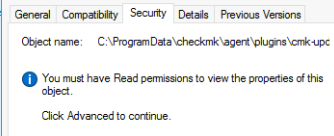
Yes, but we can’t register. In the file cmk-update-agent.exe, we have not permissions
imagen

Its the only file that no have permissions and this file isnt activated in others installations in “read only”.

Regards.

Well you have to run the agent with admin privileges. Normal users cannot access the files, that seems right. Did you run the registration as admin?

Yes, of course. We do it all with admin privileges.
We have some hosts with win 2016 server with the same problem.

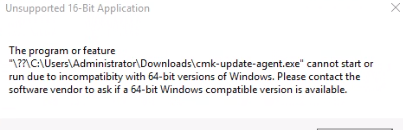
We try to download directly the cmk-update-agent.exe and add privileges, but for windows its a 16bit app.

Regards.

This is rather odd then. A clean install should work. What is especially weird is, that it stops working after some time. Maybe some third party software or antivirus is intervening?

Do you mean 64bit?

Hi Robin,

Sorry for the delay. Let me explain again: we downloaded the agent updater plugin directly and copied to destination. We tried to register and this is the windows message we get

imagen

Please roll out the agent updater plugin through the agent bakery.
See Automatic agent updates - Distribute agents and plug-ins automatically for instructions.

This topic was automatically closed 365 days after the last reply. New replies are no longer allowed. Contact an admin if you think this should be re-opened.