In both case there is a sudo yum install command or a sudo wget command involved to install check-mk. It refers in both tutorials to specific versions – in both versions it gives me a error 404:
Wget error
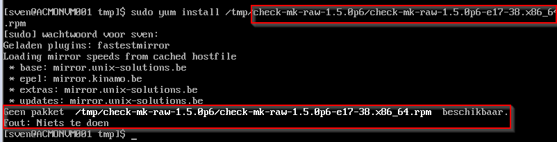
Yum error
‘Package not available’
Regardless of the versions i use. The current version is listed in the two screenshots above – if i use the versions in the tutorials, the same errors appear.
In both case there is a sudo yum install command or a sudo wget command involved to install check-mk. It refers in both tutorials to specific versions – in both versions it gives me a error 404:
Wget error
Yum error
‘Package not available’
Regardless of the versions i use. The current version is listed in the two screenshots above – if i use the versions in the tutorials, the same errors appear.
In both case there is a sudo yum install command or a sudo wget command involved to install check-mk. It refers in both tutorials to specific versions – in both versions it gives me a error 404:
Wget error
Yum error
‘Package not available’
Regardless of the versions i use. The current version is listed in the two screenshots above – if i use the versions in the tutorials, the same errors appear.
In both case there is a sudo yum install command or a sudo wget command involved to install check-mk. It refers in both tutorials to specific versions – in both versions it gives me a error 404:
Wget error
<C2FACBE4360343499AFCC617A85DD991.png>
Yum error
<5DDB759B2C8042AB802FEE7E0F2AC4BD.png>
‘Package not available’
Regardless of the versions i use. The current version is listed in the two screenshots above – if i use the versions in the tutorials, the same errors appear.