Hi,
I’m using the 1.4.0p24 CRE version
I have some hosts that I want to check the SSL cert age, so in WATO, I’ve configured the active http check as follows
Service check command: check_mk_active-http!’-I’ ‘$_HOSTADDRESS_4$’ ‘-C’ ‘14,7’ ‘–sni’
If I run that via cli on the monitoring host:
OMD[it]:~$ /opt/omd/versions/1.4.0p24.cre/lib/nagios/plugins/check_http ‘-I’ ‘www.myexample.com ’ ‘-C’ ‘14,7’ ‘–sni’
CRITICAL - Cannot make SSL connection.
however, if I change the -I argument to -H, it works:
OMD[it]:~$ /opt/omd/versions/1.4.0p24.cre/lib/nagios/plugins/check_http -H ‘www.myexample.com ’ ‘-C’ ‘14,7’ ‘–sni’
OK - Certificate ‘www.myexample.com ’ will expire on Mon 07 May 2018 06:47:13 PM GMT +0000.
How can I get that ‘-H’ parameter in the check via WATO? Selecting the "Check Certificate of different IP / DNS Name " seems to add it, and I’ve tried putting $_HOSTADDRESS_4$ in the field below, but no change, even though the check command looks like:
check_mk_active-http!’-H’ ‘$_HOSTADDRESS_4$’ ‘-C’ ‘14,7’ ‘–sni’
which matches my working command line.
Any ideas?
cjcox
February 9, 2018, 5:47pm
2
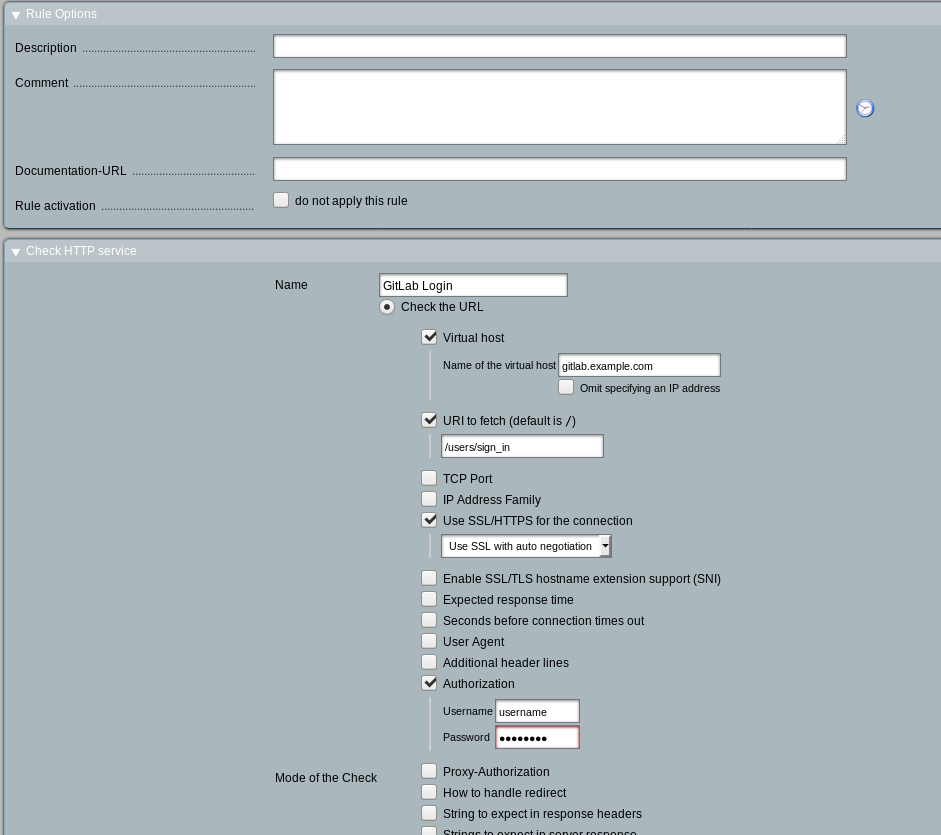
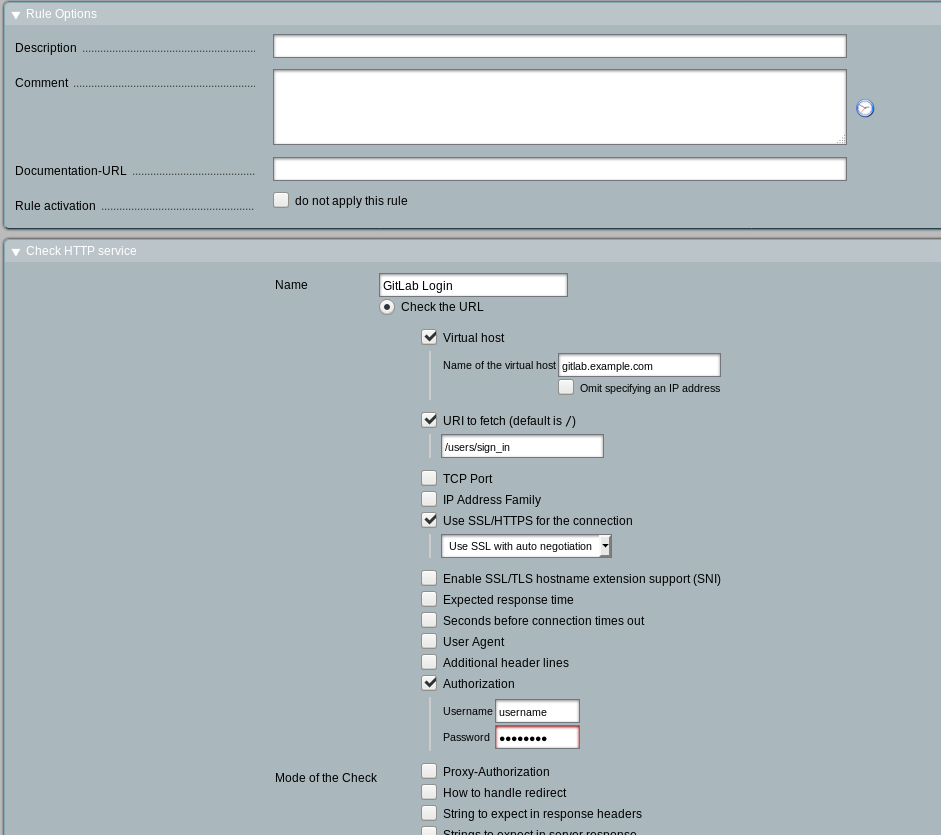
We've set these up WATO (web) The mk rule entry ended up looking like:
active_checks['http'] = [
How it looks under the web UI:
···
On 02/09/2018 11:28 AM, Graham Dunn wrote:
Hi,
I'm using the 1.4.0p24 CRE version
I have some hosts that I want to check the SSL cert age, so in WATO, I've configured the active http check as follows
Service check command: check_mk_active-http!'-I' '$_HOSTADDRESS_4$' '-C' '14,7' '--sni'
If I run that via cli on the monitoring host:
OMD[it]:~$ /opt/omd/versions/1.4.0p24.cre/lib/nagios/plugins/check_http '-I' 'www.myexample.com <http://www.myexample.com >' '-C' '14,7' '--sni'
however, if I change the -I argument to -H, it works:
OMD[it]:~$ /opt/omd/versions/1.4.0p24.cre/lib/nagios/plugins/check_http -H 'www.myexample.com <http://www.myexample.com >' '-C' '14,7' '--sni'http://www.myexample.com >' will expire on Mon 07 May 2018 06:47:13 PM GMT +0000.
How can I get that '-H' parameter in the check via WATO? Selecting the "Check Certificate of different IP / DNS Name " seems to add it, and I've tried putting $_HOSTADDRESS_4$ in the field below, but no change, even though the check command looks like:
check_mk_active-http!'-H' '$_HOSTADDRESS_4$' '-C' '14,7' '--sni'
which matches my working command line.
Any ideas?
cjcox
February 9, 2018, 5:50pm
3
Sorry, that example didn't have the cert age, but hopefully close enough to get you going (?)
···
On 02/09/2018 11:47 AM, Christopher Cox wrote:
On 02/09/2018 11:28 AM, Graham Dunn wrote:
Hi,
I'm using the 1.4.0p24 CRE version
I have some hosts that I want to check the SSL cert age, so in WATO, I've configured the active http check as follows
Service check command: check_mk_active-http!'-I' '$_HOSTADDRESS_4$' '-C' '14,7' '--sni'
If I run that via cli on the monitoring host:
OMD[it]:~$ /opt/omd/versions/1.4.0p24.cre/lib/nagios/plugins/check_http '-I' 'www.myexample.com <http://www.myexample.com >' '-C' '14,7' '--sni'
however, if I change the -I argument to -H, it works:
OMD[it]:~$ /opt/omd/versions/1.4.0p24.cre/lib/nagios/plugins/check_http -H 'www.myexample.com <http://www.myexample.com >' '-C' '14,7' '--sni'http://www.myexample.com >' will expire on Mon 07 May 2018 06:47:13 PM GMT +0000.
How can I get that '-H' parameter in the check via WATO? Selecting the "Check Certificate of different IP / DNS Name " seems to add it, and I've tried putting $_HOSTADDRESS_4$ in the field below, but no change, even though the check command looks like:
check_mk_active-http!'-H' '$_HOSTADDRESS_4$' '-C' '14,7' '--sni'
which matches my working command line.
Any ideas?
We've set these up WATO (web) The mk rule entry ended up looking like:
active_checks['http'] = [
How it looks under the web UI:https://endlessnow.com/images/wato-active-http.png
_______________________________________________http://lists.mathias-kettner.de/mailman/listinfo/checkmk-en
[re-send to list]
Just to make things complicated, I’d like this to apply to a bunch of hosts in a folder, so I don’t have to go through and set it individually per host
···
On Fri, Feb 9, 2018 at 12:51 PM Christopher Cox chriscox@endlessnow.com wrote:
Sorry, that example didn’t have the cert age, but hopefully close enough
to get you going (?)
On 02/09/2018 11:47 AM, Christopher Cox wrote:
On 02/09/2018 11:28 AM, Graham Dunn wrote:
Hi,
I’m using the 1.4.0p24 CRE version
I have some hosts that I want to check the SSL cert age, so in WATO,
I’ve configured the active http check as follows
Service check command: check_mk_active-http!‘-I’ ‘$_HOSTADDRESS_4$’
‘-C’ ‘14,7’ ‘–sni’
If I run that via cli on the monitoring host:
OMD[it]:~$
/opt/omd/versions/1.4.0p24.cre/lib/nagios/plugins/check_http ‘-I’
‘www.myexample.com <http://www.myexample.com >’ ‘-C’ ‘14,7’ ‘–sni’
CRITICAL - Cannot make SSL connection.
however, if I change the -I argument to -H, it works:
OMD[it]:~$
/opt/omd/versions/1.4.0p24.cre/lib/nagios/plugins/check_http -H
‘www.myexample.com <http://www.myexample.com >’ ‘-C’ ‘14,7’ ‘–sni’
OK - Certificate ‘www.myexample.com <http://www.myexample.com >’ will
expire on Mon 07 May 2018 06:47:13 PM GMT +0000.
How can I get that ‘-H’ parameter in the check via WATO? Selecting the
"Check Certificate of different IP / DNS Name " seems to add it, and
I’ve tried putting $_HOSTADDRESS_4$ in the field below, but no change,
even though the check command looks like:
check_mk_active-http!‘-H’ ‘$_HOSTADDRESS_4$’ ‘-C’ ‘14,7’ ‘–sni’
which matches my working command line.
Any ideas?
We’ve set these up WATO (web) The mk rule entry ended up looking like:
active_checks[‘http’] = [
( (u’GitLab Login’, {‘ssl’: ‘auto’, ‘virthost’:
(‘gitlab.example.com ’, False), ‘uri’: ‘/users/sign_in’,
‘auth’: (‘username’, ‘password’)}),
How it looks under the web UI:
https://endlessnow.com/images/wato-active-http.png
checkmk-en mailing list
checkmk-en@lists.mathias-kettner.de
http://lists.mathias-kettner.de/mailman/listinfo/checkmk-en
checkmk-en mailing list
checkmk-en@lists.mathias-kettner.de
http://lists.mathias-kettner.de/mailman/listinfo/checkmk-en
Paul
February 9, 2018, 6:21pm
5
Create unique tags for those that require the -H and those that -I. Then have two rules for the active check, 1 for each. (I think) you can put $HOSTADDRESS$ in the 'use different IP" field and that should take effect to those hosts you specify by the tags, or folder.
I do similar for HTTP and HTTPS checks.
···
On Fri, Feb 9, 2018 at 10:12 AM, Graham Dunn graham.dunn@kik.com wrote:
[re-send to list]
Just to make things complicated, I’d like this to apply to a bunch of hosts in a folder, so I don’t have to go through and set it individually per host
On Fri, Feb 9, 2018 at 12:51 PM Christopher Cox chriscox@endlessnow.com wrote:
Sorry, that example didn’t have the cert age, but hopefully close enough
to get you going (?)
On 02/09/2018 11:47 AM, Christopher Cox wrote:
On 02/09/2018 11:28 AM, Graham Dunn wrote:
Hi,
I’m using the 1.4.0p24 CRE version
I have some hosts that I want to check the SSL cert age, so in WATO,
I’ve configured the active http check as follows
Service check command: check_mk_active-http!‘-I’ ‘$_HOSTADDRESS_4$’
‘-C’ ‘14,7’ ‘–sni’
If I run that via cli on the monitoring host:
OMD[it]:~$
/opt/omd/versions/1.4.0p24.cre/lib/nagios/plugins/check_http ‘-I’
‘www.myexample.com <http://www.myexample.com >’ ‘-C’ ‘14,7’ ‘–sni’
CRITICAL - Cannot make SSL connection.
however, if I change the -I argument to -H, it works:
OMD[it]:~$
/opt/omd/versions/1.4.0p24.cre/lib/nagios/plugins/check_http -H
‘www.myexample.com <http://www.myexample.com >’ ‘-C’ ‘14,7’ ‘–sni’
OK - Certificate ‘www.myexample.com <http://www.myexample.com >’ will
expire on Mon 07 May 2018 06:47:13 PM GMT +0000.
How can I get that ‘-H’ parameter in the check via WATO? Selecting the
"Check Certificate of different IP / DNS Name " seems to add it, and
I’ve tried putting $_HOSTADDRESS_4$ in the field below, but no change,
even though the check command looks like:
check_mk_active-http!‘-H’ ‘$_HOSTADDRESS_4$’ ‘-C’ ‘14,7’ ‘–sni’
which matches my working command line.
Any ideas?
We’ve set these up WATO (web) The mk rule entry ended up looking like:
active_checks[‘http’] = [
( (u’GitLab Login’, {‘ssl’: ‘auto’, ‘virthost’:
(‘gitlab.example.com ’, False), ‘uri’: ‘/users/sign_in’,
‘auth’: (‘username’, ‘password’)}),
How it looks under the web UI:
https://endlessnow.com/images/wato-active-http.png
checkmk-en mailing list
checkmk-en@lists.mathias-kettner.de
http://lists.mathias-kettner.de/mailman/listinfo/checkmk-en
checkmk-en mailing list
checkmk-en@lists.mathias-kettner.de
http://lists.mathias-kettner.de/mailman/listinfo/checkmk-en
checkmk-en mailing list
checkmk-en@lists.mathias-kettner.de
http://lists.mathias-kettner.de/mailman/listinfo/checkmk-en
This has revealed something interesting:
check_mk_active-http!‘-H’ ‘$HOSTADDRESS$’ ‘-C’ ‘14,7’ ‘–sni’
doesn’t work for some hosts (eg my.kik.com ), but setting it explicitly
check_mk_active-http!‘-H’ ‘my.kik.com ’ ‘-C’ ‘14,7’ ‘–sni’
does.
Where would find docs on what $HOSTADDRESS$ is getting expanded to?
···
On Fri, Feb 9, 2018 at 10:12 AM, Graham Dunn graham.dunn@kik.com wrote:
[re-send to list]
Just to make things complicated, I’d like this to apply to a bunch of hosts in a folder, so I don’t have to go through and set it individually per host
On Fri, Feb 9, 2018 at 12:51 PM Christopher Cox chriscox@endlessnow.com wrote:
Sorry, that example didn’t have the cert age, but hopefully close enough
to get you going (?)
On 02/09/2018 11:47 AM, Christopher Cox wrote:
On 02/09/2018 11:28 AM, Graham Dunn wrote:
Hi,
I’m using the 1.4.0p24 CRE version
I have some hosts that I want to check the SSL cert age, so in WATO,
I’ve configured the active http check as follows
Service check command: check_mk_active-http!‘-I’ ‘$_HOSTADDRESS_4$’
‘-C’ ‘14,7’ ‘–sni’
If I run that via cli on the monitoring host:
OMD[it]:~$
/opt/omd/versions/1.4.0p24.cre/lib/nagios/plugins/check_http ‘-I’
‘www.myexample.com <http://www.myexample.com >’ ‘-C’ ‘14,7’ ‘–sni’
CRITICAL - Cannot make SSL connection.
however, if I change the -I argument to -H, it works:
OMD[it]:~$
/opt/omd/versions/1.4.0p24.cre/lib/nagios/plugins/check_http -H
‘www.myexample.com <http://www.myexample.com >’ ‘-C’ ‘14,7’ ‘–sni’
OK - Certificate ‘www.myexample.com <http://www.myexample.com >’ will
expire on Mon 07 May 2018 06:47:13 PM GMT +0000.
How can I get that ‘-H’ parameter in the check via WATO? Selecting the
"Check Certificate of different IP / DNS Name " seems to add it, and
I’ve tried putting $_HOSTADDRESS_4$ in the field below, but no change,
even though the check command looks like:
check_mk_active-http!‘-H’ ‘$_HOSTADDRESS_4$’ ‘-C’ ‘14,7’ ‘–sni’
which matches my working command line.
Any ideas?
We’ve set these up WATO (web) The mk rule entry ended up looking like:
active_checks[‘http’] = [
( (u’GitLab Login’, {‘ssl’: ‘auto’, ‘virthost’:
(‘gitlab.example.com ’, False), ‘uri’: ‘/users/sign_in’,
‘auth’: (‘username’, ‘password’)}),
How it looks under the web UI:
https://endlessnow.com/images/wato-active-http.png
checkmk-en mailing list
checkmk-en@lists.mathias-kettner.de
http://lists.mathias-kettner.de/mailman/listinfo/checkmk-en
checkmk-en mailing list
checkmk-en@lists.mathias-kettner.de
http://lists.mathias-kettner.de/mailman/listinfo/checkmk-en
checkmk-en mailing list
checkmk-en@lists.mathias-kettner.de
http://lists.mathias-kettner.de/mailman/listinfo/checkmk-en
Jam_Mulch
February 9, 2018, 6:58pm
7
Easier to just create 2 folders. That way you can just drop a host into a folder and pick up the rule. But to each his own.
···
On Feb 9, 2018, at 1:21 PM, Paul paulmonitoring@gmail.com wrote:
Create unique tags for those that require the -H and those that -I. Then have two rules for the active check, 1 for each. (I think) you can put $HOSTADDRESS$ in the 'use different IP" field and that should take effect to those hosts you specify by the tags, or folder.
I do similar for HTTP and HTTPS checks.
On Fri, Feb 9, 2018 at 10:12 AM, Graham Dunn graham.dunn@kik.com wrote:
[re-send to list]
Just to make things complicated, I’d like this to apply to a bunch of hosts in a folder, so I don’t have to go through and set it individually per host
On Fri, Feb 9, 2018 at 12:51 PM Christopher Cox chriscox@endlessnow.com wrote:
Sorry, that example didn’t have the cert age, but hopefully close enough
to get you going (?)
On 02/09/2018 11:47 AM, Christopher Cox wrote:
On 02/09/2018 11:28 AM, Graham Dunn wrote:
Hi,
I’m using the 1.4.0p24 CRE version
I have some hosts that I want to check the SSL cert age, so in WATO,
I’ve configured the active http check as follows
Service check command: check_mk_active-http!‘-I’ ‘$_HOSTADDRESS_4$’
‘-C’ ‘14,7’ ‘–sni’
If I run that via cli on the monitoring host:
OMD[it]:~$
/opt/omd/versions/1.4.0p24.cre/lib/nagios/plugins/check_http ‘-I’
‘www.myexample.com <http://www.myexample.com >’ ‘-C’ ‘14,7’ ‘–sni’
CRITICAL - Cannot make SSL connection.
however, if I change the -I argument to -H, it works:
OMD[it]:~$
/opt/omd/versions/1.4.0p24.cre/lib/nagios/plugins/check_http -H
‘www.myexample.com <http://www.myexample.com >’ ‘-C’ ‘14,7’ ‘–sni’
OK - Certificate ‘www.myexample.com <http://www.myexample.com >’ will
expire on Mon 07 May 2018 06:47:13 PM GMT +0000.
How can I get that ‘-H’ parameter in the check via WATO? Selecting the
"Check Certificate of different IP / DNS Name " seems to add it, and
I’ve tried putting $_HOSTADDRESS_4$ in the field below, but no change,
even though the check command looks like:
check_mk_active-http!‘-H’ ‘$_HOSTADDRESS_4$’ ‘-C’ ‘14,7’ ‘–sni’
which matches my working command line.
Any ideas?
We’ve set these up WATO (web) The mk rule entry ended up looking like:
active_checks[‘http’] = [
( (u’GitLab Login’, {‘ssl’: ‘auto’, ‘virthost’:
(‘gitlab.example.com ’, False), ‘uri’: ‘/users/sign_in’,
‘auth’: (‘username’, ‘password’)}),
How it looks under the web UI:
https://endlessnow.com/images/wato-active-http.png
checkmk-en mailing list
checkmk-en@lists.mathias-kettner.de
http://lists.mathias-kettner.de/mailman/listinfo/checkmk-en
checkmk-en mailing list
checkmk-en@lists.mathias-kettner.de
http://lists.mathias-kettner.de/mailman/listinfo/checkmk-en
checkmk-en mailing list
checkmk-en@lists.mathias-kettner.de
http://lists.mathias-kettner.de/mailman/listinfo/checkmk-en
checkmk-en mailing listcheckmk-en@lists.mathias-kettner.de http://lists.mathias-kettner.de/mailman/listinfo/checkmk-en
 The really interesting thing is that 6 out of the 16 hosts in the folder have this check working as is - it’s dependent on the server (googlehosted sites need -H, others seem not to).