I need your support regarding a recurring issue we have experienced with some network devices uploaded into our CMK Raw edition v 1.6.0p15. These devices frequently go to Request Timed Out.
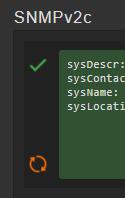
When I run a test to one of these devices, the SNMP configuration shown is correct (version used is V2)
When I run a Discovery, the services are shown.
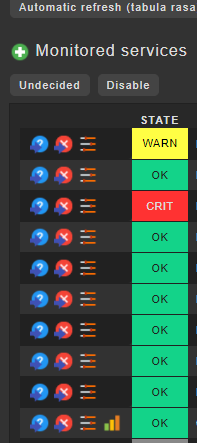
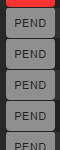
Finally, I apply the changes for monitor. When checking the services, they appear in Pending state and Check_MK and Check_MK Discovery return to Timed Out status.
Have you tried checking one or more of those “problematic” devices on the commandline with snmpwalk? Do you have many devices to check via SNMP?
Do they respond as expected when checking with snmpwalk? You could also prefix a time to the snmpwalk command on the shell to determine how long it really takes until its completely done: Maybe you simply need to raise the SNMP time out in order to get the results into CMK.
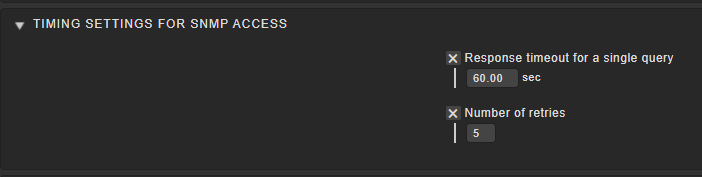
Yes, I actually try to check the time by doing a snmpwalk and it takes over 60 seconds. but when I try to increase this value, in “Time settings for SNMP access”, the maximum is only 60 seconds:
Yeah, SNMP can be a “PITA” sometimes… actually almost all the time…
The bitter truth is, that it can’t be avoided for some devices, though…
Just out of interest: Do you have many devices you need to
monitor via SNMP? Perhaps simply “spreading out checks” by increasing
the check interval for some of them already helps. Furthermore, may I ask
which devices work OK for you and which don’t?
Perhaps me or someone else can share his/her experience with similar
devices and give you hints about how to get them monitored after all.
In the meantime - in case you haven’t found this particular part in the documentation
yourself - please take your time and review the section about SNMP monitoring: There are various useful Tips & Tricks you may be able to employ for your case.
Thanks for the info, and yes, as you mentioned, I try these 3 options:
-Normal check interval for service checks
-Check intervals for SNMP checks
-Timing settings for SNMP access
Without success, could you please provide me with some settings that work for you?
I am monitoring 80 devices with SNMP configuration and only 10 - 15 show this error (Timed Out). I am wondering if it is possible that this error comes from a bad network configuration, and if there is a way to test the network.
A little bit more clarification to this problem from my side.
The setting @Gustavo posted with the 60 seconds has nothing to do with the real timeout problem.
Sorry to say this. This timeout is used while an SNMPwalk is running inside the SNMPwalk command.
I think if you do an SNMPwalk on your device on the command line it will work without timeout but it takes a very long time.
The relevant timeout for this problem here is the maximum time a check can run before it is terminated by the core.
As we use the RAW edition here with Nagios core you can only modify this setting inside the Nagios configuration files.
The setting what needs to be modified is “service_check_timeout”. The default value is 60 seconds. If you set this to 120 seconds then i would recommend also to set the check interval for the problem hosts to an minimum of 120 seconds from the default of 60. To avoid some race conditions.
Indeed, it doesn’t… perhaps I should’ve also been a bit more clear in my previous reply. Regarding
the rest: Fully agree with you! I wanted to reply something similar, but… you were faster.
Thank you very mucho for the information and help, i just have a one more question regarding the Nagios configuration file, could you please provide me the path of this file ?
Hi Gustavo, I have about 400 SNMP devices and I tried many configuration changes to let them work fine, but I haven’t found a stable solution since… I bought CEE version and I can tell you that is “another world” for SNMP devices!!!
Now all of them are working very good, also with standard parameters.
Sounds interesting, right now I’m still trying, I’m starting to believe that maybe the network may be the problem, the communication between my master and the devices, can some one know how can i test the response to see if there is a problem in my network ?
You can check with command snmpwalk/snmpbulkwalk but you will see that the device is working fine and fast, while CheckMK not.
CEE version has a specific improvement for SNMP devices, and it’s really true: all of my problems with SNMP disappeared with CEE version! (and, believe me, I’m not getting money sponsoring it )
This topic was automatically closed 365 days after the last reply. New replies are no longer allowed. Contact @fayepal if you think this should be re-opened.


 )
)