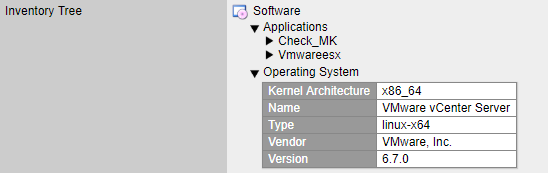
Hello I can shed some light on this.
You will notice that you are asking about the check_mk service having the Version: unknown. This is correct as when running the special agent for vsphere it has no <<<check_mk>>> section.
For instance when looking at a Windows host the very first section is the <<<check_mk>>> section:
<<<check_mk>>>
Version: 1.5.0p15
BuildDate: Apr 17 2019
AgentOS: windows
Which those entries correspond to the status detail lines:
OK - [agent] Version: 1.5.0p15, OS: windows, execution time 1.5 sec
The section you are asking about is <<<esx_systeminfo>>> which is used for the HW/SW inventory check which is found under WATO → Host & Services Parameters → Hardware/Software-Inventory → Do hardware/software Inventory section.
You can find the function for this in share/check_mk/inventory/esx_systeminfo and the agent in share/check_mk/agents/special/agent_vsphere.
If you want to populate the check_mk version and agent fields in the status detail you would need to either write a new agent or edit the vsphere agent to add a <<<check_mk>>> section that has the Version: and AgentOS: lines populated.
As a quick example I edited the agent_vsphere file and added the following lines:
output(“<<<check_mk>>>”)
output(“Version: 6.7.0”)
to this section:
Note: If the cookie fails inbetween these calls, we also start a second run
try:
output(“<<<check_mk>>>”)
output(“Version: 6.7.0”)
output(“<<<esx_systeminfo>>>”)
for entry in systeminfo.items():
output(“%s %s” % entry)
and since that section now shows up in my output:
<<<check_mk>>>
Version: 6.7.0
<<<esx_systeminfo>>>
vendor VMware, Inc.
name VMware vCenter Server
propertyCollector propertyCollector
apiVersion 6.7.2
sessionManager SessionManager
osType linux-x64
version 6.7.0
build 13639324
licenseManager LicenseManager
perfManager PerfMgr
rootFolder group-d1
it also appears on my status detail:

Hope that helps shed some light on what is going on.
On Behalf Of marco checl-mk




···
External Email
Hi Praveen,
Thanks for your help so far.
So, in order to fetch the CPU, Interface, Memory, Uptime, etc. I used SNMPv3 and for this, I just set up an SNMP monitoring user on the Vcenter server.
I can see these metrics now.
There is also now a service check available i.e. SNMP info which displays the information about the Vcenter appliance.
At the moment, the check_mk service check looks like this(Version and OS are still unknown- Don’t know what is wrong here)
But I still don’t understand the use of section <<<esx_systeminfo>>> which I can see the Diagnostics of the Vcenter host , also when I execute command agent_vsphere manually and also
download the checkmk agent output from the check_mk service check but it doesn’t get displayed in the monitoring UI.
Rgrds,
Marco
On Fri, Aug 2, 2019 at 1:21 PM Praveen Kumar Velpula praveen.velpula@gmail.com wrote:
Yes, We even don’t see CPU utilization, Memory, Interface,Uptime metrics information on vCenter. This is how the rule works for vCenter.
We are getting CPU utilization, Memory metrics using VMWare nagios plugin.
Thanks & Regards,
Praveen.
On Thu, Aug 1, 2019 at 11:21 PM marco checl-mk marcocheckmk2005@gmail.com wrote:
In addition, I also receive the piggyback data from the Vcenter on all the ESXi hosts but no data related to the section <<<esx_systeminfo>>>:
:
Also, Why I do not see the other metrics like CPU utilization, Memory, Interface,Uptime on the Vcenter host: At the moment, I only see below service checks:
Check_MK
Check_MK discovery
Hostsystem…
Filesystem …
Object count…
Could you please advise ?
BRgrds,
Marco
On Thu, Aug 1, 2019 at 10:59 PM marco checl-mk marcocheckmk2005@gmail.com wrote:
Thanks Praveen and Kai. I did modified the " Service
check timeout (Microcore) to 5 minutes and this turned the Check_Mk check to OK status.
But in the output , Verison and OS is Unknown. Are you also getting the same output ?
[special_vsphere] Version: unknown, OS: unknown, execution time 8.5 sec
Brgrds,
Marco
On Thu, Aug 1, 2019 at 6:09 PM Praveen Kumar Velpula praveen.velpula@gmail.com wrote:
Hi Marco,
ESXi system info, you should be seeing on the VM’s created on ESX Hosts. Below are the setting we have done in our environment and we can see the details on VM.
vSphere User name: <>
vSphere secret: <>
Type of query: Queried host is the vCenter
SSL certificate checking:
Compatibility mode: fast
Retrieve information about…: Host Systems, Datastores, Performance Counters
Placeholder VMs: ignore
Display ESX Host power state on: The queried ESX system (vCenter / Host)
Display VM power state additionally on: The Virtual Machine
Piggyback name of virtual machines: Use the VMs hostname if set, otherwise fall back to ESX name
Spaces in hostnames: Cut everything after first space
And coming to Performance counter option, as Kai said it will take time. So in-order to get that work you have rule " Service
check timeout (Microcore)", set this time interval and this will help you in getting the information.
Thanks & Regards,
Praveen.
On Thu, Aug 1, 2019 at 4:07 PM Groshert, Kai (FII6) kai.groshert@porsche.de wrote:
Hi Marco,
not sure if it is causing your problem but from your output I see you are retrieving the following data:
Retrieve information about…: Host Systems, Virtual Machines,
Datastores, Performance Counters, License Usage
My setup works fine but as soon as I activate “Retrieve performance counters” the special agent needs around
10 minutes to complete, so checking hits the timeout.
Without performance counters it’s around 10 seconds.
I don’t know the size of your installation but performance counters seem to be a big
problem to retrieve (tried with around 4000 VMs).
Cheers,
Kai
–
Kai Groshert
FII6 Compute & Middleware Services
Dr. Ing. h.c. F. Porsche AG
Porscheplatz 1, D-70435 Stuttgart-Zuffenhausen
Besucheradresse:
Mittlerer Pfad 15
70499 Stuttgart Weilimdorf
Telefon: +49 (0)711/911-24485
Fax: +49 (0)711/911-23171
E-Mail:
kai.groshert@porsche.de
Dr. Ing. h.c. F. Porsche Aktiengesellschaft
Sitz der Gesellschaft: Stuttgart
Registergericht: Amtsgericht Stuttgart HRB-Nr. 730623
Vorsitzender des Aufsichtsrats: Dr. Wolfgang Porsche
Vorstand: Oliver Blume, Vorsitzender
Lutz Meschke, stv. Vorsitzender
Andreas Haffner, Detlev von Platen, Albrecht Reimold, Uwe-Karsten Städter, Michael Steiner
Informationen zum Umgang mit Ihren Daten finden Sie in unseren
Datenschutzhinweisen.
Die vorgenannten Angaben werden jeder E-Mail automatisch hinzugefügt. Dies ist kein Anerkenntnis,
dass es sich beim Inhalt dieser E-Mail um eine rechtsverbindliche Erklärung der Porsche AG handelt.
Erklärungen, die die Porsche AG verpflichten, bedürfen jeweils der Unterschrift durch zwei zeichnungs-
berechtigte Personen der AG.
From: checkmk-en checkmk-en-bounces@lists.mathias-kettner.de
On Behalf Of marco checl-mk
Sent: Donnerstag, 1. August 2019 12:04
To: checkmk-en@lists.mathias-kettner.de
Subject: Re: [Check_mk (english)] VMWARE monitoring ESXi-6.7.0
In addition to that, after I activate the changes, the Check_MK service check is CRITICAL as shown in the below screensho:
Is this because of the new agent_vsphere plugin does not provide <<<Check_mk>>> in the section output?
I have also set up the monitoring of Esxi 6 and 5.5. on Checkmk 1.2.6p15 and just had a quick look at **share/check_mk/agents/special/agent_vsphere ** and
found that it returns <<<Check_MK>>> section.
Regards,
Marco
On Thu, Aug 1, 2019 at 11:40 AM marco checl-mk marcocheckmk2005@gmail.com wrote:
Dear all,
I am using checkmk 1.5.0p12. The issue is as follows:
I am trying to setup the VMWARE monitoring for ESXi-6.7.0.
So far, this is I have done:
-
Added the Vcenter host
-
Set the agent type as “Contact either Check_mk agent or use datasource program from the dropdown list”.
-
Operating system = “ip only”
-
Functionality = Vmware Vcenter
-
Added a rule under Datasource program >> Check state of VMWare ESX via vSphere
vSphere User name: monitoring
vSphere secret: ******
Type of query: Queried host is the vCenter with Check_MK Agent installed
SSL certificate checking: Disabled
Connect Timeout: 240 seconds
Compatibility mode: fast
Retrieve information about…: Host Systems, Virtual Machines, Datastores, Performance Counters, License Usage
Placeholder VMs: ignore
Piggyback name of virtual machines: Use the name specified in the ESX system
Spaces in hostnames: Replace with underscores
After this If I click on Save&Test on the Host Paratemeters screen, it takes me to the Diagonistic of this host.
If I see the agent section :
<<<esx_systeminfo>>>
vendor VMware, Inc.
name VMware vCenter Server
propertyCollector propertyCollector
apiVersion 6.7.1
sessionManager SessionManager
osType linux-x64
version 6.7.0
licenseManager LicenseManager
perfManager PerfMgr
rootFolder group-d1
I see this information here followed by other sections like <<<esx_vsphere_licenses:sep(9)>>> , <<<esx_vsphere_datastores:sep(9)>>> etc. I can see all the sections under WATO >> Service discovery of this host but cannot see the output from this section <<<esx_systeminfo>>>
.
Can anybody advise me what I am doing wrong here ?
PS: I have not configured any retry check,normal interval etc. Shall I do that ?
Thanks,
Marco
checkmk-en mailing list
checkmk-en@lists.mathias-kettner.de
Manage your subscription or unsubscribe
https://lists.mathias-kettner.de/cgi-bin/mailman/listinfo/checkmk-en