CMK version: Checkmk Raw Edition 2.2.0p11
OS version: Ubuntu 22.04.3 LTS
Hello!
There is an issue with activating changes.
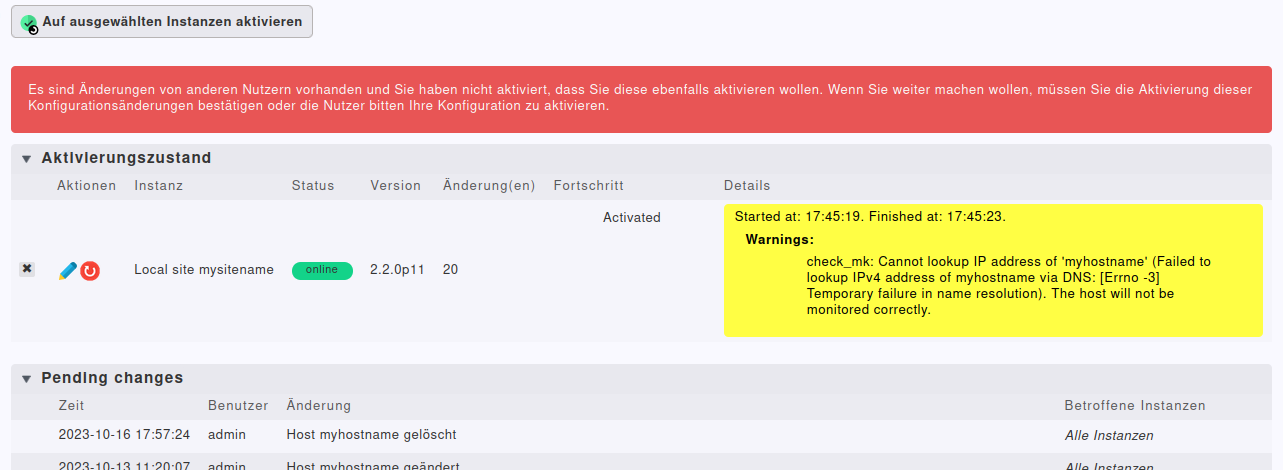
The following message appears
“There are some changes made by your colleagues and you did not confirm to activate these changes. In order to proceed, you will have to confirm the activation or ask you colleagues to activate these changes in their own.”
But the confirmation checkbox is missing.
Also there is a warning in details field of activation status:
Started at: 17:45:19. Finished at: 17:45:23.
Warnings:
check_mk: Cannot lookup IP address of ‘myhostname’ (Failed to lookup IPv4 address of myhostname via DNS: [Errno -3] Temporary failure in name resolution). The host will not be monitored correctly.
I have already tried the following with “myhostname”:
- added tag to host in host configuration: Criticality=Do not monitor this host
- delete host
but I cannot activate these changes…
Also I set hostname in /etc/hosts. Now I can see all checks on this host, but I still can not activate the changes. So it is clear, checkmk can lookup IP address. Now I am confused.
What can I do to still activate all changes.
Regards
Sven