Hello Checkmk Team and Forum.
Veeam 10 (https://www.veeam.com/veeam_backup_10_0_whats_new_wn.pdf) got released a few days ago. After the Veeam 10 Update the Checkmk Check Plugin is broken. (checkmk/agents/windows/plugins/veeam_backup_status.ps1 at master · Checkmk/checkmk · GitHub)
Checkmk uses the Veeam Powershell Snap-In. Veeam 10 added a warning message to some CMDlet functions.
WARNUNG: This cmdlet is obsolete and no longer supported. To get computer backup job use “Get-VBRComputerBackupJob” instead.
Example:
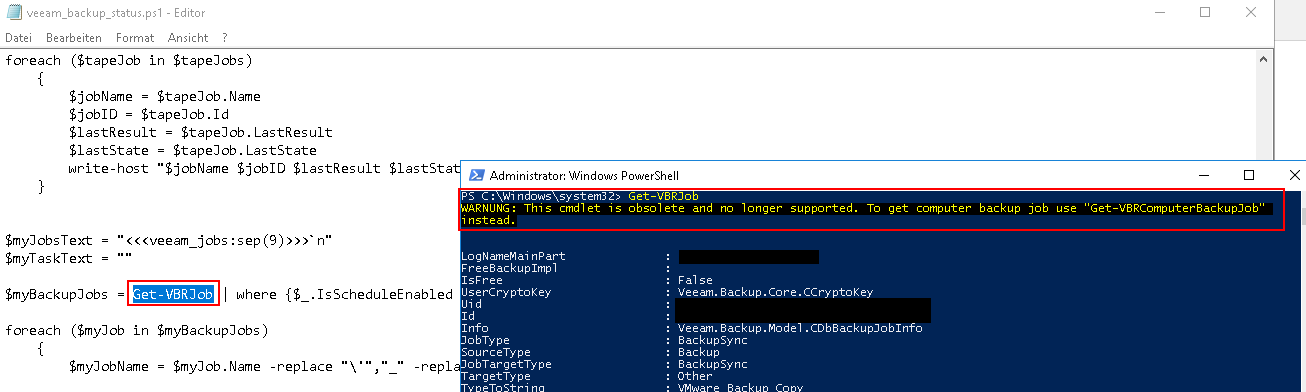
The warning message is the reason why the checkmk plugin is broken.

If you run the recommended command “Get-VBRComputerBackupJob” you only get a fraction of the information you get from “Get-VBRJob”.
Veeam 10 Powershell Reference: A-Z Cmdlets List - Veeam Backup PowerShell Reference
I hope we get a solution for this asap. Please keep in mind before updating to Veeam 10 that Checkmk (in the current state) is not able to monitor it anymore!
