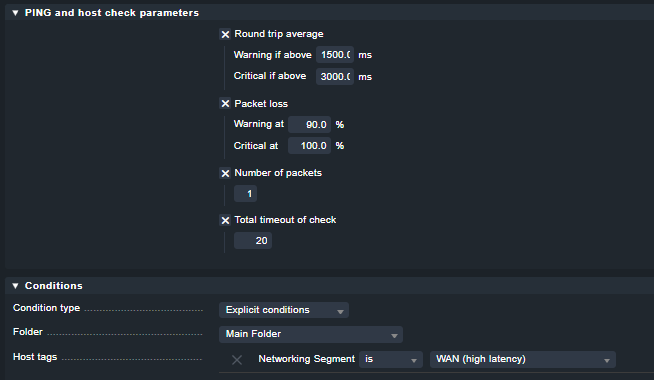
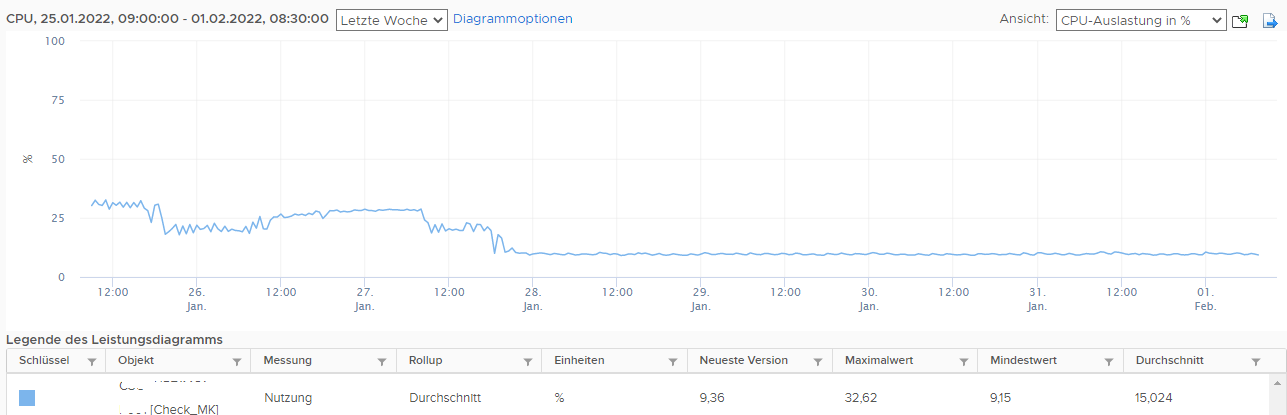
we have problems with the performance in general with our CheckMK server.
Regularly, like every 3 minutes, many hosts are shown as Down - Flapping (Host Check Timed Out), see attached picture. So the system is not really useable.
This causes then CPU spikes on the server and this sometimes even leads to a nagios crash:
“Caught SIGSEGV, shutting down…”
Over the years the configuration got changed so we think there is a misconfiguration.
Please can someone give us an advice if these settings are okay or maybe inconvenient.
How should it be as a best practice?
Hardware of the Linux VM:
Debian 10
12 vCPU
12 GB RAM
Following the configuration:
/etc/nagios/nagios.cfg
service_check_timeout=120
Wato Global Settings
Agent TCP connect timeout: 30
Staleness value to mark hosts / services stale: 30
Apache process tuning: 96
Rules
Maximum number of check attempts for host: 3
Normal check interval for host checks: 3 minutes
Retry check interval for host checks: 2 minutes
Maximum number of check attempts for service: 3
Normal check interval for service checks: 5 minutes
Retry check interval for service checks: 2 minutes
Timing settings for SNMP access
Timeout: 45 sec
Retries: 2
Fetch intervals for SNMP sections: not set
Periodic service discovery: Do not perform periodic service discovery check
I think these are the important settings. If there is something else we should take care of please let me know.
thanks for the fast answer. Yes we know that the CEE is way more performant than the CRE.
But we dont expect too much from the CRE. We just want that it is useable. And it did very well in the past but at the moment in our case we get many of the “Host Check Timed Out” and dont know where this comes from. Not easy to recognize a real host problem when there are all day these timeouts,
Chances are high that there is some bad configuration.
Hard disk type is not SSD / we use 10k HDDs for the system (VM).
At the moment not possible to move to SSDs.
I increased to 18 GB RAM now but i guess this is not the problem cause looking at the RAM shows that usually only around 6 GB are used.
Ok,
the hostsystem is ok?
No other VMs with high load or similiar problems?
No messages in the controller tools or the hypervisor with messages about disk problems.
If everything ist fine you should your checks a little bis more detailed.
Perhaps a reorganisation of the checks my help.
snmp for example is often a problem.
Ralf
The number of hosts and services hit the Nagios limits. You have these problems because of all the forking Nagios has to do. If you cannot migrate to CEE you should increase the check intervals.
An alternative would be to split the site into multiple sites (even on the same server). This way you have multiple Nagios cores running each with a lower number of hosts to check. This is quite easy with checkmk’s distributed monitoring.
Wato Global Settings
Agent TCP connect timeout: 30
Staleness value to mark hosts / services stale: 30
Apache process tuning: 96
Rules
Maximum number of check attempts for host: 6
Normal check interval for host checks: 5 minutes
Retry check interval for host checks: not set (Default value)
Maximum number of check attempts for service: 3
Normal check interval for service checks: 10 minutes
Retry check interval for service checks: 2 minutes
Timing settings for SNMP access
Timeout: 45 sec
Retries: 2
Fetch intervals for SNMP sections: 120 minutes
Periodic service discovery: Do not perform periodic service discovery check
This topic was automatically closed 365 days after the last reply. New replies are no longer allowed. Contact an admin if you think this should be re-opened.