CMK version: 2.3.0p29
OS version: Debian 12
Error message:
[special_cisco_meraki]: Agent exited with code 1:
Output of “cmk --debug -vvn hostname”:
value store: synchronizing
Trying to acquire lock on /omd/sites/xy/tmp/check_mk/counters/10.10.12.96
Got lock on /omd/sites/xy/tmp/check_mk/counters/10.10.12.96
value store: loading from disk
Releasing lock on /omd/sites/xy/tmp/check_mk/counters/10.10.12.96
Released lock on /omd/sites/xy/tmp/check_mk/counters/10.10.12.96
Checkmk version 2.3.0p29
+ FETCHING DATA
  Source: SourceInfo(hostname='10.10.12.96', ipaddress='10.10.12.96', ident='special_cisco_meraki', fetcher_type=<FetcherType.SPECIAL_AGENT: 6>, source_type=<SourceType.HOST: 1>)
[cpu_tracking] Start [7fa4a35611c0]
Read from cache: AgentFileCache(10.10.12.96, path_template=/omd/sites/xy/tmp/check_mk/data_source_cache/special_cisco_meraki/{hostname}, max_age=MaxAge(checking=0, discovery=90.0, inventory=90.0), simulation=False, use_only_cache=False, file_cache_mode=6)
Not using cache (does not exist)
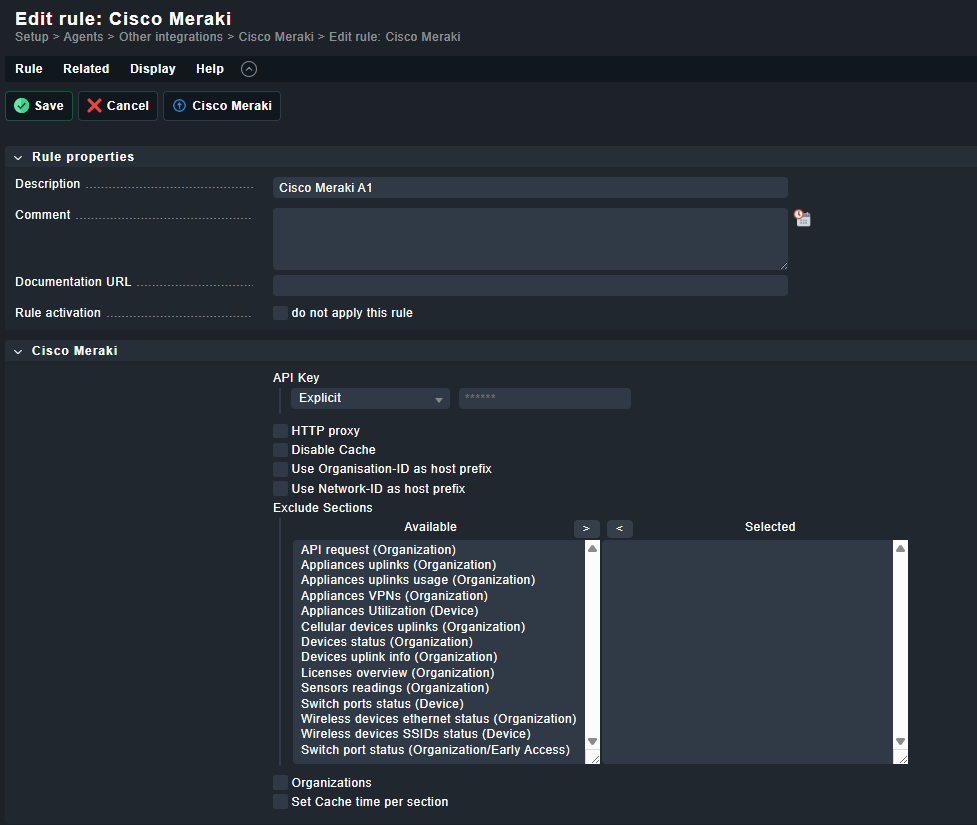
Calling: /omd/sites/xy/local/lib/python3/cmk/plugins/collection/libexec/agent_cisco_meraki --pwstore=2@0@/omd/sites/xy/var/check_mk/passwords_merged@uuidf71db5d6-b748-47a9-80d1-e154371a2810 10.10.12.96 '****************************************' --excluded-sections appliance-uplinks appliance-uplinks-usage appliance-performance cellular-uplinks device-status device-uplinks-info licenses-overview sensor-readings switch-ports-statuses wireless-ethernet-statuses wireless-device-status org-switch-ports-statuses
Get data from program
[cpu_tracking] Stop [7fa4a35611c0 - Snapshot(process=posix.times_result(user=0.0, system=0.0, children_user=1.21, children_system=0.12, elapsed=1.3299999982118607))]
  Source: SourceInfo(hostname='10.10.12.96', ipaddress='10.10.12.96', ident='piggyback', fetcher_type=<FetcherType.PIGGYBACK: 4>, source_type=<SourceType.HOST: 1>)
[cpu_tracking] Start [7fa4a3560ec0]
Read from cache: NoCache(10.10.12.96, path_template=/dev/null, max_age=MaxAge(checking=0.0, discovery=0.0, inventory=0.0), simulation=False, use_only_cache=False, file_cache_mode=1)
No piggyback files for '10.10.12.96'. Skip processing.
No piggyback files for '10.10.12.96'. Skip processing.
Get piggybacked data
[cpu_tracking] Stop [7fa4a3560ec0 - Snapshot(process=posix.times_result(user=0.0, system=0.0, children_user=0.0, children_system=0.0, elapsed=0.010000001639127731))]
[cpu_tracking] Start [7fa4a4089340]
+ PARSE FETCHER RESULTS
  HostKey(hostname='10.10.12.96', source_type=<SourceType.HOST: 1>)  -> Add sections: []
Received no piggyback data
No piggyback files for '10.10.12.96'. Skip processing.
No piggyback files for '10.10.12.96'. Skip processing.
[cpu_tracking] Stop [7fa4a4089340 - Snapshot(process=posix.times_result(user=0.0, system=0.0, children_user=0.0, children_system=0.0, elapsed=0.0))]
[special_cisco_meraki] Agent exited with code 1: (!!), [piggyback] Success (but no data found for this host), execution time 1.3 sec | execution_time=1.340 user_time=0.000 system_time=0.000 children_user_time=1.210 children_system_time=0.120 cmk_time_ds=0.000 cmk_time_agent=0.010
I´ve created a rule with API key from cisco meraki at Setup => Agents => Other Integrations => Cisco Meraki. The API key is correct. Has anyone a hint, what could be wrong?