CMK Version: CRE 2.1.0
OS: Windows Server 2019
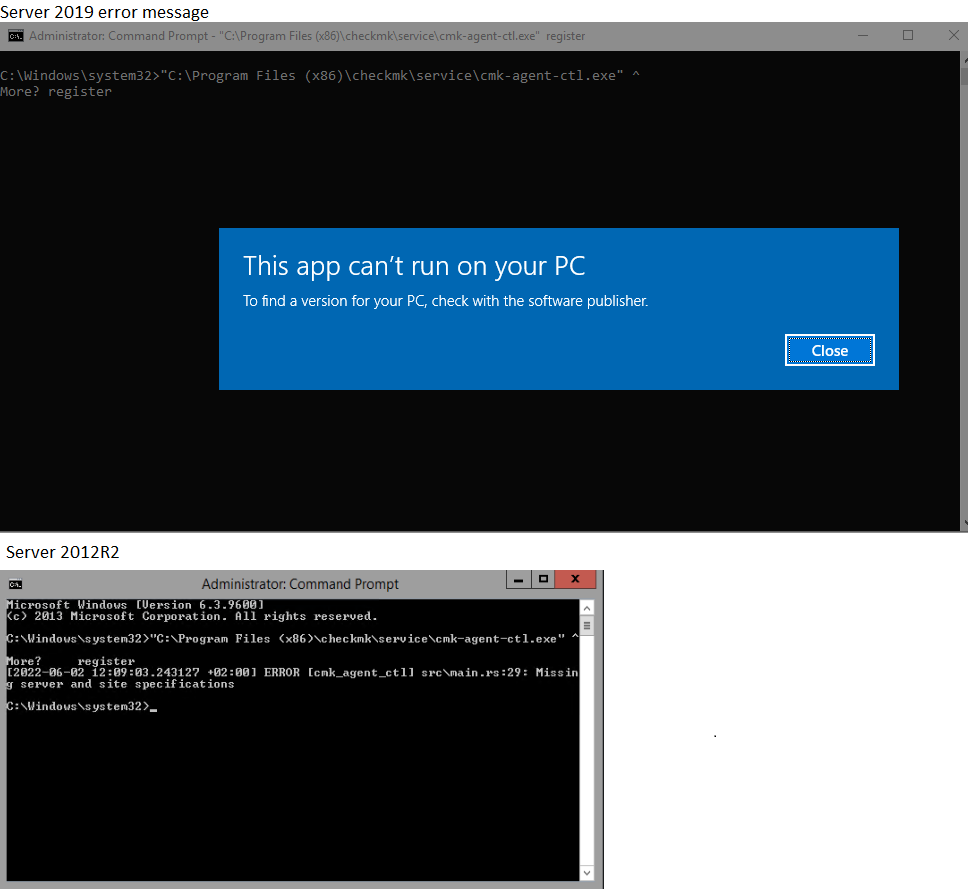
When trying to register the checkmk agent: Access is denied: This app can’t run on your pc error message pops up.
It seems that the cmk-agent-ctl isn’t compatible with Windows Server 2019.
When i tried registering from an older vm that i spun up (server 2012 R2) it is possible to run cmk-agent-ctl.
I’ve only just started setting up CheckMK, the server I’ve received the error on when registering was my first “victim”. I figured waiting on some helpfull tips i would start setting up the agent on other servers. Just to check my sanity I’ve tried to register the second server I’ve installed the Check_MK agent on, which is also Server 2019. Somehow it does work on this secondary Windows Server 2019 machine. Any ideas as to why it isn’t working on the first?
Hi Jlagendijk,
I have it running ( 2.1 & 2.1.0p1 ) on windows server 2019 ( datacenter ) fine, are these new hosts or were they running 2.0 before the update ?
I would install the vanilla windows plugin first, do a discovery, build an updated agent and deploy that to the box, to make sure you have a compatible install.
Another gotcha I came across was trying to run the register, make sure you are using admin cmd ( which you are ), then cut and paste the command in full :
“C:\Program Files (x86)\checkmk\service\cmk-agent-ctl.exe” register --site yousitename --server yourcmkserver --user automation --hostname windows_box_hostname --password
Thanks for the response. I’ve only started implementing CheckMK last monday. All installs are fresh.
I’ve also tried the full command without success. I will try a clean install of the agent on the server again to see if something changes.
This topic was automatically closed 365 days after the last reply. New replies are no longer allowed. Contact an admin if you think this should be re-opened.