**Error message:SFTP could not get the file from SFTP server (!!)
Hi,
I’m trying to monitor SFTP upload/download files, I created a rule on CMK but I’m receiving a CRIT alert that I cannot get files from sftp- download issue.
any suggestions what can be the problem.
Did you try an absolute Path like /home/sftpuser/21M or something alike?
And for the PUT
I would use a file you are certain that’s always available.
Maybe something like /etc/os-release or /omd/versions/default/skel/etc/environment or /proc/version.
Just to be sure the File will definitely exist across reboots with files in /tmp being a bit problematic
It depends on your Connection to the SFTP-Host. You could also try those files i mentioned for PUT in the GET-Rules if the SFTP-User isn’t chrooted. And if the user is chrooted i would try the absolute Path to the File you are trying to fetch. But this also depends on the Remote-Host and how it is configured.
Without any restrictions i would go with something like the following:
Put
Local file: /etc/os-release
Remote destination: /dev/null
Get
Remote file: /etc/os-release
Local destination: /dev/null
I think the check itself only looks if an sftp transfer returns with 0.
After reading SFTP Server i would say that you wouldn’t even need to try to Put or Get anything. It would only matter if you want to check if maybe the access-rights on the Remote-Host is still working if that is what you are after? Then you would need to enter the whole Path to the File and not only 21M.
Thanks Crpb, I need to monitor Put and Get, as you said maybe the problem with the Get is with chrooted on cmk server… still trying to see how to fix it.
The chroot for the SFTP-Session would be on the Target-Host for which you define this Rule. It’s just a guess as you haven’t shared that much information.
So a quick update.
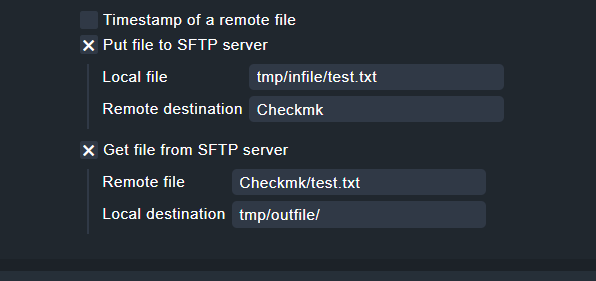
I got help from checkmark support - Thanks to Sudhir Chauhan the support expert from their team that he managed to give me the correct path and to define this service rule.
so the steps are:
Login as site user and go to tmp folder in the site. You should be in this path:
/omd/sites//tmp/
After this create two folders under tmp (so that you can keep track of the file):
infile
outfile
Your directory tmp should have two subfolders: inflie and outfile.
create folder on FTP under the name checkmk.
run this command on cmk server: ./check_sftp --host ftp.cognyte.com --user --secret --put-local tmp/infile/test.txt --put-remote Checkmk --get-remote Checkmk/test.txt --get-local tmp/outfile/
This topic was automatically closed 365 days after the last reply. New replies are no longer allowed. Contact an admin if you think this should be re-opened.