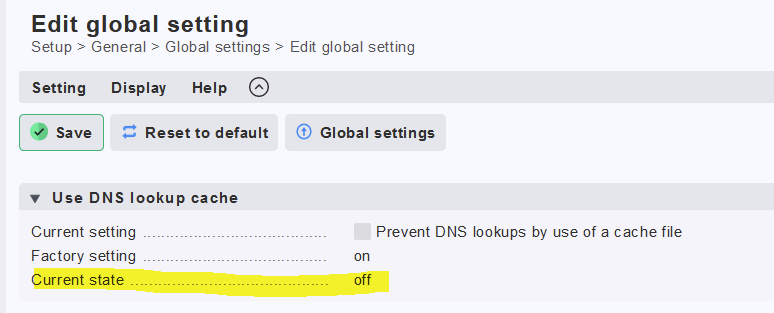
clicking the “update site DNS cache” button (or running cmk --update-dns-cache) definitely refreshes the ipaddress.cache file
BUT
The host in question still shows down indefinitely with the old IP address.
The only way to get CMK to pick up the new IP address from the ipaddresses.cache file is to make a minor change of some sort manually to the host in question, then activate the change. I can add a label and then remove it. That’s a workaround, but not a good solution or a long term supportable workaround for us.
Edit to add, we have “hosts with dynamic DNS lookup” set for the host in question, it doesn’t solve the issue either.
The way I understand it
if hostname is set, but alias is not, the ipaddresses.cache file is only read on “activations”
that’s the behaviour we are currently seeing
BUT
if you set an alias, it’s supposed to check dns at every service check
OR, if you set that dynamic DNS lookup rule, it’s also supposed to do that
so since we have the rule, it should be auto updating
That is correct. That’s why you sometimes get an error “host X not resolved” during activation. This can be changed so it will always do an DNS lookup while talking to the agent.
We run an automatic discovery ever hour.
I think it all depends on how reliable your DNS servers are. The cache is there also in the case of dns issues (not only networking issues)
My DNS reliability is not the issue.
The monitored hosts are being rebuilt, get a new DNS address with the same hostname, and CMK doesn’t detect the IP address change even with the “DNS lookup” rule set for it. I have to force it with an activation.
Hi ! This is the reason why we disabled the usage of the dns cache file for almost all our 60 cee cmk servers…maybe this can be a solution for you, if your DNS is reliability enough ?
I agree, I have 60k managed services so ipcaching is a good thing normally.
I just need the process to work correctly.
Maybe there is something wrong with our rule that is supposed to turn on dns lookups for a particular host.
Maybe a good option for the “update site dns cache” button would be, when you click it, the host you are currently in is also automatically reactivated so that the new IP address can take affect.
OR we need another button to re-activate the current host w/o having to introduce fake changes.
Monitoring website ip left empty so it uses dns, got migrated to different webserver and thus different ip. After Update site DNS cache button the file contents of ~/var/check_mk/ipaddresses.cache has the ip change, but Checkmk keeps looking at the old ip.
I have to make a fake change to host and activate the change, to have it actually use the new ip.
Edit: Or make a fake change and instead of activate the change, choose discard all active changes. Afterwards the new ip is also picked up by Checkmk.