Delay Check Storage Arrays

CheckMK RAW 2.3p36
Ubuntu 24.04 LTS

I have 2 storage arrays that I monitor via Checkmk.
I use a plugin (latest version) Checkmk Exchange created by @lbuhleie

I installed UEMCLI on the checkmk server and the manual checks plus downloading of the agent output works.
It’s just that the Check_MK service stays in the RED and it never turns green.

I’ve tried to set longer times between checks, for services and for hosts, up to 5 or 10 minutes but it doesn’t seem to affect anything.

What else can I do?

Hi Steven,

what is the output of the special agent?
You can check this by SSHing into your Checkmk Server and becoming the Site user. There, you can run “cmk -D ” to get the command with which the special agent is being run. Under “Type of agent:” you should find this. Copy the command and run it to see if it really is a timeout or if there is a error message that is not being displayed in the GUI.

If it really is a timeout problem, you can also add to the command to run the special agent " | ts" to have the current time printed in front of every line printed to see where you loose time.
With this information you can go ahead and disable the sections that need to long and are not needed for your purpose directly in the special agent file. This should be under ~local/lib/python3/cmk_addons/plugins/emcunity/libexec/agent_emcunity beginning somewhere around line ~100. There are two dictionaries, checks & metrics. You can comment the sections you don’t want / need by putting a # infront of the line.

I just uploaded a updated version of the MKP (v4.3.4) to the Exchange, that adds the possibility to exclude sections via rule, but until it is approved by the Checkmk Team, you will need to go forward with the method described above to disable sections being queried.

Hope this helps!

Cheers,
Leon

Hi Leon

Thanks for your time:

There is a sudden jump of 30 secs halfway through the replication disks listing.

Sep 16 15:02:28 11:   ID                             = res_15
Sep 16 15:02:28
Sep 16 15:02:28       LUN                            = sv_14
Sep 16 15:02:28
Sep 16 15:02:28       Name                           = ADC_Datastore_4_replicated
Sep 16 15:02:28
Sep 16 15:02:28       Description                    =
Sep 16 15:02:28
Sep 16 15:02:28       Type                           = Primary
Sep 16 15:02:28
Sep 16 15:02:28       Base storage resource          = res_15
Sep 16 15:02:28
Sep 16 15:02:28       Source                         =
Sep 16 15:02:28
Sep 16 15:02:28       Original parent                =
Sep 16 15:02:28
Sep 16 15:02:28       Health state                   = OK (5)
Sep 16 15:02:28
Sep 16 15:02:28       Health details                 = "The component is operating normally. No action is required."
Sep 16 15:02:28
Sep 16 15:02:28       Storage pool ID                = pool_1
Sep 16 15:02:28
Sep 16 15:02:28       Storage pool                   = Pool1
Sep 16 15:02:28
Sep 16 15:02:28       Size                           = 2199023255552 (2.0T)
Sep 16 15:02:28
Sep 16 15:02:28       Maximum size                   = 70368744177664 (64.0T)
Sep 16 15:02:28
Sep 16 15:02:28       Thin provisioning enabled      = yes
Sep 16 15:02:28
Sep 16 15:02:28       Data Reduction enabled         = yes
Sep 16 15:02:28
Sep 16 15:02:28       Data Reduction space saved     = 639144820736 (595.2G)
Sep 16 15:02:28
Sep 16 15:02:28       Data Reduction percent         = 50%
Sep 16 15:02:28
Sep 16 15:02:28       Data Reduction ratio           = 1.99:1
Sep 16 15:02:28
Sep 16 15:02:28       Advanced deduplication enabled = yes
Sep 16 15:02:28
Sep 16 15:02:28       Current allocation             = 597795602432 (556.7G)
Sep 16 15:02:28
Sep 16 15:02:28       Preallocated                   = 137080946688 (127.6G)
Sep 16 15:02:28
Sep 16 15:02:28       Total Pool Space Used          = 646213713920 (601.8G)
Sep 16 15:02:28
Sep 16 15:02:28       Protection size used           = 26674839552 (24.8G)
Sep 16 15:02:28
Sep 16 15:02:28       Non-base size used             = 26674839552 (24.8G)
Sep 16 15:02:28
Sep 16 15:02:28       Family size used               = 646213713920 (601.8G)
Sep 16 15:02:28
Sep 16 15:02:28       Snapshot count                 = 2
Sep 16 15:02:28
Sep 16 15:02:28       Family snapshot count          = 2
Sep 16 15:02:28
Sep 16 15:02:28       Family thin clone count        = 0
Sep 16 15:02:28
Sep 16 15:02:28       Protection schedule            =
Sep 16 15:02:28
Sep 16 15:02:28       Protection schedule paused     =
Sep 16 15:02:28
Sep 16 15:02:28       SP owner                       = SPB
Sep 16 15:02:28
Sep 16 15:02:28       Trespassed                     = no
Sep 16 15:02:28
Sep 16 15:02:28       Version                        = 6
Sep 16 15:02:28
Sep 16 15:02:28       Block size                     =
Sep 16 15:02:28
Sep 16 15:02:28       Virtual disk access hosts      = Host_1, Host_2, Host_3, Host_4
Sep 16 15:02:28
Sep 16 15:02:28       Host LUN IDs                   = 9, 9, 9, 5
Sep 16 15:02:28
Sep 16 15:02:28       Snapshots access hosts         =
Sep 16 15:02:28
Sep 16 15:02:28       WWN                            = 60:06:01:60:A2:D0:56:00:9E:21:58:62:84:F0:69:94
Sep 16 15:02:28
Sep 16 15:02:28       Replication destination        = no
Sep 16 15:02:28
Sep 16 15:02:28       Creation time                  = 2022-04-14 13:28:59
Sep 16 15:02:28
Sep 16 15:02:28       Last modified time             = 2022-04-14 13:28:59
Sep 16 15:02:28
Sep 16 15:02:28       IO limit                       =
Sep 16 15:02:28
Sep 16 15:02:28       Effective maximum IOPS         = N/A
Sep 16 15:02:28
Sep 16 15:02:28       Effective maximum KBPS         = N/A
Sep 16 15:02:56
Sep 16 15:02:56
Sep 16 15:02:56
Sep 16 15:02:56 12:   ID                             = res_18
Sep 16 15:02:56
Sep 16 15:02:56       LUN                            = sv_18
Sep 16 15:02:56
Sep 16 15:02:56       Name                           = ADC_Datastore_5_Replicated
Sep 16 15:02:56
Sep 16 15:02:56       Description                    =
Sep 16 15:02:56
Sep 16 15:02:56       Type                           = Primary
Sep 16 15:02:56
Sep 16 15:02:56       Base storage resource          = res_18
Sep 16 15:02:56
Sep 16 15:02:56       Source                         =
Sep 16 15:02:56
Sep 16 15:02:56       Original parent                =
Sep 16 15:02:56
Sep 16 15:02:56       Health state                   = OK (5)
Sep 16 15:02:56
Sep 16 15:02:56       Health details                 = "The component is operating normally. No action is required."
Sep 16 15:02:56
Sep 16 15:02:56       Storage pool ID                = pool_1
Sep 16 15:02:56
Sep 16 15:02:56       Storage pool                   = Pool1
Sep 16 15:02:56
Sep 16 15:02:56       Size                           = 3221225472000 (2.9T)
Sep 16 15:02:56
Sep 16 15:02:56       Maximum size                   = 70368744177664 (64.0T)
Sep 16 15:02:56
Sep 16 15:02:56       Thin provisioning enabled      = yes
Sep 16 15:02:56
Sep 16 15:02:56       Data Reduction enabled         = yes
Sep 16 15:02:56
Sep 16 15:02:56       Data Reduction space saved     = 1063541276672 (990.5G)
Sep 16 15:02:56
Sep 16 15:02:56       Data Reduction percent         = 57%
Sep 16 15:02:56
Sep 16 15:02:56       Data Reduction ratio           = 2.34:1
Sep 16 15:02:56
Sep 16 15:02:56       Advanced deduplication enabled = yes
Sep 16 15:02:56
Sep 16 15:02:56       Current allocation             = 685758431232 (638.6G)
Sep 16 15:02:56
Sep 16 15:02:56       Preallocated                   = 197243912192 (183.6G)
Sep 16 15:02:56
Sep 16 15:02:56       Total Pool Space Used          = 794625097728 (740.0G)
Sep 16 15:02:56
Sep 16 15:02:56       Protection size used           = 83633733632 (77.8G)
Sep 16 15:02:56
Sep 16 15:02:56       Non-base size used             = 83633733632 (77.8G)
Sep 16 15:02:56
Sep 16 15:02:56       Family size used               = 794625097728 (740.0G)
Sep 16 15:02:56
Sep 16 15:02:56       Snapshot count                 = 5
Sep 16 15:02:56
Sep 16 15:02:56       Family snapshot count          = 5
Sep 16 15:02:56
Sep 16 15:02:56       Family thin clone count        = 0
Sep 16 15:02:56
Sep 16 15:02:56       Protection schedule            = snapSch_4
Sep 16 15:02:56
Sep 16 15:02:56       Protection schedule paused     = no
Sep 16 15:02:56
Sep 16 15:02:56       SP owner                       = SPA
Sep 16 15:02:56
Sep 16 15:02:56       Trespassed                     = no
Sep 16 15:02:56
Sep 16 15:02:56       Version                        = 6
Sep 16 15:02:56
Sep 16 15:02:56       Block size                     =
Sep 16 15:02:56
Sep 16 15:02:56       Virtual disk access hosts      = Host_1, Host_2, Host_3, Host_4
Sep 16 15:02:56
Sep 16 15:02:56       Host LUN IDs                   = 10, 10, 10, 7
Sep 16 15:02:56
Sep 16 15:02:56       Snapshots access hosts         =
Sep 16 15:02:56
Sep 16 15:02:56       WWN                            = 60:06:01:60:A2:D0:56:00:77:89:77:63:4D:56:44:00
Sep 16 15:02:56
Sep 16 15:02:56       Replication destination        = no
Sep 16 15:02:56
Sep 16 15:02:56       Creation time                  = 2022-11-18 13:32:35
Sep 16 15:02:56
Sep 16 15:02:56       Last modified time             = 2025-09-01 11:18:21
Sep 16 15:02:56
Sep 16 15:02:56       IO limit                       =
Sep 16 15:02:56
Sep 16 15:02:56       Effective maximum IOPS         = N/A
Sep 16 15:02:56
Sep 16 15:02:56       Effective maximum KBPS         = N/A

If I disable that piece by commenting it out like you suggested, the 30 sec jump occurs somewhere else…

Sep 16 15:10:29 <<<emcunity_hostcons:sep(61)>>>
Sep 16 15:10:29 1:    ID              = Host_1
Sep 16 15:10:29
Sep 16 15:10:29       Name            = esxi4
Sep 16 15:10:29
Sep 16 15:10:29       Description     =
Sep 16 15:10:29
Sep 16 15:10:29       Tenant          =
Sep 16 15:10:29
Sep 16 15:10:29       Type            = host
Sep 16 15:10:29
Sep 16 15:10:29       Address         = 10.127.0.185,10.254.127.74,10.254.128.74,10.255.0.1
Sep 16 15:10:29
Sep 16 15:10:29       Netmask         =
Sep 16 15:10:29
Sep 16 15:10:29       OS type         = VMware ESXi 8.0.3
Sep 16 15:10:29
Sep 16 15:10:29       Ignored address =
Sep 16 15:10:29
Sep 16 15:10:29       Management type = VMware
Sep 16 15:10:29
Sep 16 15:10:29       Accessible LUNs = sv_1,sv_2,sv_4,sv_5,sv_9,sv_7,sv_8,sv_12,sv_13,sv_14,sv_18,sv_19
Sep 16 15:10:29
Sep 16 15:10:29       Host LUN IDs    = 0,1,2,3,4,5,6,7,8,9,10,11
Sep 16 15:10:29
Sep 16 15:10:29       Host group      =
Sep 16 15:10:29
Sep 16 15:10:29       Health state    = OK (5)
Sep 16 15:10:29
Sep 16 15:10:29       Health details  = "The component is operating normally. No action is required."
Sep 16 15:10:29
Sep 16 15:10:29
Sep 16 15:10:29
Sep 16 15:10:29 2:    ID              = Host_2
Sep 16 15:10:29
Sep 16 15:10:29       Name            = esxi5
Sep 16 15:11:01
Sep 16 15:11:01       Description     =
Sep 16 15:11:01
Sep 16 15:11:01       Tenant          =
Sep 16 15:11:01
Sep 16 15:11:01       Type            = host
Sep 16 15:11:01
Sep 16 15:11:01       Address         = 10.127.0.186,10.254.127.75,10.254.128.75,10.255.0.3
Sep 16 15:11:01
Sep 16 15:11:01       Netmask         =
Sep 16 15:11:01
Sep 16 15:11:01       OS type         = VMware ESXi 8.0.3
Sep 16 15:11:01
Sep 16 15:11:01       Ignored address =
Sep 16 15:11:01
Sep 16 15:11:01       Management type = VMware
Sep 16 15:11:01
Sep 16 15:11:01       Accessible LUNs = sv_1,sv_2,sv_4,sv_5,sv_9,sv_7,sv_8,sv_12,sv_13,sv_14,sv_18,sv_19
Sep 16 15:11:01
Sep 16 15:11:01       Host LUN IDs    = 0,1,2,3,4,5,6,7,8,9,10,11
Sep 16 15:11:01
Sep 16 15:11:01       Host group      =
Sep 16 15:11:01
Sep 16 15:11:01       Health state    = OK (5)
Sep 16 15:11:01
Sep 16 15:11:01       Health details  = "The component is operating normally. No action is required."

Hey Steven,
I’m not sure what the Unity is doing there, but it seems to me that the response is just slow.

What exactly did you do before, did you extend the timeout of the Check_MK Services or did you extend the check interval? Because just changing the interval doesn’t increase the timeout.
In the commercial editions there is a rule “Service check timeout (Micro Core)”, which you can create and match on your Unity Host and its Check_MK Services. Please note that in addition to this, you will also need to change the check & retry interval for the same Host / Services.
If you have a Raw edition, you can only change the timeout for your whole site, see EMC Unity "timeout" setting - #2 by lbuhleie

I upgraded to CheckMK 2.4p20 @lbuhleie

I needed to download the new extension that you wrote '(thanks by the way!) and deleted the old rules and setup the new rules:

AttributeError ('NoneType' object has no attribute 'items')
File "/omd/sites/icasa_group/lib/python3/cmk/base/modes/check_mk.py", line 1881, in mode_check_discovery
    check_results = execute_check_discovery(
  File "/omd/sites/icasa_group/lib/python3/cmk/checkengine/discovery/_active_check.py", line 156, in execute_check_discovery
    discovered_services=discovery_by_host(
  File "/omd/sites/icasa_group/lib/python3/cmk/checkengine/discovery/_autodiscovery.py", line 637, in discovery_by_host
    host_name: discover_services(
  File "/omd/sites/icasa_group/lib/python3/cmk/checkengine/discovery/_services.py", line 130, in discover_services
    for entry in _discover_plugins_services(
  File "/omd/sites/icasa_group/lib/python3/cmk/checkengine/discovery/_services.py", line 190, in _discover_plugins_services
    yield from plugin.function(check_plugin_name, **kwargs)
  File "/omd/sites/icasa_group/lib/python3/cmk/base/checkers.py", line 1064, in __discovery_function
    yield from (
  File "/omd/sites/icasa_group/lib/python3/cmk/base/checkers.py", line 1071, in <genexpr>
    for service in plugin.discovery_function(*args, **kw)
  File "/omd/sites/icasa_group/lib/python3/cmk/base/api/agent_based/register/check_plugins.py", line 76, in filtered_generator
    for element in generator(*args, **kwargs):
  File "/omd/sites/icasa_group/local/lib/python3/cmk_addons/plugins/emcunity/agent_based/emcunity_disk.py", line 67, in discover_emcunity_disk
    for _id, element in section_emcunity_disk.items():
'NoneType' object has no attribute 'items'
{'section_emcunity_disk': None,
 'section_emcunity_disk_resp': None,
 'section_emcunity_disk_rrate': {'dpe_disk_0': 145.7,
                                 'dpe_disk_1': 169.7,
                                 'dpe_disk_10': 160.9,
                                 'dpe_disk_11': 178.0,
                                 'dpe_disk_12': 173.1,
                                 'dpe_disk_13': 174.9,
                                 'dpe_disk_14': 160.2,
                                 'dpe_disk_15': 182.9,
                                 'dpe_disk_2': 166.2,
                                 'dpe_disk_3': 193.2,
                                 'dpe_disk_4': 161.8,
                                 'dpe_disk_5': 160.7,
                                 'dpe_disk_6': 146.8,
                                 'dpe_disk_7': 167.1,
                                 'dpe_disk_8': 166.0,
                                 'dpe_disk_9': 162.4},
 'section_emcunity_disk_wrate': {'dpe_disk_0': 121.2,
                                 'dpe_disk_1': 139.2,
                                 'dpe_disk_10': 130.5,
                                 'dpe_disk_11': 144.7,
                                 'dpe_disk_12': 142.5,
                                 'dpe_disk_13': 143.4,
                                 'dpe_disk_14': 135.4,
                                 'dpe_disk_15': 152.4,
                                 'dpe_disk_2': 141.0,
                                 'dpe_disk_3': 160.2,
                                 'dpe_disk_4': 130.5,
                                 'dpe_disk_5': 136.3,
                                 'dpe_disk_6': 119.3,
                                 'dpe_disk_7': 137.0,
                                 'dpe_disk_8': 134.6,
                                 'dpe_disk_9': 133.5}}

Is there anything you can do about that or help me solve it?

Hi @Steven1,

I ran into a similar error the other day and already fixed this, but didn’t upload the newest version to the exchange. Have done that right now.

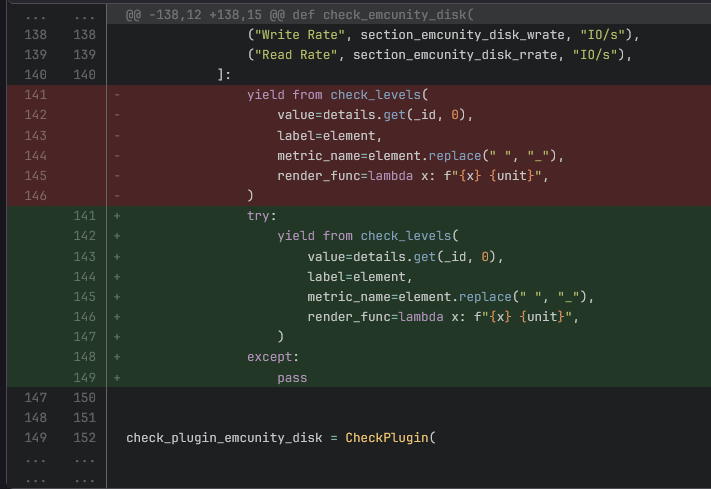
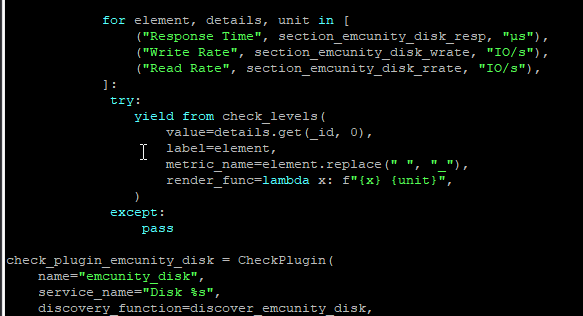
This happens because not all expected sections are present for some metric calculations. For the mean time, you can fix this by wrapping some lines in a try / except statement in ~/local/lib/python3/cmk_addons/plugins/emcunity/agent_based/emcunity_disk.py:

Hope this helps.

Best regards,

Leon

I just saw that you have another error. You have quite a lot of sections disabled, was this on purpose? The problem here is, that the disk section is excluded

This check used to be VERY slow with my setup so I dared not enable it.
If the check stops crashing, I will try and enable disk check.

But it hasn’t stop crashing for now:

I just installed the new version that you uploaded. I have the same issues.

 File "/omd/sites/icasa_group/lib/python3/cmk/base/modes/check_mk.py", line 1881, in mode_check_discovery
    check_results = execute_check_discovery(
  File "/omd/sites/icasa_group/lib/python3/cmk/checkengine/discovery/_active_check.py", line 156, in execute_check_discovery
    discovered_services=discovery_by_host(
  File "/omd/sites/icasa_group/lib/python3/cmk/checkengine/discovery/_autodiscovery.py", line 637, in discovery_by_host
    host_name: discover_services(
  File "/omd/sites/icasa_group/lib/python3/cmk/checkengine/discovery/_services.py", line 130, in discover_services
    for entry in _discover_plugins_services(
  File "/omd/sites/icasa_group/lib/python3/cmk/checkengine/discovery/_services.py", line 190, in _discover_plugins_services
    yield from plugin.function(check_plugin_name, **kwargs)
  File "/omd/sites/icasa_group/lib/python3/cmk/base/checkers.py", line 1064, in __discovery_function
    yield from (
  File "/omd/sites/icasa_group/lib/python3/cmk/base/checkers.py", line 1071, in <genexpr>
    for service in plugin.discovery_function(*args, **kw)
  File "/omd/sites/icasa_group/lib/python3/cmk/base/api/agent_based/register/check_plugins.py", line 76, in filtered_generator
    for element in generator(*args, **kwargs):
  File "/omd/sites/icasa_group/local/lib/python3/cmk_addons/plugins/emcunity/agent_based/emcunity_disk.py", line 67, in discover_emcunity_disk
    for _id, element in section_emcunity_disk.items():
'NoneType' object has no attribute 'items'
{'section_emcunity_disk': None,
 'section_emcunity_disk_resp': None,
 'section_emcunity_disk_rrate': {'dpe_disk_0': 145.7,
                                 'dpe_disk_1': 169.7,
                                 'dpe_disk_10': 160.9,
                                 'dpe_disk_11': 178.0,
                                 'dpe_disk_12': 173.1,
                                 'dpe_disk_13': 174.9,
                                 'dpe_disk_14': 160.2,
                                 'dpe_disk_15': 182.9,
                                 'dpe_disk_2': 166.2,
                                 'dpe_disk_3': 193.2,
                                 'dpe_disk_4': 161.8,
                                 'dpe_disk_5': 160.7,
                                 'dpe_disk_6': 146.8,
                                 'dpe_disk_7': 167.1,
                                 'dpe_disk_8': 166.0,
                                 'dpe_disk_9': 162.4},
 'section_emcunity_disk_wrate': {'dpe_disk_0': 121.2,
                                 'dpe_disk_1': 139.2,
                                 'dpe_disk_10': 130.5,
                                 'dpe_disk_11': 144.7,
                                 'dpe_disk_12': 142.5,
                                 'dpe_disk_13': 143.4,
                                 'dpe_disk_14': 135.4,
                                 'dpe_disk_15': 152.4,
                                 'dpe_disk_2': 141.0,
                                 'dpe_disk_3': 160.2,
                                 'dpe_disk_4': 130.5,
                                 'dpe_disk_5': 136.3,
                                 'dpe_disk_6': 119.3,
                                 'dpe_disk_7': 137.0,
                                 'dpe_disk_8': 134.6,
                                 'dpe_disk_9': 133.5}}

Yes, in my first comment I thought you had a crash caused by another problem.

The crash in the emcunity_disk check will occur, as long as you don’t query the disk section. This is something I did not account for until now.

Your problem is:

The emcunity_disk check relies on multiple sections: disk, disk_resp, disk_wrate, disk_rrate. As long as you query any one of those sections, but not the disk section, you will have this error. You will either have to:

  1. Stop querying disk_resp or
  2. Start querying disk

You cannot query any of the metric “disk_…“ sections and not query the disk section.

I reset everything to standard, I left it to query however much it wants and enabled ”parallel execution”
Now the crash is gone and no more time-outs (for the moment)
Thanks for the support

1 Like