gera83
March 11, 2026, 4:24pm
1
Hi guys.
CEE 2.2.0
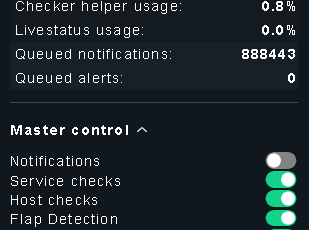
I just want to take that “queued notifications” to ZERO. Is there a real method?
I did all this:
disable mkeventd (just in case)
disable notifications on “master control”
remove the only rule inside “Setup → Events → Notification Configuration”
stop the site, delete: ~/var/check_mk/notify/backlog.mk, and start the site again
The number keeps rising
Don’t know what else to do.
Thank you!!!
BH2005
March 12, 2026, 6:18am
2
Hey @gera83 ,
the issue is that you’re deleting the wrong file. In CEE, the
~/var/check_mk/notify/spool/
not in backlog.mk. The Checkmk docs confirm this:
To clear the queue:
omd stop
rm ~/var/check_mk/notify/spool/*
rm ~/var/log/mknotifyd.state
omd start
Deleting the spool files is the officially documented approach —#8638:
The mknotifyd.state file holds the spooler’s internal state (written#2041: Werk #2041: Notification Spooler can now handle incoming and outgoing persistent TCP connections ).
backlog.mk is only relevant for the synchronous notification path
Greetz Bernd