I have a distributed environment with a central site which is a VM with ubuntu installed, and a lot of different remote sites which are running on checkmk appliances.
As of now the remotes are monitored under their own site (added as 127.0.0.1), this of course means that any issue is correctly notified… except for the site itself if it dies of course.
To solve this issue the support team suggested the following:
1) Under the central site add dummy hosts and have them assigned the real ip of the remote site.
2) Disable any checks
3) create a custom monitor to check tcp connection to livestatus port 6557.
This solves part of the issue, since that port actually responds even if the site itself is dead… I had this happen on one of my customers. So the port still could be responding but the omd state is in state failed.
That’s pretty much what I do here, too, though I don’t use a TCP connection for status reports as I have Wireguard-based VPN tunnels from each site to the central site. Therefore I use regular ping checks as the host check command.
In practice I have:
a separate folder for all status hosts
all status hosts are monitored from the central site, of course (configured via the folder)
all status hosts use the naming scheme status-host-<site-id> to make correlating sites & status hosts trivial
back when I used forwarded ports I used a rule of type “Host check command” tied to that folder with “TCP connection” & the ssh port of the sites (no need for port forwardings now that I use VPN tunnels)
additionally I have each distributed site configured to use the corresponding status-host-<site-id> as “Status connection” → “Status host”, making web UI interaction much snappier when a connection is not established
Clear this up for me, I have seen your replies on this same issue… so basically you confirm that if one of your sites is in state failed (omd status) your checks will still show it up and running?
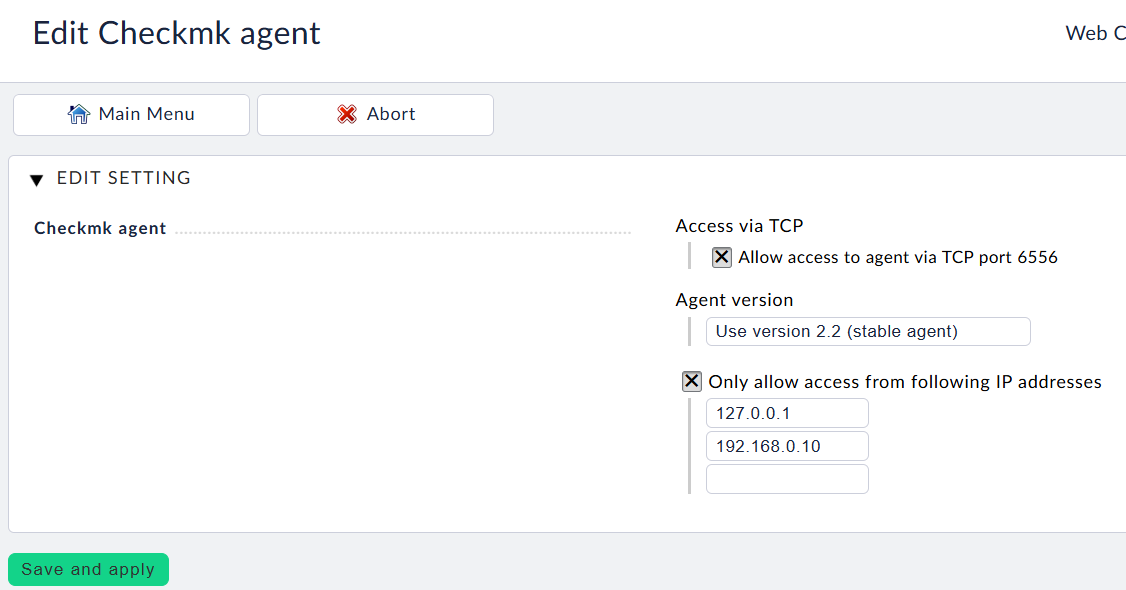
I too have a VPN S2S with all my remotes, this makes it easy to check livestatus port directly but querying the agent port 6556 is not possible since that port is open only to localhost.
I also tried the agent in push mode but does not work.
Each site works independently of the connection to the main site. What I mean by that is that the remote site will continue running the checks for the hosts it’s supposed to monitor even if the connection to the main site is down. If your notification configuration is set up to send notifications from the remote site (instead of through the main site) then notifications will be sent out by the remote sites if anything in their purview requires a notification.
From the POV of the main site & the web UI, what happens when the connection to a remote site is down is:
You will see the corresponding status-host-<site-id> go into CRIT
The main site will sent a notification for status-host-<site-id> if so configured
All hosts & services monitored by the remote site will not be visible via by the main site/the web UI while the connection is down; as soon as the connection is up again they’ll all come back
As I wrote above the monitoring & notification continues while the connection is down. You just won’t see the current status in the web UI. You will see the fact that the remote site is down via its status host in the web UI, though.
If you already have S2S VPNs then I highly suggest you keep using the regular ping checks as the host checks for the status hosts, not arbitrary TCP connections. Ping checks require much less resources, are easier to set up (as in, work out of the box normally), don’t require configuration changes so that services on the remote site listen on all interfaces instead of just localhost etc. You usually only need to use TCP connections if you do not have full VPN connections to the remote site but only a select number of port forwardings via some firewall (think of having the central site on the internet somewhere, e.g. AWS, and remote sites sitting in the on-premises networks of your customers — in such a case you often only get your customers to forward a couple of TCP ports from their edge firewalls to the CheckMK sites running inside their local networks).
What I want to achive and what I expected would be an out-of-the-box experience at least for who has an MSP license is the following:
In distributed monitoring add my remote site I just created, for which port 6557 is open for livestatus check and 443.
In hosts, under the central site, i will add a new host, with the ip of the remote appliance on which the site is running on.
I would run service discovery for this host which would find all services of the host, just like when i run service discovery for an appliance when I set it as localhost, it finds the state of all services, including OMD.
We were advised that this is not an implemented check and would have to do this otherwise.
Our customer implemented then a custom check, check if livestatus port responds, which is half solving the issue since as I said, it could still respond, but OMD service failed.
This is all.
I want both worlds, and I expected CheckMK to have this set up in a simple way, which does not seem like its the case.
I am then here available if you care to explain how to make it work since the appliances have indeed the agent installed already but the query is only possible through localhost!
When querying from central to the remote site, ping is correctly shown, 6556 is open only locally by design.