**CMK version: 2.3.0p18 Multi Service Edition **
**OS version: RED HAT ENTERPRISE LINUX 9.4 **
Hello Community,
We have a central check mk and 2 remote servers that have multiple instance (sites).
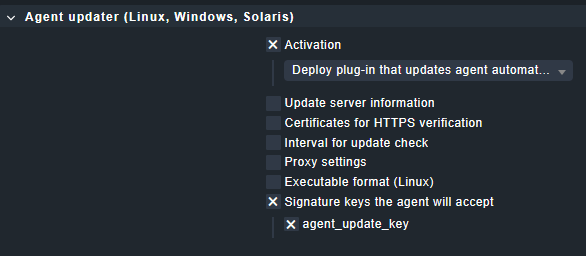
We are having some problem on registering the auto update, maybe we configured the auto update rule wrongly, ill attache a screen shot.
The command that we are executing on servers are these:
Linux: cmk-agent-ctl register -s “” -i “” -U “” -P ‘’ -H “” --trust-cert
windows: cmk-agent-ctl.exe register -H “” -s “” -i “” -U “” -P ‘’ --trust-cert
The error that we are recieving is some “ssl errors” (Caused by SSLError(SSLCertVerificationError(1, ‘[SSL: CERTIFICATE_VERIFY_FAILED] certificate verify failed: unable to get local issuer certificate (_ssl.c:1076)’))))
Does someone got these errors? how did you fixed it ?
Okay, but our goal was to create a single agent that is okay for everyone, in the documentation i read that if you don’t fill up the update server information you can give does info from the comand line, when you attempt to register the auto updater
This topic was automatically closed 365 days after the last reply. New replies are no longer allowed. Contact an admin if you think this should be re-opened.