Distributed Monitoring Direction

Hello everyone,

I would like to switch from Zabbix to Checkmk. With Zabbix, I have a local Zabbix proxy at each company that collects all SNMP traps, metrics, etc. and sends them to the Zabbix server.

Now I have seen that checkmk has distributed monitoring. Did I understand correctly that the main Zabbix server collects the data from the remote sites and not the other way around? This means that the “main checkmk server” needs direct access to all remote sites?

That is complete nonsense. It should be the case that the data has to be sent to the main server and not the other way round. I don’t understand this at all. So the product is actually completely useless or have I misunderstood something?

Thank you very much for your tips in advance, because the product basically looks great.

Hi @mr412

and welcome to the Checkmk forum.

To answer your questions:

Did I understand correctly that the main Zabbix server collects the data from the remote sites and not the other way around?

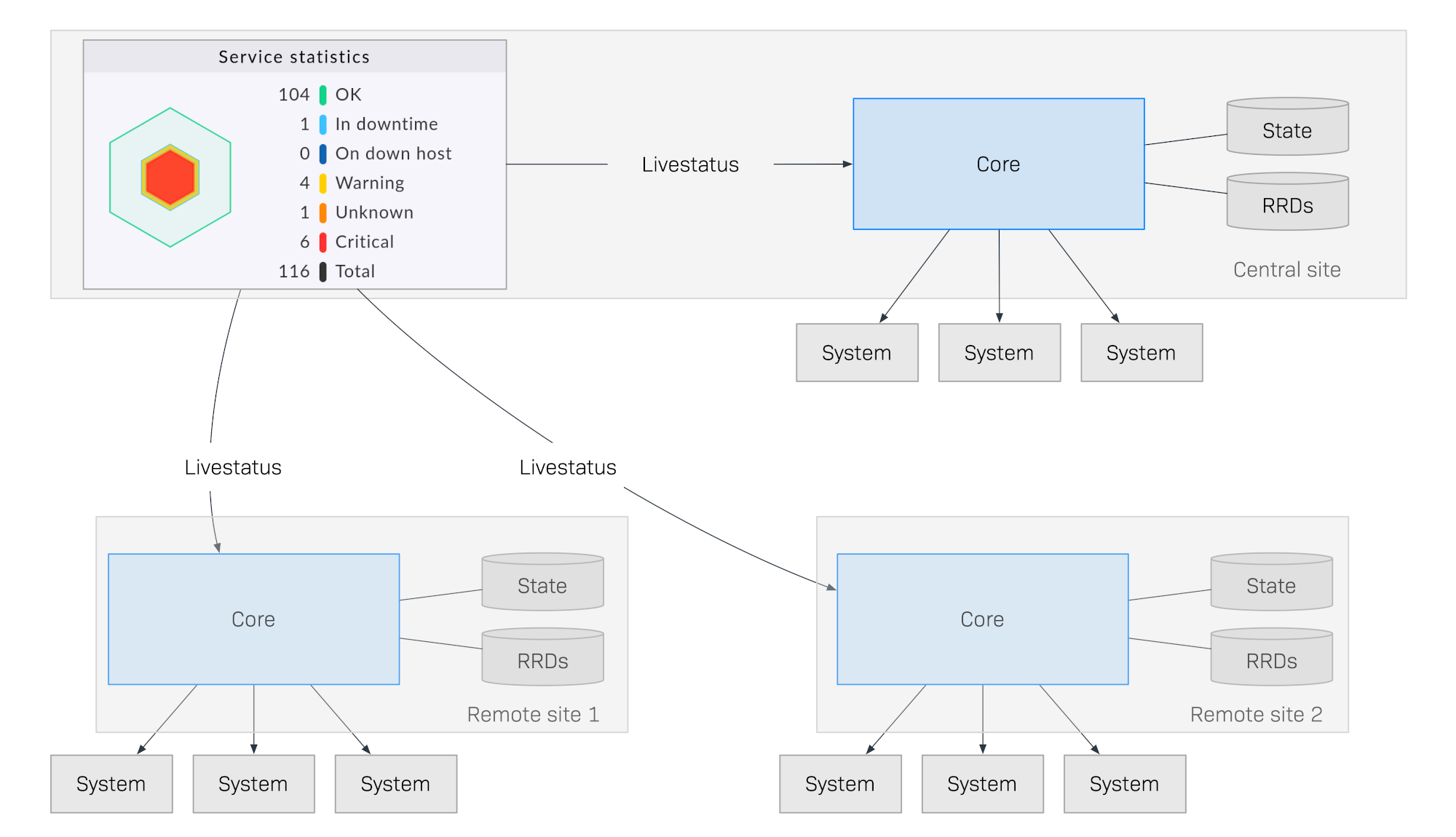
I suspect you mean “the main Checkmk server”. If that is the case, the answer is: The monitoring data is collected and stored locally at the remote sites and pulled on demand to the central site (via ‘Livestatus’). You can still see the data from the central server, it just doesn’t reside there.

Now for that to work, the main site needs “access” to all remote sites, which usually is not a big problem. There are however ways around that requirement, should that not be possible for whatever reason (the most prominent being an airgapped network).

So the product is actually completely useless or have I misunderstood something?

Besides the very diplomatic choice of words, you may be misunderstanding the purpose of distributed monitoring.

Maybe an example will illustrate this:

Imagine you have three datacenters, Asia, EU, US, for example. You have a monitoring site running in every one, with one of the three being the central site (let’s say EU). What happens if all the monitoring data was collected centrally and the now the network connection between the locations has a problem, or the central server crashes. Then all the other sites would be useless as well.

However, if the data is stored decentralized and something happens so that the central site can’t be reached, the other sites are fine and keep chugging along. Better yet, they can even let you know that of the other sites may have a problem.

Does that make sense?

Curious to hear why you think this setup to be “completely useless”, and the advantage of the data being sent to the main server?
1 Like

This picture from our docs illustrates it pretty well:

In case you haven’t taken a closer look yet, here’s the article: Distributed monitoring - Scaling and distributing Checkmk

It also mentions some other advantages of this approach that I didn’t get into.

2 Likes

Thank you very much for your answer Elias. I have seen the diagram. But that tells me that I need a direct connection to the “local” CheckMK server for every customer and that is a no-go for me. Because the ‘local’ Zabbix proxies in this case in Asia and the USA send the data to Zabbix EU. It is not the case that EU ‘fetches’ the data from Asia and the USA.

In other words. I have to open ports for CheckMK for all customers. Of course, whitelisting etc. is still an unnecessary intervention in the infrastructure instead of simply sending the data. Because if the data is no longer being sent, it is an alert for me to check the infrastructure anyway. That’s why the “crash” scenario is not relevant for me.

hi @mr412

there are a few things to unpack here:

I do see your point: Yes, in the “normal” setup the Checkmk server needs to be able to access port 443 of the remote server. There is the possibility to use the Livestatus proxy, so “direct” access is not entirely correct, but for your intents and purposes those are semantics.

As mentioned, if that is a no-go for some reason, there are some ways around that, which some customers are using. This case study might be interesting in this context: Software developer PSI monitors critical infrastructure with Checkmk

Now mind you, this way is a lot less convenient, than the default, but it is possible.

Because if the data is no longer being sent, it is an alert for me to check the infrastructure anyway. That’s why the “crash” scenario is not relevant for me.

Yes, that is true if remote site has a problem. However, what if the central site has a problem? Then you are flying completely blind, rather than having the possibility to log into the remote site and see what’s going on there. Or is there a replication that stores the data locally AND centrally?

Thank you @elias.voelker !

That is actually a fair point. What if my Zabbix main server goes down. Yes, then I lose the monitoring of ALL customers.

I just want to send to my locations a preinstalled checkmk Raspberry Pi, plug it into the LAN and it sends the data to my “central site”.

I think the only solution would be with reverse SSH?

  • I can’t establish a VPN to my central site
  • I cannot open incoming ports to the local CheckMK instance for all customers.

Then reverse SSH might be the only option, is that right?

Installing Checkmk on a RaspPi is nothing that is supported officially, although I know that there are builds out there and people who do it. Just saying. But let’s assume you said Intel NUC :wink:

As for the rest, I am starting to get out of my depth. I hardly know how to spell reverse S-S-H :thinking: Is it H-S-S?

But srsly, from what 5 minutes of reading about it tell me, it sounds like this could be a plausible approach (warning: blind man talking of color here…), but I have no clue about the actual nuts and bolts of it.

I know that the approach chosen by PSI is not relying on reverse SSH. They use the CMC dump and send that via email, which is then automatically parsed and processed on the other side. Not elegant, but it works. See the case study I linked above.

Take a look at the article on “Livedump and CMC Dump” for the approach to this problem.

I’ll leave more advanced suggestions to some of the people here with more expertise :slight_smile:

Thanks again @elias.voelker

Many thanks also for the PSI approach and Livedump I am currently studying. But it reads more like a “workaround” than a proper solution. It seems as if checkmk wanted to solve this problem. But it seems “tinkered”. I now understand what CheckMK’s approach is and it has convinced me except for this small but important detail.

I think the only approach will be H-S-S :sweat_smile: or moving the dump file.

If I devote myself to this approach and everything works as if the remote sites were really accessible as intended by the CheckMK concept, I will be happy to report on it in detail.

Until then, thank you very much for your advice and help. It has given me clarity about the project. Of course I will also use the Intel NUC instead of the berries.

hi @mr412

I am glad that I can be of help!

But it reads more like a “workaround” than a proper solution. It seems as if checkmk wanted to solve this problem. But it seems “tinkered”.

That may be true. I don’t know if a “proper” solution (where you can choose to do it one way OR the other) is anywhere on the roadmap. So far, the approach we have built has so many advantages in a large majority of scenarios that we would actually consider it a “selling point” for Checkmk.

We did it with the communication direction of the agent (where you can now choose ‘push’ or ‘pull’ mode). Doing this with the server is of course a major undertaking, but maybe our product team is actually already giving this some thought. I am sure they are reading along here :slight_smile:

With that being said, I wouldn’t be doing my job if I didn’t mention that from what you describe, you are providing some kind of managed service. This can of course be done using Checkmk Raw, but there is also a commercial version (Checkmk MSP) for that. It may be worthwhile to talk to us or one of our partners to explore whether that may be a viable solution. And then you could work with an engineer to figure out how to set up your desired use case.

Whichever way you choose: Best of luck! And I hope maybe some of the experts here can provide some more insights on using Livedump or CMC dump or H-S-S in the wild.

This topic was automatically closed 365 days after the last reply. New replies are no longer allowed. Contact an admin if you think this should be re-opened.