Output of “cmk --debug -vvn hostname”: (If it is a problem with checks or plugins)
Hello, knowledgeable community,
I have an issue when trying to set up distributed monitoring, I get an error type “RC1:[Errno 32] Broken pipe” and I do not know where it comes from. The central site is not able to communicate with the remote, although I tried following the documentation to the letter. The one thing I am not sure of is if port 80 is open on the remote site. For the rest, LiveStatus enabled, port 6557 used is open and the same is specified on the central site.
Couple of pictures below and I would appreciate any pointers in the right direction to solve the issue.
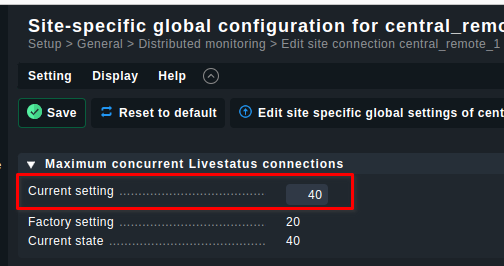
you can try to change the “livestatus_threads” to a higher value, the default value is 20. So you can choose 40 for this site and 80 for the remote site. You can change this value in the site specific global settings:
Hi,
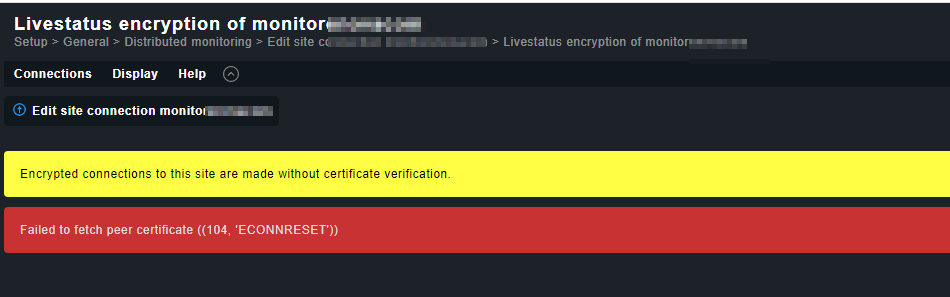
have you added the certificate of the remote site already? Just click the yellow icon left of the red x. Checkmk should show the certificate. Then click on the thumbs up icon to accept the certificate.
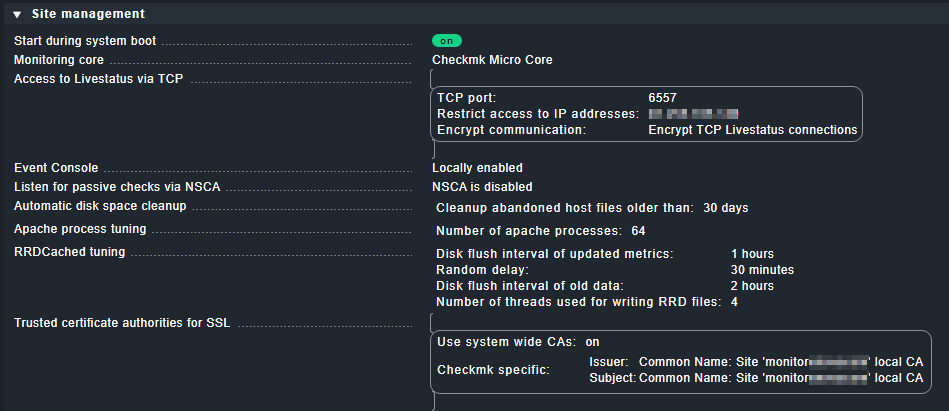
I don’t have nonstop access to the remote site to check right now, but the global settings from the GUI show the following, which should mean that livestatus with access via TCP is indeed enabled. We also put in place IP restriction in order to accept connections only from central site.
Thank you for the ideas kdeutsch. The option is disabled as it was shown disabled in the video by Checkmk (it’s a self-generated certificate and its authenticity cannot be verified).
This topic was automatically closed 365 days after the last reply. New replies are no longer allowed. Contact an admin if you think this should be re-opened.